Error when install Microsoft Dynamics CRM 2015 Report Authoring Extension on Windows 10.
The error message is as bellow:
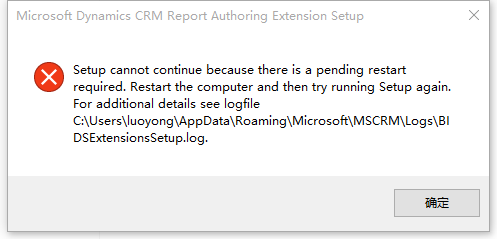
Tthe log message is as following:
15:54:46| Info| === 安装程序启动记录开始 2015/11/23 15:54:46 ===
15:54:46| Info| Bootstrap version: 7.0.0.3027.
15:54:46| Info| User: luoyong.
15:54:46| Error| Reboot required -- Key Found: HKCU\Software\Microsoft\Windows\CurrentVersion\RunOnce contains Uninstall C:\Users\luoyong\AppData\Local\Microsoft\OneDrive\17.3.5892.0626\amd64
15:54:47| Error| 由于需要挂起重新启动,安装程序无法继续运行。请重新启动计算机,然后再次尝试运行安装程序。, Error, OK
15:54:47| Info| InputResult: OK
15:54:47| Info| Clean up the BITS downloader.
15:54:47| Info| === 安装程序启动记录结束 2015/11/23 15:54:47 ===
I have tried delete the regedit key named HKCU\Software\Microsoft\Windows\CurrentVersion\RunOnce and restart computer, but it did not take effect.
Can anybody help?
Thanks
*This post is locked for comments
I have the same question (0)







