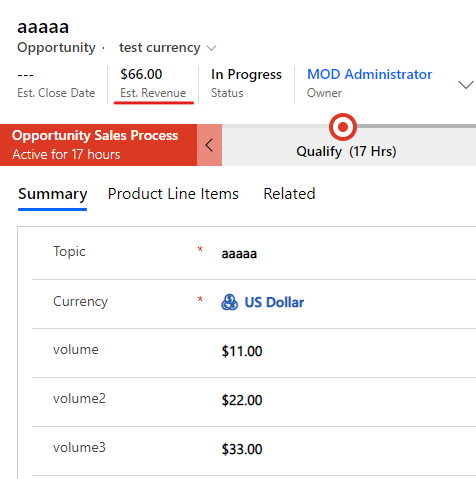
Hi partner,
You can use JavaScrip to achieve it, since business rule can’t perform as well as you want.
I try to use business rule to test, but they all failed unfortunately.
Firstly, I new a business rule include all conditions and actions, however, it only does part of the job, and it doesn't work when I just fill in a field value.
Then I tried to split it into multiple business processes, but executed only one of them.
When only two fields are calculated, the business rule works perfectly, but if there are more than two fields, the business rule no longer applies.
So JS code maybe a better choice for it.
Here are steps.
1. JS code.
function sumofcurrency(executionContext) {
    var formContext = executionContext.getFormContext();

    var volume1 = formContext.getAttribute("new_volume").getValue();
    var volume2 = formContext.getAttribute("new_volume2").getValue();
    var volume3 = formContext.getAttribute("new_volume3").getValue();
    var test =0;
    if(volume1 !== null)
    {
     test =test   volume1;
     if(volume2 !== null)
     {
        test =test volume2;
     }
    if(volume3!== null)
    {
        test =test volume3;
    }
    }
    else if(volume2!== null)
    {
        test=test  volume2;
        if(volume3!== null)
        {
            test =test volume3;
        }
    }
    else if(volume3!== null)
    {
       test =test volume3;
    }
    Xrm.Page.getAttribute("estimatedvalue").setValue(test);
}
2. Add your JavaScript code in a Script web resource.

3. Add a OnChange event with this Script web resource to the opportunity entity form.
(1) open the form and click Form Porperties.

(2) click Add button to add JS that you create just now.

(3) select these three fields and Onchange event, then click Add button to add JS.

(4) double-clcik the JS and set as following.

4.Test.