web
You’re offline. This is a read only version of the page.
close
Skip to main content

Notifications

Announcements

No record found.

Community site session details

Community site session details

Session Id :
Microsoft Dynamics CRM (Archived)

How to redirect to a specific View of an Entity? but avoid duplicate navbar

(0) ShareShare
ReportReport
Posted on by 141

I have used the following link to achieve this but first it wouldn't show navbar but I got it to working by adding  "_hc=false" at the end. 

My working URL is here: 

https://xxxxxxxxxxxx.crm4.dynamics.com/main.aspx?etn=account&pagetype=entitylist&viewid={2B4CFBE0-0AFA-E711-811A-E0071B6E7741}&navbar=on&_hc=false

However, when using/redirecting to URL its duplicating navbar: 
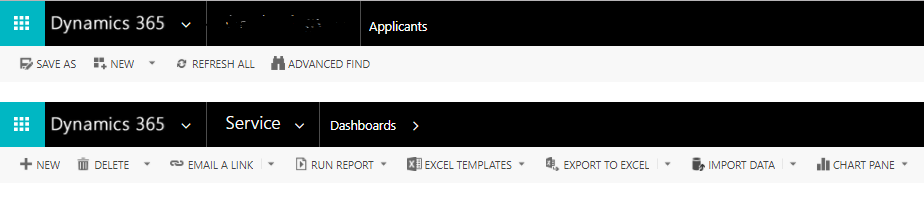
0250.navbar.PNG

Is there a fix to this? or Is there another way to achieve above?

Thanks.

*This post is locked for comments

I have the same question (0)
  • Radu Chiribelea Profile Picture
    6,667 on at

    Hi Qaqa,

    This looks like known bug. What build are you on?

    Regards,

    Radu

  • Qaqa Profile Picture
    141 on at

    Hello Radu,

    Our build is as follows:

    Version 1612 (8.2.2.160) (DB 8.2.2.160) online

    Is there a way to fix for this bug or another way achieve this requirement?

    Thanks.

  • Verified answer
    Radu Chiribelea Profile Picture
    6,667 on at

    I think it is best to reach out to MS Support for this

  • Verified answer
    Qaqa Profile Picture
    141 on at

    The issue was solved by adding webresource in Dynamics App designer as a way of redirection to another view of a different or same entity.

    Here is the code:

    <!--Call Applicants-->
    <html>
    <head>
    <title></title>
    <meta charset="utf-8"></head>
    <body>
    <script type="text/javascript">
    function redirect()
    { 
    window.location.href = "xxxxxxxxxxxx.crm4.dynamics.com/main.aspx;viewid={12E2ACE3-0BFA-E711-811A-E0071B6E7741}&pagetype=entitylist&viewtype=1039";
    }
    window.onload=redirect();
    window.top.document.getElementById("crmRibbonManager").style.display = "none"; 
    </script>
    </body>


    Alternative way is to remove either _hc=false or web=true, which ever tag has been used to enforce
    navbar visibility on the first place because it duplicates navbar.

    Thanks.

Under review

Thank you for your reply! To ensure a great experience for everyone, your content is awaiting approval by our Community Managers. Please check back later.

Helpful resources

Quick Links

Responsible AI policies

As AI tools become more common, we’re introducing a Responsible AI Use…

Neeraj Kumar – Community Spotlight

We are honored to recognize Neeraj Kumar as our Community Spotlight honoree for…

Leaderboard > 🔒一 Microsoft Dynamics CRM (Archived)

#1
SA-08121319-0 Profile Picture

SA-08121319-0 4

#1
Calum MacFarlane Profile Picture

Calum MacFarlane 4

#3
Alex Fun Wei Jie Profile Picture

Alex Fun Wei Jie 2

Last 30 days Overall leaderboard

Featured topics

Product updates

Dynamics 365 release plans



