web
You’re offline. This is a read only version of the page.
close
Skip to main content

Notifications

Announcements

No record found.

Community site session details

Community site session details

Session Id :
Microsoft Dynamics 365 | Integration, Dataverse...
Suggested Answer

Custom JS on the Enhanced Experience for adding products

(0) ShareShare
ReportReport
Posted on by 905

Hello,

I have added custom fields to the new "Enhanced experience for adding Products" by following the below documentation:


docs.microsoft.com/.../customize-add-products-dialog-box

One of my custom fields is a calculated field called "Total Amount" of type currency that has logic on JS as follows:
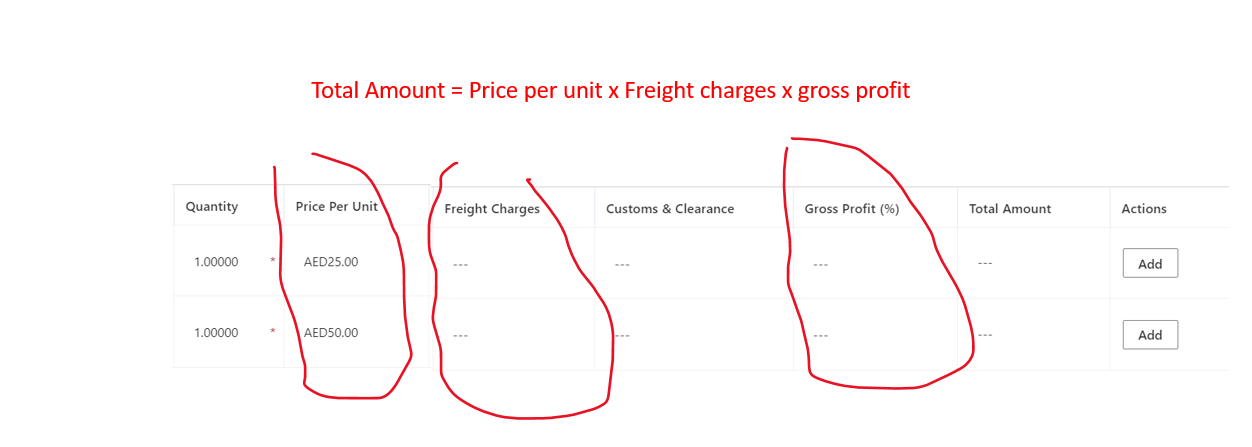
GridScreenshot.png

As you see above, the total amount field has a math multiplication formula with a combination of the highlighted fields.

On the main or the quick create form, the JS is working perfectly and is showing the right results. However, in the enhanced experience of adding products I am facing the below challenges:

  1. The total amount (Currency type) is editable knowing that on the form I have set it as read-only.
  2. When changing the values of any of the above fields the "Total amount" is not updated to show the current result before saving. However, on the main or quick create form this is working perfectly as I have added the logic onChange event of the mentioned fields.

Are there any limitations on the "Enhanced products experience" that does not make the above requirements work as expected?

Please let me know if there is/are any workaround to achieve the same functionality on this grid experience.

Any help is highly appreciated.

Best regards,
EBMRay

I have the same question (0)
  • Suggested answer
    Community Member Profile Picture
    on at

    Hi EBMRay,

    1.The total amount (Currency type) is editable knowing that on the form I have set it as read-only.

    You can try to use business rule to lock the field:

    How to – Use Business Rules to Disable / Read-only fields in Editable Grid (Dynamics 365 / CRM) – Nishant Rana's Weblog

    2.When changing the values of any of the above fields the "Total amount" is not updated to show the current result before saving. However, on the main or quick create form this is working perfectly as I have added the logic onChange event of the mentioned fields.

    pastedimage1656491299965v1.png

    Based on the screenshot, you can know that "Enhanced products experience" will open one page contains xxx'add product' view, and js code you created has added to the form, so it didn't work in the enhanced experience of adding products page.

    Maybe you can try to add js code to the view listed in the screenshot:

    View Customization With JavaScript In Dynamics 365 (c-sharpcorner.com)

    But I'm not sure if it will work because it's not the style that the standard view shows, you need try to test it by yourself.

  • Suggested answer
    Community member Profile Picture
    5 on at
    Hi, EBMRay!
     
    Did you find a solution to this issue? I am struggling with the same atm.

Under review

Thank you for your reply! To ensure a great experience for everyone, your content is awaiting approval by our Community Managers. Please check back later.

Helpful resources

Quick Links

Responsible AI policies

As AI tools become more common, we’re introducing a Responsible AI Use…

Neeraj Kumar – Community Spotlight

We are honored to recognize Neeraj Kumar as our Community Spotlight honoree for…

Leaderboard > Microsoft Dynamics 365 | Integration, Dataverse, and general topics

#1
Martin Dráb Profile Picture

Martin Dráb 47 Most Valuable Professional

#2
André Arnaud de Calavon Profile Picture

André Arnaud de Cal... 38 Super User 2025 Season 2

#3
#ManoVerse Profile Picture

#ManoVerse 31

Last 30 days Overall leaderboard

Product updates

Dynamics 365 release plans



