web
You’re offline. This is a read only version of the page.
close
Skip to main content

Notifications

Announcements

No record found.

Community site session details

Community site session details

Session Id :
Microsoft Dynamics CRM (Archived)

Real time workflow on Queue Item to update Case

(0) ShareShare
ReportReport
Posted on by

Hi,

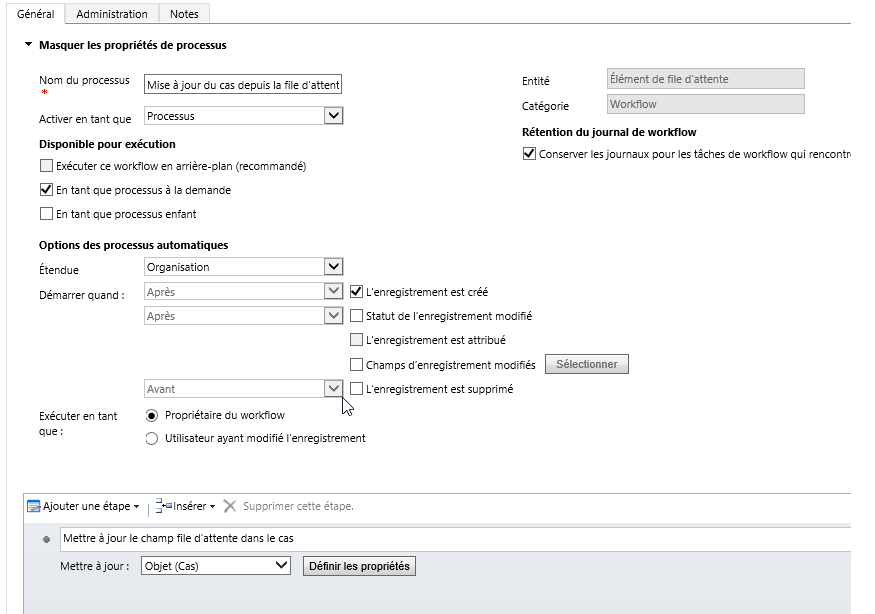
I've a problem with a real time Workflow that should update a field on the related case when an queueitem is created.

My workflow is triggered but I receive an error message on the action trying to update the Case:

"Sync workflow failed with error message - Unhandled Exception: Microsoft.Crm.CrmException: Cannot find record to be updated"

I've tried to trigger the start of the Workflow on the update of the "Object(Case)" field but is doesn't fire anymore. If I try to run is as on demand it works perfectly.

It's like if the Workflow was running too soon. Do you have any idea to resolve this?

I can't use a background workflow, I need this information on the case as soon as the queue item has been created.

Thanks!
*This post is locked for comments

I have the same question (0)
  • Verified answer
    Royal King Profile Picture
    27,686 on at

    can you add step to check whether queue item contains case or not before updating it?  because queue item can be created for any record type not just for case. If queue item does not contain the regarding wait until regarding field contains data then update the case.

  • Community Member Profile Picture
    on at

    Hi,

    Thanks for your answer. I've tried to add a check on the "Object" item. The only thing I can check is if the "Object" contains data. This check is successfull but the next step to update this Object fails (even if it is related to a Case). 

    I don't think I can insert a "wait until" action in a real time Workflow or have I missed something? 

  • Verified answer
    Royal King Profile Picture
    27,686 on at

    you are right there is no wait step in real-time workflow. I just tested what you were trying to do and its working fine with out any issue. May be error occurs in plugin that has been registered in the case entity.If you have any plugin or real-time workflow in case disable it and test it.

  • Verified answer
    Aldo Macedo Profile Picture
    on at

    Hello ACU,

    The error message when you are running your WF in real time: "Sync workflow failed with error message - Unhandled Exception: Microsoft.Crm.CrmException: Cannot find record to be updated" could be because there is another WF or plugin that is sharing, updating or managing the same resource generating blocking in your WF execution. When you set your WF in on demand or background mode you are unlocking the resources and that is why is working. I suggest you to verify if you have any plugin or WF that are using the same resources for this WF and decide what it is needed to run first or try to disable other WF or plugin and verify if this is unlocked after this you could activate other WF until you could find which is generating the blocking.

    Also you could test your WF in background mode and verify the response time hoping that meets requirements.

    Best Regards,

  • Community Member Profile Picture
    on at

    Thanks, your answer helps me a lot, I've found the source of the problem!

    You were right in your first message, I forgot a QueueItem was created also with an incoming email. The workflow failed with the Email --> QueueItem and not the Case --> QueueItem process. As everything is automated (case creation rules and routing rules) I was thinking the process crashed on the creation of the QueueItem for the case.

    Anyway, thank you, it works!

Under review

Thank you for your reply! To ensure a great experience for everyone, your content is awaiting approval by our Community Managers. Please check back later.

Helpful resources

Quick Links

Responsible AI policies

As AI tools become more common, we’re introducing a Responsible AI Use…

Neeraj Kumar – Community Spotlight

We are honored to recognize Neeraj Kumar as our Community Spotlight honoree for…

Leaderboard > 🔒一 Microsoft Dynamics CRM (Archived)

#1
SA-08121319-0 Profile Picture

SA-08121319-0 4

#1
Calum MacFarlane Profile Picture

Calum MacFarlane 4

#3
Alex Fun Wei Jie Profile Picture

Alex Fun Wei Jie 2

Last 30 days Overall leaderboard

Featured topics

Product updates

Dynamics 365 release plans



