web
You’re offline. This is a read only version of the page.
close
Skip to main content

Notifications

Announcements

No record found.

Community site session details

Community site session details

Session Id :
Microsoft Dynamics CRM (Archived)

open external url from sitemap

(0) ShareShare
ReportReport
Posted on by 2,379

Hi all,

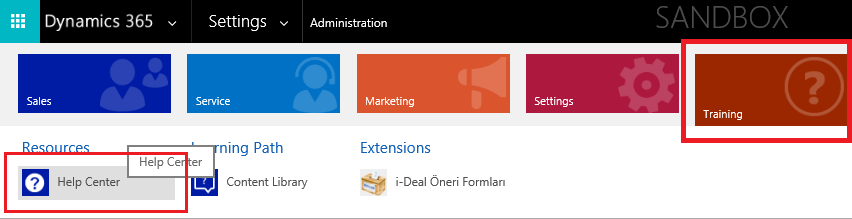
I need to open external url from Sitemap area (screenshot below) but no redirection on main CRM page.

For example if you navigate to "main > Training > Help Center" D365 opens training url (docs.microsoft.com/.../dynamics365#pivot=main&panel=enterprise?sitemappath=HLP%7cHLP_GRP%7cHelp_Resource_Center) on new windows and there is noting change on main D365 screen. 
2867.01.png

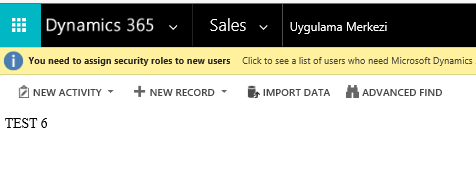
I tried to open webresource and using javascript inside to open window (js :  window.open(url);) however webresource displayed on man D365 screen and also open my external url.
5582.02.png

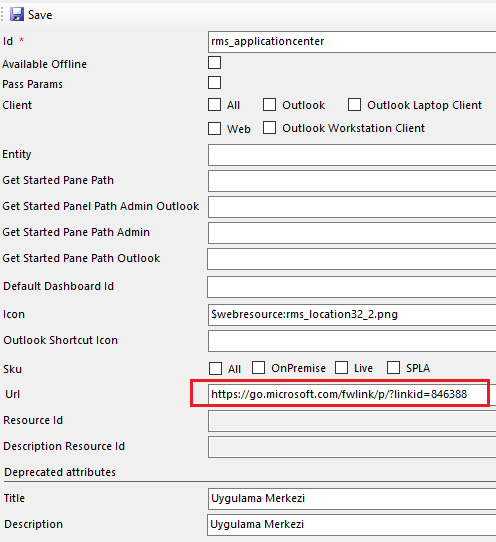
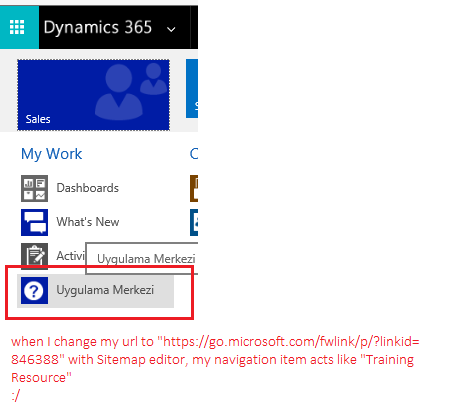
If I try to give training page url (go.microsoft.com/.../p) to my navigation item, its icon and url changing automatically and working perfectly :)
8306.03.png

5822.04.png

I'm also modify my url to "http://MYEXTERNALURL/#pivot=main&panel=enterprise?sitemappath=SFA%7cMyWork%7crms_applicationcenter", but nothing changed.

How can I solve this issue? 

*This post is locked for comments

I have the same question (0)
  • Verified answer
    ashlega Profile Picture
    34,477 on at

    Hey, maybe there is a better solution.. but I've only seen this so far:

    community.dynamics.com/.../246876

  • Emre GULCAN Profile Picture
    2,379 on at

    Hi Alex,

    Yeap I saw this however not solve my question.

  • Emre GULCAN Profile Picture
    2,379 on at

    Actually keypoints are "#pivot" and "sitemappath", but I failed about this keys when add to end of my ufl

  • Verified answer
    Community Member Profile Picture
    on at

    Make an HTML webresource then have the tile open that webresource.  The following code will get you there just tweak it for your purposes, in this case i'm passing the user id to the url

    <html><head>

       <script src="ClientGlobalContext.js.aspx" type="text/javascript"></script>

            <title>Context Info</title>

           <style type="text/css">

               body {

                   background-color: #b0c4de;

               }

           </style>

    <meta charset="utf-8"><style type="text/css">P { margin: 0; }</style></head><body onfocusout="parent.setEmailRange();"><iframe width="1680" height="1050" id="bi" src="" frameborder="0" scrolling="yes"></iframe>

         <script type="text/javascript">

    var userID=Xrm.Page.context.getUserId();

    var ID = userID.substr(0, 38);

        window.open("reports.dev.test.org;+ID);

           </script>

    <br></body></html>

  • Verified answer
    Syed Ibrahim Profile Picture
    6,257 on at

    Try to put your external url inside an html webresouce and open the resource from the site map.

    Try similar below.

    www.crmanswers.net/.../dynamic-navigation-links-using.html

    Hope this helps

  • Verified answer
    Preeti Sharma Profile Picture
    2,678 on at

    Hi,

    Please have a look on below community thread:

    community.dynamics.com/.../196411

    Thanks

  • Emre GULCAN Profile Picture
    2,379 on at

    Hi all,

    Thank for your response, however I tried all solutions before posting question here. My current webresource (html) code is below, 

    <!DOCTYPE html>
    
    <html lang="en" xmlns="http://www.w3.org/1999/xhtml">
    <head>
        <meta charset="utf-8" />
        <script type="text/javascript">
            var url = "my external url";
            window.open(url);
        </script>
    </head>
    <body>
    WEBRESOURCE TEST CONTENT
    </body>
    </html>


    as you can see I have a variable named "url" and using "window.open" javascript command to open this url.

    I'm also tried cover with a function and use "window.onload=myFunction();" or "<body onload="myFunction()">" and also try this metatag "<meta http-equiv="refresh" content="0; url=EXTERNALURL">" but nothing changed, webresource can open my external url on new window however showing itself content on MS CRM main screen. 

    I want only redirect process when click sitemap, don't want show any content inside MS CRM main screens. If you navigate "Training resources" from your sitemap you'll see what I need.

  • Verified answer
    Community Member Profile Picture
    on at

    If you want to reload inside the same window use window.location.replace("[View:http://www.google.com]");

  • Emre GULCAN Profile Picture
    2,379 on at

    Hi John,

    No I don't want load inside same window, I need open new window and actually it's working correctly.

    I'm trying to only open url (new window) and not reload anything inside MS CRM.

  • Community Member Profile Picture
    on at

    That's what I posted the first time.

    This will open the URL in a new tab in the browser  window.open("reports.dev.test.org;+ID);

Under review

Thank you for your reply! To ensure a great experience for everyone, your content is awaiting approval by our Community Managers. Please check back later.

Helpful resources

Quick Links

Responsible AI policies

As AI tools become more common, we’re introducing a Responsible AI Use…

Neeraj Kumar – Community Spotlight

We are honored to recognize Neeraj Kumar as our Community Spotlight honoree for…

Leaderboard > 🔒一 Microsoft Dynamics CRM (Archived)

#1
SA-08121319-0 Profile Picture

SA-08121319-0 4

#1
Calum MacFarlane Profile Picture

Calum MacFarlane 4

#3
Alex Fun Wei Jie Profile Picture

Alex Fun Wei Jie 2

Last 30 days Overall leaderboard

Featured topics

Product updates

Dynamics 365 release plans



