Hi Pawel
Thank you for your help so far. I have looked and read so much over the last few days, but still cannot quite get it.
I have been trying to follow this link which would best represent my end goal. Whilst I'm trying to get everything working, all I'm trying to do is click the button which would pass the Giud as a string to my plugin which created a text file.
I'm basing everything on the two links you provided and this link https://www.wipfli.com/insights/blogs/connect-microsoft-dynamics-365-blog/160810-calling-custom-actions-from-javascript
My Action

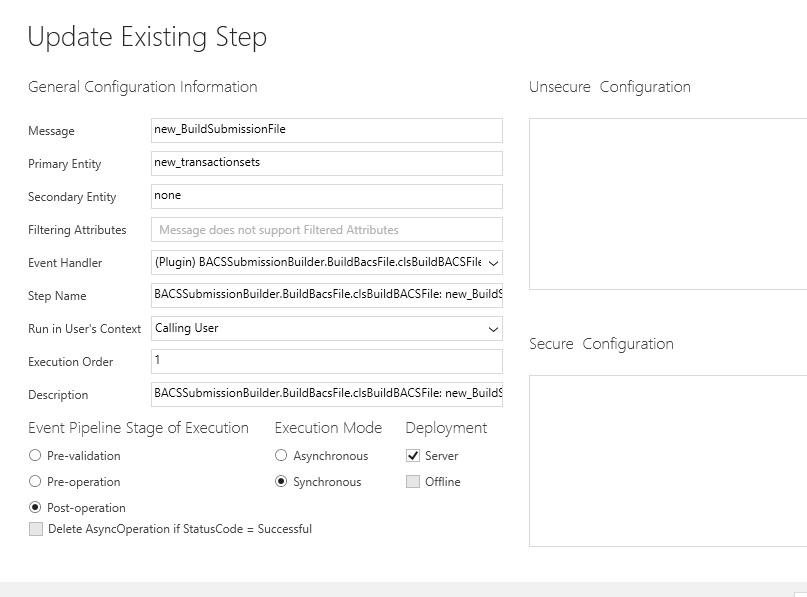
My plugin Step
My JavaScript
function run(selectedItems)
{
var selectedItem = selectedItems[0];
// Here you can use the information below to open a new window or whatever!
alert("Id=" + selectedItem.Id + "\nName=" + selectedItem.Name + "\nTypeCode=" + selectedItem.TypeCode.toString() + "\nTypeName=" + selectedItem.TypeName);
var inputParams = [
{ key: "IDStringList", type: Process.Type.String, value: selectedItem.Id.toString }];
//Call the custom action
Process.callAction("new_BuildSubmissionFile", inputParams, successCallback, errorCallback);
}
function successCallback(params) {
//Get the result from the plugin and display the information in a notification
var outputParamOne = params["OutputParamOne"];
alert(outputParamOne )}
function errorCallback(error, trace) {
alert("Error: " + error, "ERROR", "myError");
}
When the button is clicked alert("Id=" + selectedItem.Id + "\nName=" + selectedItem.Name + "\nTypeCode=" + selectedItem.TypeCode.toString() + "\nTypeName=" + selectedItem.TypeName); is fired and displayed. I put this back in to check the button was firing the script. it seems that after that nothing happens.
my Plugin ( simple to get the hang of this process
Imports System.Globalization
Imports System.IO
Imports System.Net
Imports System.Text
Imports System.Xml
Imports Microsoft.Xrm.Sdk
Namespace BuildBacsFile
Public Class clsBuildBACSFile
Implements IPlugin
Public Sub Execute(serviceProvider As IServiceProvider) Implements IPlugin.Execute
Using Reportprocessing As StreamWriter = New StreamWriter("\\CBI018\Logs\BACS_Sub_Builder.txt")
Reportprocessing.WriteLine("Started")
End Using
Dim tracingService As ITracingService = DirectCast(serviceProvider.GetService(GetType(ITracingService)),
ITracingService)
Dim localContext As IPluginExecutionContext =
DirectCast(serviceProvider.GetService(GetType(IPluginExecutionContext)), IPluginExecutionContext)
Dim output As String = String.Empty
Try
If localContext Is Nothing Then
Throw New InvalidPluginExecutionException("localContext")
End If
Dim TransactionsetRef As EntityReference = CType(localContext.InputParameters("Target"), EntityReference)
Dim StringIDs As String = CStr(localContext.InputParameters("IDStringList"))
Using Reportprocessing As StreamWriter = New StreamWriter("\\CBI018\Logs\BACS_Sub_Builder.txt")
Reportprocessing.WriteLine("Started")
End Using
output = "Completed"
Catch exception As WebException
Dim str As String = String.Empty
If exception.Response IsNot Nothing Then
Using reader As StreamReader = New StreamReader(exception.Response.GetResponseStream())
str = reader.ReadToEnd()
End Using
exception.Response.Close()
End If
If exception.Status = WebExceptionStatus.Timeout Then
Throw New InvalidPluginExecutionException("The timeout elapsed while attempting to issue the request.", exception)
End If
Throw New InvalidPluginExecutionException(String.Format(CultureInfo.InvariantCulture, "A Web exception occurred while attempting to issue the request. {0}: {1}", exception.Message, str), exception)
End Try
localContext.OutputParameters("OutputParamOne") = output
End Sub
End Class
End Namespace
It appears that the plugin is not fired at all. I'm presuming it something to do with the process.js library . I got this from processjs.codeplex.com
Being completely new to script .. I'm at a total loss as to why this isn't working or how to fix it.







