web
You’re offline. This is a read only version of the page.
close
Skip to main content

Announcements

No record found.

News and Announcements icon
Community site session details

Community site session details

Session Id :
Service | Customer Service, Contact Center, Fie...
Suggested Answer

Capture variables for channels (WhatsApp, Facebook, SMS) in omnichannel

(1) ShareShare
ReportReport
Posted on by 107

Hello everyone,

For a chat channel, I am able to use the value (email) captured from a pre-chat survey to automatically search CRM and look for the contact within the CRM system.

pastedimage1635938491310v1.png

An application tab (Search) was created to use the email from the pre-chat survey to search the contact.

pastedimage1635938582687v2.png

Also, the system automatically identifies the contact (an OOB feature).

But the same does not apply to Facebook, WhatsApp, SMS, and Twitter channel.  

How can I capture the values/variables from these channels? 

For Facebook and Twitter, it will be ideal to capture the email address and search CRM
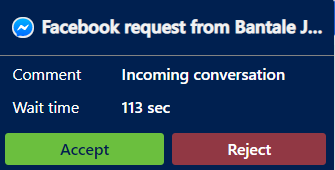
pastedimage1635938623913v3.png

For Whatsapp & SMS, it will be ideal to capture the phone number and search CRM. 

pastedimage1635938645982v4.png

I have the same question (0)
  • Suggested answer
    Community Member Profile Picture
    on at

    Hi Jide Bantale,

    Unfortunately, there is no way to do this. You could post an idea here https://experience.dynamics.com/ideas/ to progress the feature.

  • Jide Bantale Profile Picture
    107 on at

    Thanks Steve,

    So I tried capturing Phone Number value for WhatsApp.

    I was able to use slugs {customerName} to capture the Phone number value

    I created an application tab and passed the slug  {customerName} to search the CRM contact table. It worked as expected.

    But I realized the slugs are limited right now and the context variable can't be used. (correct me if I am wrong here)

  • Estanislao Profile Picture
    5 on at
    Any solution? I have the same query


Under review

Thank you for your reply! To ensure a great experience for everyone, your content is awaiting approval by our Community Managers. Please check back later.

Helpful resources

Quick Links

Introducing the 2026 Season 1 community Super Users

Congratulations to our 2026 Super Stars!

Meet the Microsoft Dynamics 365 Contact Center Champions

We are thrilled to have these Champions in our Community!

Congratulations to the March Top 10 Community Leaders

These are the community rock stars!

Leaderboard > Service | Customer Service, Contact Center, Field Service, Guides

#1
Mallesh Deshapaga Profile Picture

Mallesh Deshapaga 32

#2
ManoVerse Profile Picture

ManoVerse 31 Super User 2026 Season 1

#2
Gerardo Rentería García Profile Picture

Gerardo Rentería Ga... 31 Most Valuable Professional

Last 30 days Overall leaderboard

Featured topics

Product updates

Dynamics 365 release plans
