web
You’re offline. This is a read only version of the page.
close
Skip to main content

Announcements

No record found.

News and Announcements icon
Community site session details

Community site session details

Session Id :
Finance | Project Operations, Human Resources, ...
Suggested Answer

How to show the progress bar on form D365.

(0) ShareShare
ReportReport
Posted on by 185

I am customizing out of the box form PayrollWorkspace in D365 in which I want to add the progress bar for the following steps.

1) Generating an earning statement.

2) Release earning statement.

3) Generate a pay statement.

4) Posting a pay statement.

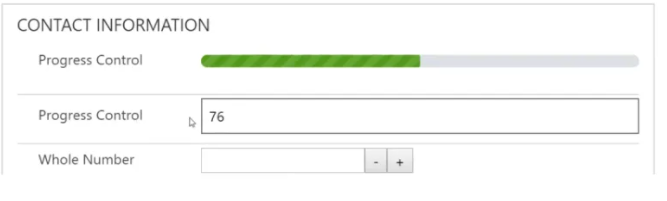
I want to show the progress bar for each of the following steps. I go through the multiple articles but I am confused about how to achieve this in D365FO, please guide. Also, a progress bar should be something like this. Thanks.
pastedimage1599566420803v1.png

I have the same question (0)
  • Suggested answer
    nmaenpaa Profile Picture
    101,172 Moderator on at

    I think there's no possibility to show such info in D365FO. In AX2012 you could use startLengthyOperation() and endLengthyOperation but that doesn't work in D365 F&O.

    What would be the additional value in showing a progress bar?

    For long running actions it's recommended to run them in batch (=in background) if possible.

  • Suggested answer
    André Arnaud de Calavon Profile Picture
    305,178 Super User 2026 Season 1 on at

    Hi Bilal,

    The progress indicator has not been used in Dynamics 365 F&O. You can have a look at e.g. the Data management execution summary form where the status is presented and can be updated with a manual Refresh button. Probably, you can implement a similar experience for your requirement.

  • Blue Wang Profile Picture
    Microsoft Employee on at

    Hi bilal170795 ,

    As mentioned, endLengthyOperation and startLengthyOperation have been deprecated. you can find it here:docs.microsoft.com/.../deprecated-apis

    You can refer these bolgs:www.tech.alirazazaidi.com/.../

    devblog.sertanyaman.com/.../

  • bilal170795 Profile Picture
    185 on at

    Hi Blue,

    None of this article helps so much If you can tell how can I use the progress control in D365FO.

    Thanks.

  • bilal170795 Profile Picture
    185 on at

    Hi Nikolaos,

    Can you tell me in some way I can use the progress control in D365FO?

    Thanks.

  • Suggested answer
    nmaenpaa Profile Picture
    101,172 Moderator on at

    As mentioned above:

    1) There's no progress bar control available in D365FO

    2) In Data management projects there's a progress indicator which is updated when a refresh button is clicked (but not automatically). You can check if that would suit your requirement and look how it's implemented.

  • Martin Dráb Profile Picture
    239,645 Most Valuable Professional on at

    The usual approach in F&O is just showing the "Processing operation" window. Wouldn't it be sufficient in your case too?

    Process.PNG

  • Blue Wang Profile Picture
    Microsoft Employee on at

    Hi Bilal170795

    As explained by several experts, the Process bar control does not exist.

    As I shared the link with you, the Process Busy Indicator is used which will display the elapsed time.

Under review

Thank you for your reply! To ensure a great experience for everyone, your content is awaiting approval by our Community Managers. Please check back later.

Helpful resources

Quick Links

Introducing the 2026 Season 1 community Super Users

Congratulations to our 2026 Super Stars!

Meet the Microsoft Dynamics 365 Contact Center Champions

We are thrilled to have these Champions in our Community!

Congratulations to the April Top 10 Community Leaders

These are the community rock stars!

Leaderboard > Finance | Project Operations, Human Resources, AX, GP, SL

#1
Giorgio Bonacorsi Profile Picture

Giorgio Bonacorsi 722

#2
André Arnaud de Calavon Profile Picture

André Arnaud de Cal... 605 Super User 2026 Season 1

#3
Subra Profile Picture

Subra 547

Last 30 days Overall leaderboard

Product updates

Dynamics 365 release plans
