web
You’re offline. This is a read only version of the page.
close
Skip to main content

Announcements

No record found.

News and Announcements icon
Community site session details

Community site session details

Session Id :
Customer experience | Sales, Customer Insights,...
Suggested Answer

Customer Self Service Portal Design

(0) ShareShare
ReportReport
Posted on by 905

Hello,

I would like to add/modify the design of this portal, and what I want to achieve is the following:


  • I want to change the color of the navigation from black to blue.
  • I want to add a company logo to this navigation.
    1106.nav.PNG
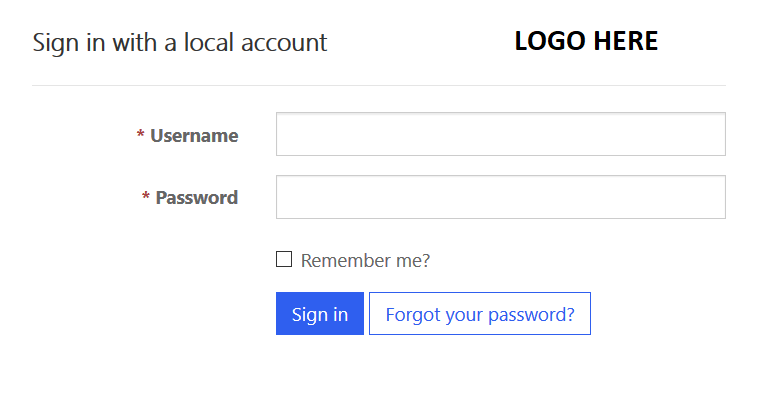
  • I want to add another logo in the right of the text "Sign in with a local account". Take a look at the screenshot below:
    Signup.PNG
  • I want to change the following photo posted below in the "Get Help" section.
    GEthelp.PNG

Can please someone explains in detail and provides an example to achieve the following requirements mentioned above for the Customer Self-Service Portal?

Any help will be greatly appreciated.

Thank you.

I have the same question (0)
  • Suggested answer
    Asif365 Profile Picture
    1,431 on at

    Please have a look at the below links

    docs.microsoft.com/.../manage-existing-portals

    docs.microsoft.com/.../portal-designer-anatomy

  • Suggested answer
    AJ-22040756-0 Profile Picture
    Microsoft Employee on at

    Hi Partner,

    Adding to the articles mentioned by Asif, you can also change the header from Portal -> Content Snippet -> Navbar left   in addition you can follow the articles mentioned here

    https://docs.microsoft.com/en-us/dynamics365/portals/get-started-portal-content-editor

    https://community.dynamics.com/crm/f/microsoft-dynamics-crm-forum/271096/styling-the-customer-portal-navbar-left-with-an-image?pifragment-97030=1#responses

  • EBMRay Profile Picture
    905 on at

    Hello Asif,

    Thank you for sharing those helpful documentations.

    I have achieved to change the color of the navigation and add a logo.

    Unfortunately, I didn't find the Content snippets for the Signup page to customize it and add a logo to the left of "Sign up with a local account".

    Do you have any idea what would be the name of this content?

     Looking to hear from you.

    Thanks again!

  • Suggested answer
    Asif365 Profile Picture
    1,431 on at

    Hi Partner,

    We are glad to hear that you have achieved what you were looking.

    Please have a look at this Post Ravi Kashyap has explained the solution for code snippet very well.

    community.dynamics.com/.../885183

  • EBMRay Profile Picture
    905 on at

    Hello Asif,

    I have created this record "Account/SignIn/SignInLocalFormHeading" of type "HTML" because I want to add a logo, but unfortunately, the HTML tags appear instead of showing the image output.


    Please take a look at the screenshots below:

    2664.Account.PNGOutput-result.PNG

    What I am doing wrong since the type of this record is "HTML"?

    Looking to hear from you.
    Thank you!

  • Suggested answer
    Asif365 Profile Picture
    1,431 on at

    Try

    <p> <img src="/Imhotep/download.png" style="width: 10%; height: 40px;"> </p>

    Note: Adjust width and Height as per your desired

  • EBMRay Profile Picture
    905 on at

    Hello Asif,


    Thanks for replying.


    Unfortunately, I have used the same code you mentioned it doesn't take effect and the HTML code still appears, instead of displaying the image.

    Please take a look here:

    pastedimage1580333190609v1.png

    I am using the same code for the logo in the navigation which already works there.


    Any idea why this problem occurs?


    Looking to hear from you.
    Thank you!

Under review

Thank you for your reply! To ensure a great experience for everyone, your content is awaiting approval by our Community Managers. Please check back later.

Helpful resources

Quick Links

Introducing the 2026 Season 1 community Super Users

Congratulations to our 2026 Super Stars!

Meet the Microsoft Dynamics 365 Contact Center Champions

We are thrilled to have these Champions in our Community!

Congratulations to the March Top 10 Community Leaders

These are the community rock stars!

Leaderboard > Customer experience | Sales, Customer Insights, CRM

#1
ManoVerse Profile Picture

ManoVerse 196 Super User 2026 Season 1

#2
11manish Profile Picture

11manish 129

#3
CU11031447-0 Profile Picture

CU11031447-0 100

Last 30 days Overall leaderboard

Product updates

Dynamics 365 release plans
