web
You’re offline. This is a read only version of the page.
close
Skip to main content

Notifications

Announcements

Community site session details

Community site session details

Session Id :
Customer experience | Sales, Customer Insights,...
Unanswered

Event Registration not sync with contact

(1) ShareShare
ReportReport
Posted on by 94
Hi All,

I wanted to create a Event based Journey on Customer Insights.
1. Created an event and made it go Live.
2. Created a journey where it would send Invitation email to a group of contacts whose age is 20.
3. Contact receive Email and registers through default registration page.
4. Registration information of that contact can be seen under can be seen Registration and attendance tab in Events.
5. But I cannot this registration information under contacts?
6. Am I looking in wrong direction, Kindly help.
I would require this information for a journey to check if contacts has registered for any Event
 
Screenshot:
Contacts Entity
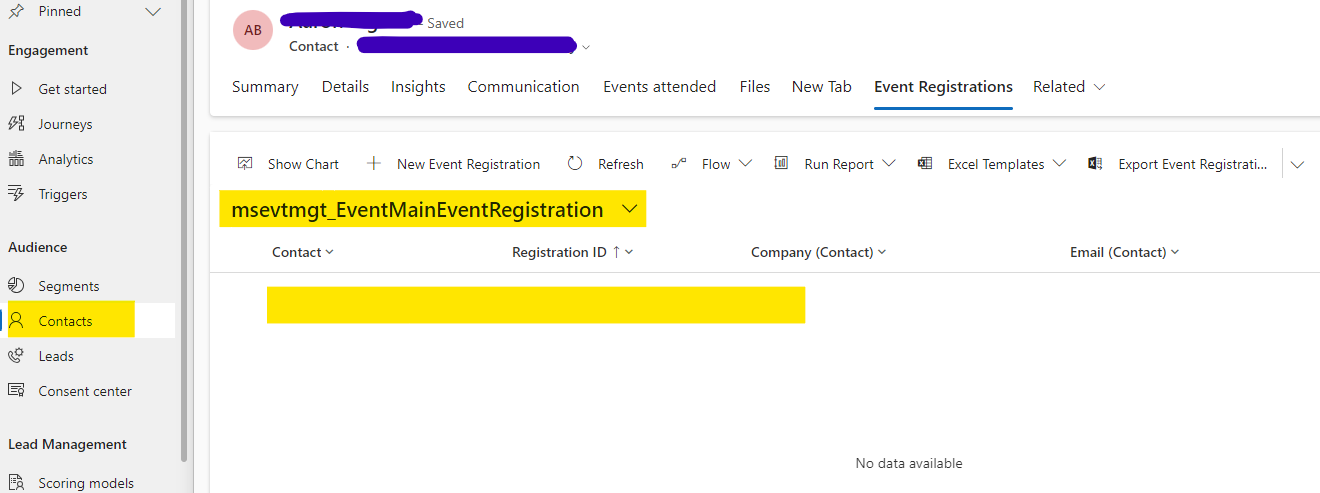
 
Event Entity:
 
 
Thanks and Regards,
Sasi
 
I have the same question (0)
  • Cui Hao Profile Picture
    on at
    Hi,

    After testing, I did not reproduce your problem.
    I'm guessing you may have selected the wrong contact, you can click on the contact in Events to see if it jumps to the corresponding contact in Contacts.

    It will go directly to the corresponding contact under Contacts.


    Afterwards you can see if the contact is involved in the event via /Events attended/.


    Best regards,
    Cui Hao
  • Sasi Bridzet Profile Picture
    94 on at
    Hi Cui Hao ,
     
    Thanks for your reply. I don't find any contact duplication, The issue is when I click the contact, I cannot see the info about it under Event Registrations tab, rather we  can see it on Event attended tab.

    And Journey always goes to No path instead of yes path


  • Cui Hao Profile Picture
    on at
    Hi,
     
    According to the image you posted, in Journey it shows that the event is not registered, so it is normal to not see the contact in /Event Registrations/.
    But you can see the record of Event Registrations in Events, the theory is that Journey should not go to No branch.
     
    My guess is that perhaps the journey itself is at fault, or there are plugins or Flow interfering, you can check these factors.
     
    If it's convenient, you can show me the detailed screenshot of your journey and your specific steps.
     
    Best regards,
    Cui Hao
  • Hancha Profile Picture
    2 on at
    Hi,
    any luck solving the issue?
    I´m experiencing the same problem.
    Under the event I can see the registered contact but under contact the event registrations are empty...

    Thanks
    Hana

Under review

Thank you for your reply! To ensure a great experience for everyone, your content is awaiting approval by our Community Managers. Please check back later.

Helpful resources

News and Announcements

Season of Giving Solutions is Here!

Quick Links

Responsible AI policies

As AI tools become more common, we’re introducing a Responsible AI Use…

Neeraj Kumar – Community Spotlight

We are honored to recognize Neeraj Kumar as our Community Spotlight honoree for…

Leaderboard > Customer experience | Sales, Customer Insights, CRM

#1
Pallavi Phade Profile Picture

Pallavi Phade 98

#2
Tom_Gioielli Profile Picture

Tom_Gioielli 81 Super User 2025 Season 2

#3
TAHER Mehdi Profile Picture

TAHER Mehdi 58

Last 30 days Overall leaderboard

Product updates

Dynamics 365 release plans
