web
You’re offline. This is a read only version of the page.
close
Skip to main content

Notifications

Announcements

No record found.

Community site session details

Community site session details

Session Id :
Microsoft Dynamics GP (Archived)

Fixed Assets General Information Update Issue

(0) ShareShare
ReportReport
Posted on by

Whenever I try to update *certain* assets' general information (such as description, extended description, etc.), I receive the attached error message (which says "A new guard page for the stack cannot be created."). With that message, GP quits forcibly. But what I wanted to update gets updated on the backend, so next time when I open it, most recent update could be seen.

We are now on GP2013 SP1. I have no clue about this error message and this is the first time we are receiving this error message. Moreover, it doesn't happen to all assets. I am still working on identifying the set/batch of assets for which this message appear.
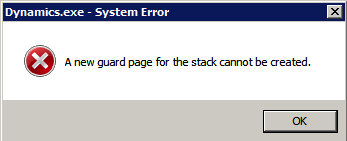
Any help/input on this would be much appreciated.

*This post is locked for comments

I have the same question (0)
  • Suggested answer
    Josh P Profile Picture
    2,895 on at

    This is a stack overflow error, and it is an error you normally see with calls to the windows service or network calls, and it is generic. This message only tells you there is an error, not what the error is caused by. I assume you have third party applications installed for fixed assets? If so, it looks like a bug.

  • Community Member Profile Picture
    on at

    Hi Joshua, thanks for the response. Yes this error does not really suggest anything with regards to cause(s). That's my confusion. Nope, we don't have any 3rd party customization on FA. Not even a single modified form. That's another reason why I am confused. I could literally identify those assets that have this problem. And still, I am not able to make any sense out of it. Terribly confused.

  • Frank Hamelly | MVP, MCP, CSA Profile Picture
    46,625 Super User 2025 Season 2 on at

    Vaidy, I would create a Dex SQL log and submit this one to MSFT.  It may be a bug, with all the enhancements they made to FA in 2013.

  • Community Member Profile Picture
    on at

    Thanks Frank. Since we are in SP1, I am just planning to check this on SP2 too and confirm this being a bug and got resolved in SP2. Action plan is to prepare my test machine with SP2, check this issue out and submit the bug report with logs to MSFT, if this is not fixed in SP2.

    Moreover, I haven't seen anyone else in our GP community to have reported/discussed this on our forum. That's another doubt that it may be specific to our GP/data environment.

  • Josh P Profile Picture
    2,895 on at

    I searched that first Vaidy, and I did not see any instances on this or the developer's forums. So, I would submit as bug if not patch fixed too.

  • Community Member Profile Picture
    on at

    Hi,

    I am encountering this error on the same version GP2013 SP1. Can someone confirm this is resolved in SP2?  And if this is a known issue? This is the only post I can find with the same symptoms.

    Here are a few of the information I gathered:

    1. Does not happen to all assets.

    2. Does not happen to new assets.

    3. Nothing significant in the DEXSQL.log

    4. Event Viewer shows DOC ATTACH entries trying to start but Doc Attach is not enabled.

    Any information you can share is greatly appreciated.

    Thank you,

    Rocky

Under review

Thank you for your reply! To ensure a great experience for everyone, your content is awaiting approval by our Community Managers. Please check back later.

Helpful resources

Quick Links

Responsible AI policies

As AI tools become more common, we’re introducing a Responsible AI Use…

Neeraj Kumar – Community Spotlight

We are honored to recognize Neeraj Kumar as our Community Spotlight honoree for…

Leaderboard > 🔒一 Microsoft Dynamics GP (Archived)

#1
mtabor Profile Picture

mtabor 1

Last 30 days Overall leaderboard

Featured topics

Product updates

Dynamics 365 release plans



