web
You’re offline. This is a read only version of the page.
close
Skip to main content

Notifications

Announcements

No record found.

Community site session details

Community site session details

Session Id :
Microsoft Dynamics CRM (Archived)

Pass parameter ribbon workbench - dialog startup

(0) ShareShare
ReportReport
Posted on by 600

Hi

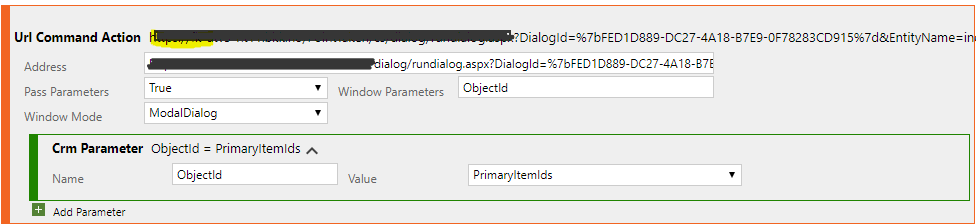
I am trying to create a button with ribbon workbench that will open a dialog window.

I have followed this approach: https://community.dynamics.com/crm/b/mscrmcustomization/archive/2015/05/06/running-crm-dialog-from-custom-ribbon-button

But I have difficulties with the last step where I will pass the objectId.
ribbonpicture.png

Thanks for help 

*This post is locked for comments

I have the same question (0)
  • Community Member Profile Picture
    on at

    Hello Martin,

    As far as i can see, everything is fine, it should work. You have the CrmParameter with the ObjectId and the PrimaryItemIds. This will populate the ObjectId.

    Are you getting any error when clicking the button?

    Cheers!

    Pedro Pisco

  • martingr Profile Picture
    600 on at

    Hi and thanks for answer. Yes that is correct. I get page with: an error has occured.

    Any other thoughts?

  • Verified answer
    Joshua Wright Profile Picture
    410 on at

    First thing to verify, the record you are running this from is created. If hitting this ribbon button on a new unsaved record you will get an error.

    Next try without the full url, so in your setup actually delete the blacked out code above.

    I had some issues with using the open url from the ribbon workbench so solved by creating a js function and using that as the command for the ribbon button.

    function openDialogProcess(dialogId, entityName, objectId) {
       var url = Xrm.Page.context.getClientUrl() +
        "/cs/dialog/rundialog.aspx?DialogId=" +
        dialogId + "&EntityName=" +
        entityName + "&ObjectId=" +
        objectId;
       window.open(url);
    }


    and then from the parameters pass the following:OpenDialogParams.PNGwith the string guid being the dialogid.

  • Community Member Profile Picture
    on at

    Hi Martin,

    Do you know Fiddler? www.telerik.com/fiddler

    Could you collect fiddler traces when you click the button?

    Would be helpful to understand the URL that CRM is trying to access.

    Cheers!

    Pedro Pisco

  • martingr Profile Picture
    600 on at

    Thank you so much Josh! I think it works now with the above javascript.

    Do you know how to change the window mode so it dosnt open in full tab, but in ModalDialog?

  • martingr Profile Picture
    600 on at

    Edit Found out to resize window

  • martingr Profile Picture
    600 on at

    Hi and thanks. This works! but if I try to launch from view (mark a record and click button) it wont work. Any ideas how to fix this?

    Thanks

  • Verified answer
    Joshua Wright Profile Picture
    410 on at

    change the FirstPrimaryItemId to FirstSelectedItemId from home or subgrid

  • Suggested answer
    Umer990 Profile Picture
    46 on at

    PassParameter should be false to avoid the error you got.

Under review

Thank you for your reply! To ensure a great experience for everyone, your content is awaiting approval by our Community Managers. Please check back later.

Helpful resources

Quick Links

Responsible AI policies

As AI tools become more common, we’re introducing a Responsible AI Use…

Neeraj Kumar – Community Spotlight

We are honored to recognize Neeraj Kumar as our Community Spotlight honoree for…

Leaderboard > 🔒一 Microsoft Dynamics CRM (Archived)

#1
SA-08121319-0 Profile Picture

SA-08121319-0 4

#1
Calum MacFarlane Profile Picture

Calum MacFarlane 4

#3
Alex Fun Wei Jie Profile Picture

Alex Fun Wei Jie 2

Last 30 days Overall leaderboard

Featured topics

Product updates

Dynamics 365 release plans



