web
You’re offline. This is a read only version of the page.
close
Skip to main content

Notifications

Announcements

No record found.

Community site session details

Community site session details

Session Id :
Microsoft Dynamics CRM (Archived)

Can I expand the width of an option set in a Header tile.

(0) ShareShare
ReportReport
Posted on by 422

Hi all,

I want to use the new style form header section on my case form to contain the status reason option set.

The case status reasons are fairly long and so I want to display the full text.

Given that we can't control the width of these header tiles natively, I've managed to add an unsupported bit of javascript which very nearly does the trick, the tile expands to display more of the status reason.

function LoadChangeHeaderTiles() {

changeHeaderTileFormat();
setInterval(changeHeaderTileFormat, 1000);
}

function changeHeaderTileFormat() {

var headertiles = document.getElementsByClassName("ms-crm-HeaderTileElement");

if (headertiles != null) {
for (var i = 0; i < headertiles.length; i++) {
 headertiles[i].style.width = "200px"; 
}
}
}

CRMheader-iissue-2.PNG

However, ideally I need the optionset header control width to also expand for a better user experience. As you can see, when you go to make a selection it truncates the text and means the users have to hover over the option to see the full text.
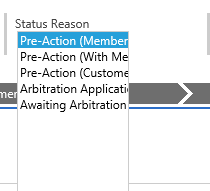
CRMheader-iissue.PNG

I'm assuming there is no supported way to achieve this but if anyone has found or knows a way to overcome this I'd love to hear from you.

This is CRM 2015 On-Premises, Case Entity.

Thanks

Alex

*This post is locked for comments

I have the same question (0)
  • Verified answer
    Peter Bohn Profile Picture
    on at

    Hi,

    You can do this with css, i cant look at the Moment, i Think it was width: auto, or similar.

    of course it is unsupprted.

    I can look tomorrow at work if you cant get it working.

    Gr. PeB

  • AlexJay Profile Picture
    422 on at

    Lovely stuff, thanks! Success.

    statusreasonautowidth.PNG

    #header_statuscode_i {width: auto}

  • Steve Le Monnier Profile Picture
    959 on at

    Can you provide guidance in where "#header_statuscode_i {width: auto}" should be placed.

    Also trying to enlarge the size of an option set in the header with frustrating results.

    Many thanks

  • AlexJay Profile Picture
    422 on at

    Hi Steve,

    I basically adapted this method for adding a custom css web resource to the case form onload

    https://snataw.wordpress.com/2014/01/30/prettify-entity-form-in-crm-2013/#more-317

    Steps are:

    1. Create a custom CSS webresource which includes this line: #header_statuscode_i {width: auto}

    2. Add the JavaScript function supplied in that link and ensure it is called OnLoad of your CRM form. (Don't forget to change the relative path to be the name of your custom CSS web resource)

    Then when the form is loaded the JavaScript function calls the custom CSS file and executes the #header_statuscode_i {width: auto} line, expanding the option set width for the option set in the header tiles.

    That's all I needed to do.

    Please be aware this was implemented for a CRM 2015 on-premises org so things may well have changed with subsequent updates or versions, I've not looked again at this recently.

    Hope this helps

    Cheers, Alex.

  • Steve Le Monnier Profile Picture
    959 on at

    Hi Alex

    Much appreciation for coming back to me with context for your fix. I was baffled and frustrated in equal measure, especially given how much time I've already spent on this problem MS should have fixed four years ago!

    I'm using 2016 on-premise, so this has been a voyage of discovery. (For the benefit of others.)

    Firstly your java-trick wasn't working, and then I realised that in CRM2016 you have to go parent.document.getElementByClass otherwise the DOM just returns Null.

    Then I was able to selectively make certain header tiles the correct width, and I had a smug expression on my face that soon disappeared when the auto-save feature kicked in and destroyed all my hard work.

    Then decided to enlarge all header tiles slightly by changing the controls.css (in that unsupported, but necessary way).

    I then thought I'd cracked it, until I tried to interact with the option set in the header tiles and found it was maintaining the original width of two-thirds of bugger all. Does MS ever test their stuff, or is that what we are here for?

    Hopefully, armed with your steps I may finally solve this one to a satisfactory level.

    PS. If its not to cheeky to ask... did you solve the auto-update problem redrawing the form header? Most of my interactions are via the UPDATE event and not CREATE so the OnLoad event only fires once and I've not found a safe technique to run the fix after auto-save.

    Cheers

    Steve

Under review

Thank you for your reply! To ensure a great experience for everyone, your content is awaiting approval by our Community Managers. Please check back later.

Helpful resources

Quick Links

Responsible AI policies

As AI tools become more common, we’re introducing a Responsible AI Use…

Neeraj Kumar – Community Spotlight

We are honored to recognize Neeraj Kumar as our Community Spotlight honoree for…

Leaderboard > 🔒一 Microsoft Dynamics CRM (Archived)

#1
SA-08121319-0 Profile Picture

SA-08121319-0 4

#1
Calum MacFarlane Profile Picture

Calum MacFarlane 4

#3
Alex Fun Wei Jie Profile Picture

Alex Fun Wei Jie 2

Last 30 days Overall leaderboard

Featured topics

Product updates

Dynamics 365 release plans



