web
You’re offline. This is a read only version of the page.
close
Skip to main content

Notifications

Announcements

No record found.

Community site session details

Community site session details

Session Id :
Customer experience | Sales, Customer Insights,...
Suggested Answer

The Currency Symbol on Goal Entity is getting Displayed as $ even though the base currency of the Application is SAR

(0) ShareShare
ReportReport
Posted on by 10

Hello All, 

I am working on Dynamics 365 On-Premise V9.0 UCI App. I am trying to create a Goal which has Target with SAR currency, I have entered the target amount and clicked outside the currency field and ended up with an error notification "Enter an Amount between $ XX and $ YY " though the base currency of the application is SAR.

Could any one let me know on how to fix the issue.

7801.Goal-Target-Error.png

I have the same question (0)
  • Suggested answer
    Community Member Profile Picture
    on at

    Hi Kunal,

    Sales goals are always captured in organization’s base currency. We cannot change currency on Sales Goal record.

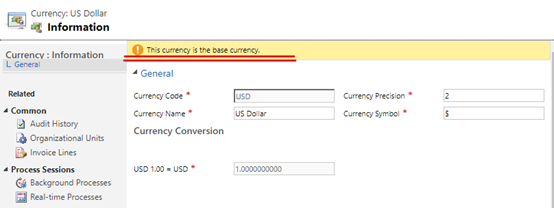
    So you need go Settings > Business Management > currencies to check which is base currency.

    Open the currency (my example is USD, in your example, you need select SAR), it told me it was the base currency and the exchange rate is read only if it is.
    pastedimage1599556053907v1.png

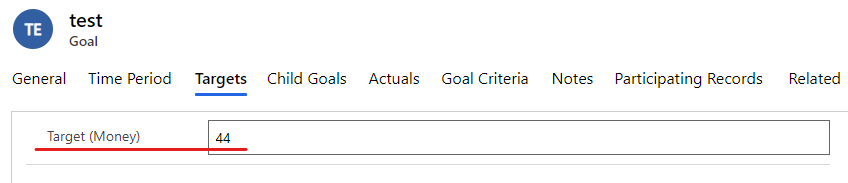
    And in the goal form, when you insert money, you don’t need write currecy name like ‘SAR’, you just need insert Currency amount (number).
    pastedimage1599556069316v2.png

    Regards,

    Leah Ju

    Please mark as verified if the answer is helpful. Welcome to join hot discussions in Dynamics 365 Forums.

  • Kunal Sen Profile Picture
    10 on at

    Hi Leah Ju,

    I have checked the organization’s base currency and SAR is the base currency also we don't have any other currency in the Organization .

     Base-Currency.png

    And in the goal form, when I try to insert money, then before saving it is appending $ as prefix in the Target Field,

    Target.png

    Regards,

    Kunal

  • Community Member Profile Picture
    on at

    Hi Kunal,

    It is so strange.

    it is possible cache issue, you can clear browser cache or change another browser to try again.

    Regards,

    Leah Ju

    Please mark as verified if the answer is helpful. Welcome to join hot discussions in Dynamics 365 Forums.

  • Suggested answer
    Naveen Ganeshe Profile Picture
    3,397 User Group Leader on at

    Hello Kunal,

    can you cross-check your personal settings currency format? It might be the issue

    pastedimage1599631789237v1.png

Under review

Thank you for your reply! To ensure a great experience for everyone, your content is awaiting approval by our Community Managers. Please check back later.

Helpful resources

Quick Links

Responsible AI policies

As AI tools become more common, we’re introducing a Responsible AI Use…

Neeraj Kumar – Community Spotlight

We are honored to recognize Neeraj Kumar as our Community Spotlight honoree for…

Leaderboard > Customer experience | Sales, Customer Insights, CRM

#1
Pallavi Phade Profile Picture

Pallavi Phade 98

#2
Tom_Gioielli Profile Picture

Tom_Gioielli 60 Super User 2025 Season 2

#3
Gerardo Rentería García Profile Picture

Gerardo Rentería Ga... 43 Most Valuable Professional

Last 30 days Overall leaderboard

Product updates

Dynamics 365 release plans
