web
You’re offline. This is a read only version of the page.
close
Skip to main content

Notifications

Announcements

Community site session details

Community site session details

Session Id :
Microsoft Dynamics 365 | Integration, Dataverse...
Suggested Answer

Issue with data capacity

(0) ShareShare
ReportReport
Posted on by 45

So, I have some issues and I'm looking for my best route.  My data capacity has been since 2014 steady at about 1gb a year of usage. We are not a super busy company that creates a lot of data in the system. A few emails a day and maybe 1 or 2 contacts with opportunities for them. 1gb per year. After the last 2nd big wave update, we started noticing that we were creating about 1-5GB per day when we were not doing anything in the system. I reached out to the support team, that was about 2 months ago and still no resolution. They told me there was many "Activitypartybase" records being made. it was only about 7 GB worth or data. The support team were able to run the script and it got rid of around 7gb of our storage capacity.  We are still over our capacity and the 7gb would not bring us under the capacity cap. So, they told me they were able to create another script that would remove a bigger amount of data. I've been asked to give them our office hours so it can be run after hours since any workflow, process, or async process will instantly cancel the script. None of these activities listed above are going on unless we create or edit records. They have run it 3 times already with all 3 being canceled. At this point we are basically at a standstill because we don't want to keep working and adding stuff to our system on the fear of it poofing since we are way over capacity. I'm not sure how to see any logs that would show me anything that would be running over night almost like an admin tool to see this. And to clarify I'm not getting anywhere with the support team for 2 months and don't get answers to emails till the next day and they are very slim emails.

I have the same question (0)
  • Venkatesh Nadar Profile Picture
    on at

    Hi,

    Did we check which entity is consuming using the chart, if the records are not taking is there any script which the Ms is applying, any details you have about it?

    Regards,

    Venkatesh N

  • AddisonPayne Profile Picture
    45 on at

    The issue is that we have been up and online since 2014 and never had this much data created by anyone. It's like the system is growing when no one is on. For the last 7 years we have been doing the same work in the system with the same workflows. The support team is running in circles because they cant figure it out. We go home at night and the next morning there is another 1gb of data created over night. No extra workflows or process. This is very frustrating.

  • Suggested answer
    Venkatesh Nadar Profile Picture
    on at

    Hi,

    Important:
    This steps on how to reduce the capacity consumption of ActivityPointerBase and ActivityPartyBase tables, which involves deleting custom data. Following deletion, these records will not be available anymore. Before proceeding with deleting any data for this table, please make sure to review your customizations, your workflows and plugins running on delete operations, and review cascade delete behaviors for this data, to make sure no data gets unintendedly deleted in the process. Please make sure to test these actions on a sandbox environment first before proceeding.


    What is ActivityPointerBase?

    The ActivityPointerBase table stores any activity or task that is performed by a user in Dynamics 365 CRM.

    There are different types of activities that can be created whose links are stored in this table, along with the user and/or team associated to that activity, which is stored in ActivityPartyBase table. As such, when attempting to reduce the consumption of ActivityPointerBase, the consumption of ActivityPartyBase will also be reduced.

    The following table lists the activity types which can be found in CRM (but not limited to):

    Appointment Letter
    Approval Opportunity Close
    Booking Alert

    Order Close

    Bulk Operation Phone Call
    Campaign Activity and Campaign Response Quick Campaign
    Case Resolution Quote Close
    Customer Voice Survey Invite and Response Recurring
    Email Service Appointment
    Fax Social Activity
    Incident Resolution Task
    Untracked Email Custom activity entities

    Please bear in mind that this includes not just OOB activity entities, but also any custom activity entities that users may have created in Dynamics 365.

    How to retrieve the data from ActivityPointerBase

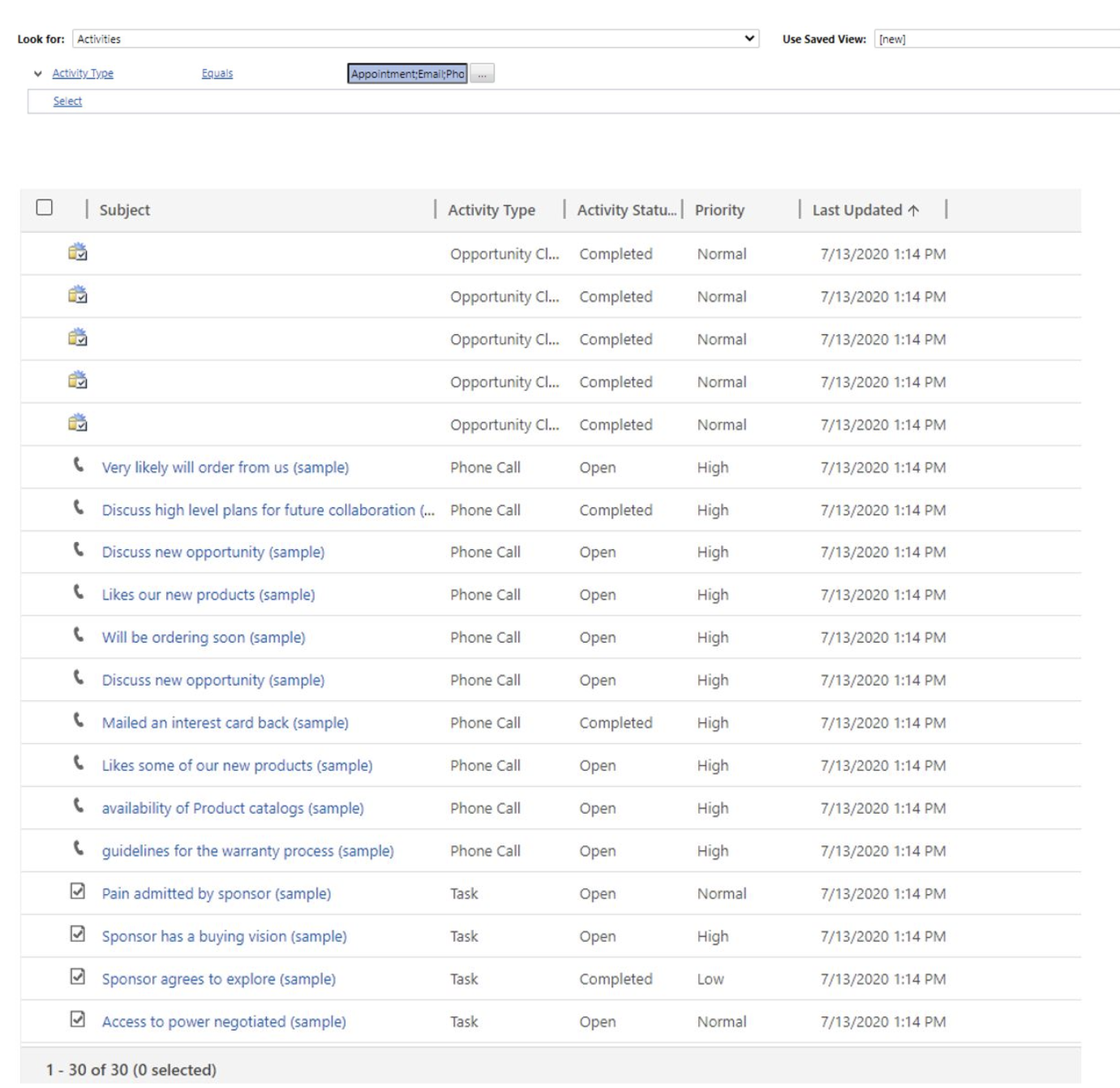
             1. Using Advanced Find and Chart Capabilities

    Through Advanced Find, you will be able to select the Activities entity and retrieve all the data that is present in this table; alternatively, you can also filter by Activity Type and Status, in order to get more streamed results.
    pastedimage1643857737503v9.png

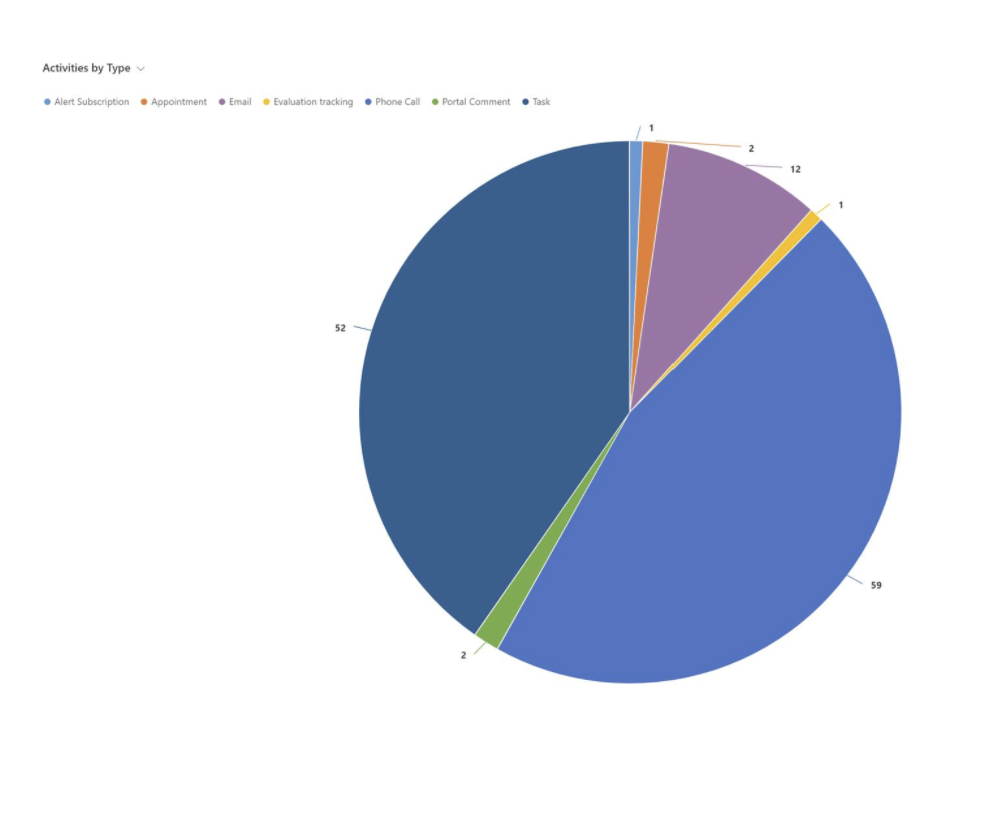
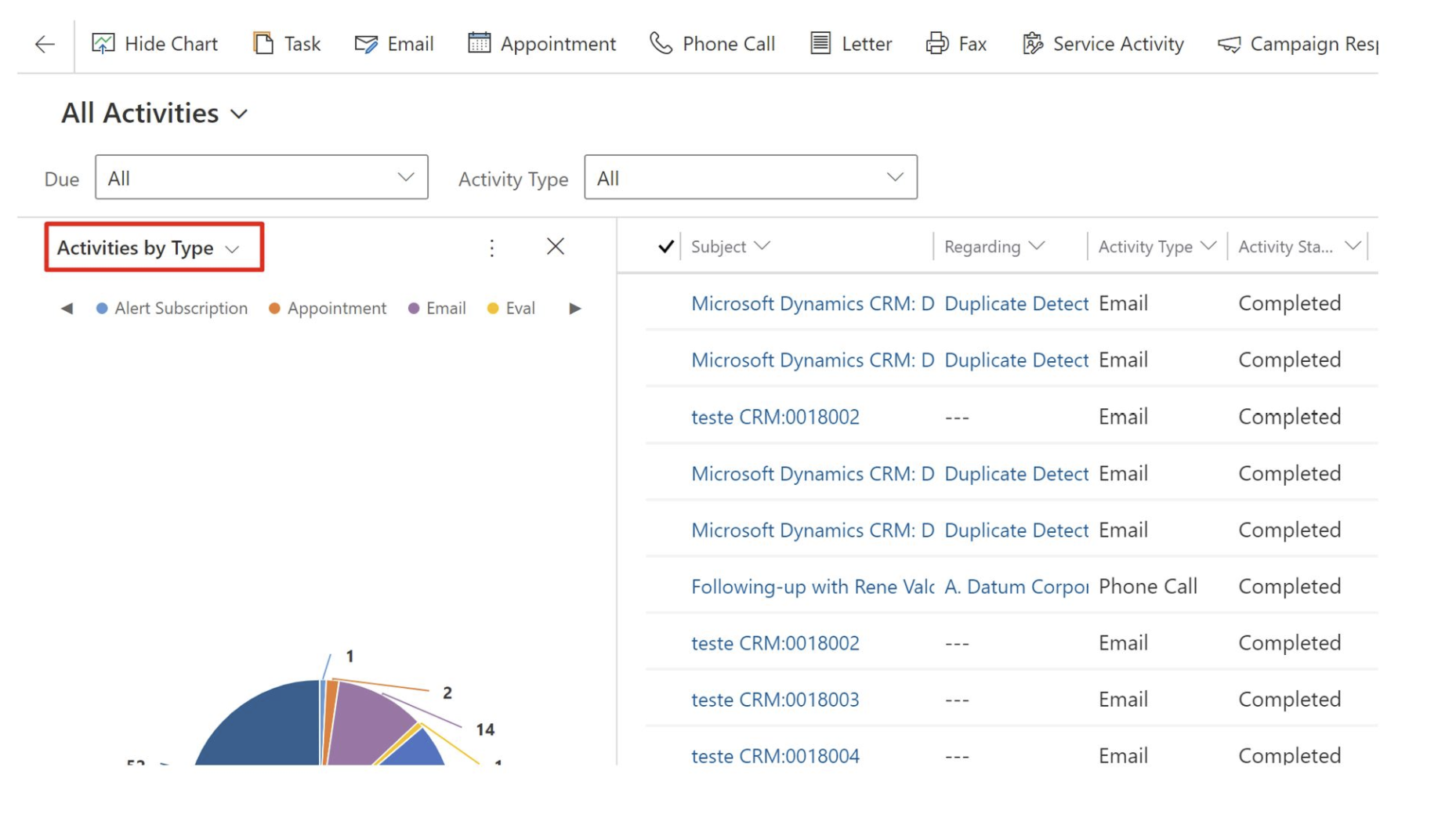
    Users can also leverage the Chart built-in functionalities to display activities records by activity type, in order to understand what records are occupying the most space in the table. This is accessible by going to Activities, change the view to All Activities (for example), select “Show Chart” and filter the Activities by Type.
    pastedimage1643857760273v10.png

    Example chart:


    pastedimage1643857779031v11.png

            2. Using SQL Management Studio,

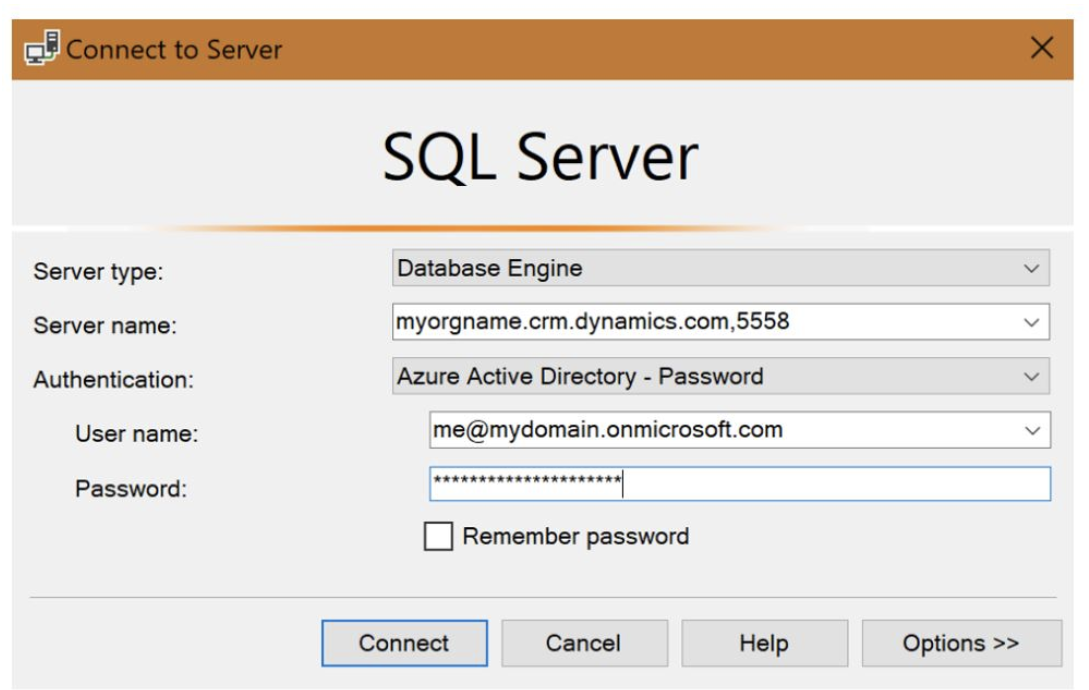
    We can use SQL Management Studio to query our online environment data, by establishing a connection to the database as per the below (make sure the TDS endpoint setting is enabled in the environment settings in the Power Platform Admin Center):
    pastedimage1643857800402v12.png

    Example query:

    select activitytypecodename as 'Activity Name', ActivityTypeCode as 'ActivityCode', count(*) as 'Number of Records'
    from [dbo].[activitypointer]
    group by ActivityTypeCode, activitytypecodename
    order by [Number of Records] desc

    Example output:
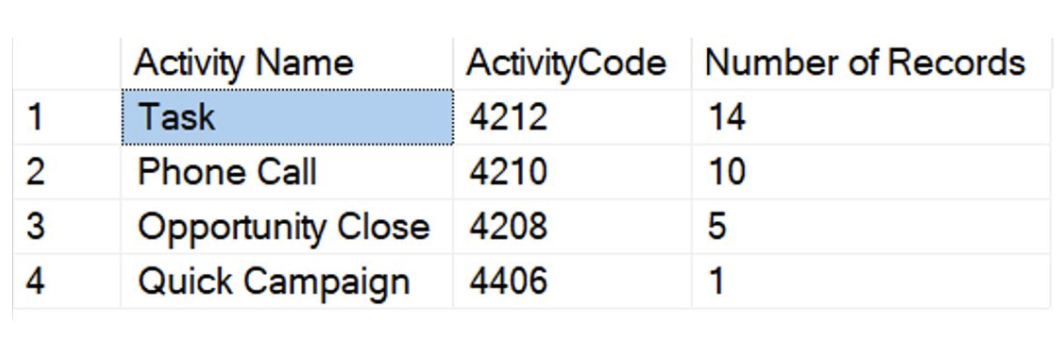
    pastedimage1643857817928v13.png

    Through this query, the user will be able to understand the type of activities and the amount of records each activity type currently has. Based on these results, we can create bulk deletion jobs targeted to address a specific activity type.

    If you wish to know more on how to leverage SQL to query your CRM online database, please review the following article: Use SQL to query CDS data.

    How to Delete the Data

    There are also two options to delete the data, depending on the size of the dataset – through Advanced Find or by running a Bulk Delete Job.

    If you are looking to delete smaller datasets, the records can be deleted through the same window of Advanced Find. Select the records you wish to delete and choose “Delete Activity”:
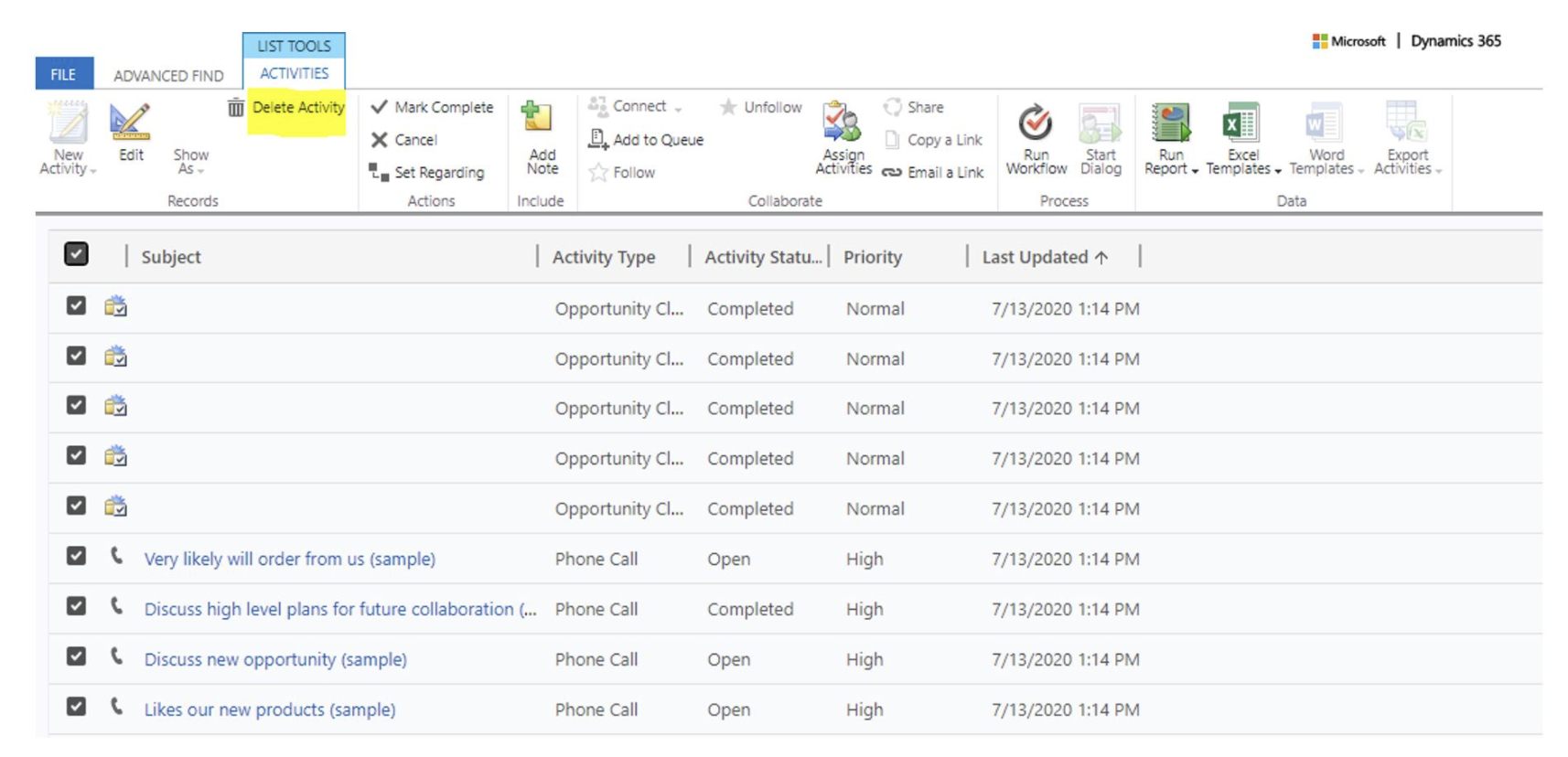
    pastedimage1643857840193v14.png

    For larger datasets, the best option is to create a bulk delete job targeting the specific entity type you wish to delete, such as Appointments, Letters, Phone Calls, Tasks.
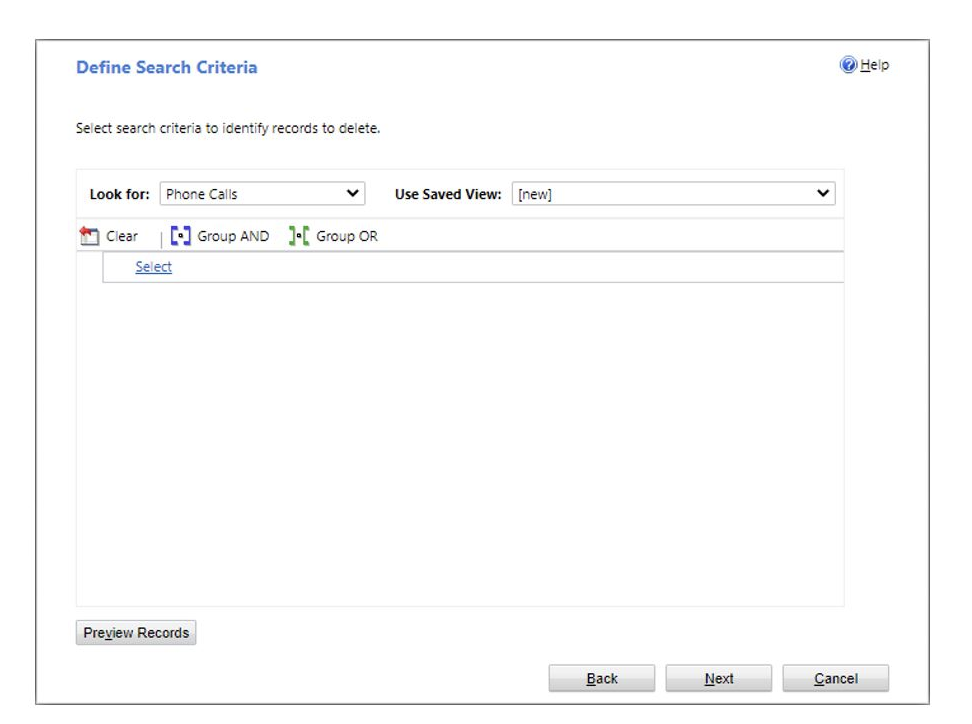
    pastedimage1643857852966v15.png

    Through these steps, it will be possible to reduce the consumption of ActivityPointerBase and ActivityPartyBase.

    Additional Resources:

    Hope this helps!

    Regards,

    Venkatesh N

Under review

Thank you for your reply! To ensure a great experience for everyone, your content is awaiting approval by our Community Managers. Please check back later.

Helpful resources

Quick Links

Responsible AI policies

As AI tools become more common, we’re introducing a Responsible AI Use…

Congratulations to our 2025 Community Spotlights

Thanks to all of our 2025 Community Spotlight stars!

Leaderboard > Microsoft Dynamics 365 | Integration, Dataverse, and general topics

#1
André Arnaud de Calavon Profile Picture

André Arnaud de Cal... 68 Super User 2025 Season 2

#2
whitebeard Profile Picture

whitebeard 60

#3
BillurSamdancioglu Profile Picture

BillurSamdancioglu 48 Most Valuable Professional

Last 30 days Overall leaderboard

Product updates

Dynamics 365 release plans