web
You’re offline. This is a read only version of the page.
close
Skip to main content

Announcements

No record found.

News and Announcements icon
Community site session details

Community site session details

Session Id :
Microsoft Dynamics AX (Archived)

How to display in line string control Report tool x++ ax 2009

(0) ShareShare
ReportReport
Posted on by

When I display string with more length 155 characters ,value in string control in report automatic down a line, how to adjust it ?
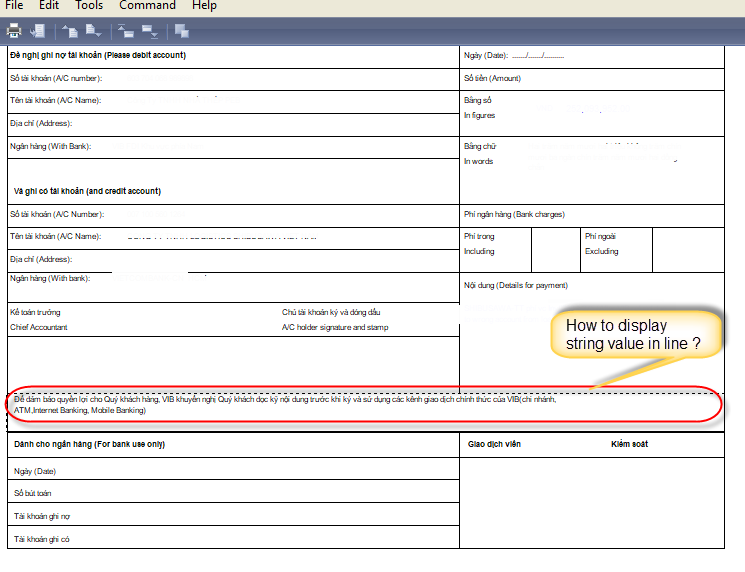
Display-string.png

Method :

display ItemFreeTxt bankRemark()

{

ItemFreeTxt strRemark;strRemark = "Ð? d?m b?o quy?n l?i cho Quý khách hàng, VIB khuy?n ngh? Quý khách d?c k? n?i dung tru?c khi ký và s? d?ng các kênh giao d?ch chính th?c c?a VIB(chi nhánh, ATM,Internet Banking, Mobile Banking)";

return strRemark;

}

Thanks a lot.

Rainy Huynh

*This post is locked for comments

I have the same question (0)
  • Suggested answer
    Chaitanya Golla Profile Picture
    17,225 on at

    Hi,

    Please check the width property of the string control used to display on Ax native report.

    Probably it is less than expected, increase value accordingly,

  • Community Member Profile Picture
    on at

    Hi Chaitanya,

    Thank your replay, I setup width property of control 186 mm but about 155 characters string automatic down a line. You can see as image have many space after.

  • Community Member Profile Picture
    on at

    Hi Sukrut,

    ItemFreeTxt has tring size of 1000 chars not 155 of chars.

  • Verified answer
    Chaitanya Golla Profile Picture
    17,225 on at

    Hi,

    Please give a try by changing the width of the string from 188mm to 200 chars(as per our requirement). Also check the width property of the textbox hosting this string, change it accordingly.

  • Community Member Profile Picture
    on at

    Hi Chaitanya,

    When i changed width of the string from 188mm to 200 chars, it's worked for me now.

    Thanks your support.

Under review

Thank you for your reply! To ensure a great experience for everyone, your content is awaiting approval by our Community Managers. Please check back later.

Helpful resources

Quick Links

Introducing the 2026 Season 1 community Super Users

Congratulations to our 2026 Super Stars!

Meet the Microsoft Dynamics 365 Contact Center Champions

We are thrilled to have these Champions in our Community!

Congratulations to the March Top 10 Community Leaders

These are the community rock stars!

Leaderboard > 🔒一 Microsoft Dynamics AX (Archived)

#1
CP04-islander Profile Picture

CP04-islander 26

#2
Michel ROY Profile Picture

Michel ROY 14

#3
imran ul haq Profile Picture

imran ul haq 8

Last 30 days Overall leaderboard

Featured topics

Product updates

Dynamics 365 release plans
