web
You’re offline. This is a read only version of the page.
close
Skip to main content

Announcements

News and Announcements icon
Community site session details

Community site session details

Session Id :
Small and medium business | Business Central, N...
Unanswered

Unit Cost on SKU does not match Inventory Valuation

(0) ShareShare
ReportReport
Posted on by 15

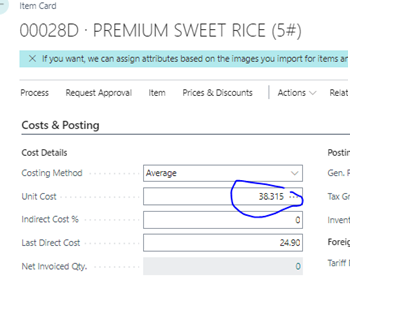
I am setting up our company in BC and migrating from NAV.  We did not use stock keeping units before, but did value our inventory the same way (Average Cost - Item, location, variant). I start with an item that has no transaction history in BC and there is no inventory. I just copied over the key data from NAV. Unit Cost is 38.315. I have two locations: 10 and 99
pastedimage1680041184639v1.png

I purchased 100CS of this item at $25 to location code 99.  When I view the unit cost on the stockkeeping unit card, it correctly displays as $25.  However, when I then buy 100 cases to location 10 at $30 (where no inventory transactions exist), the resulting unit cost calculation looks like this:

pastedimage1680041239632v2.png

pastedimage1680041290376v3.png

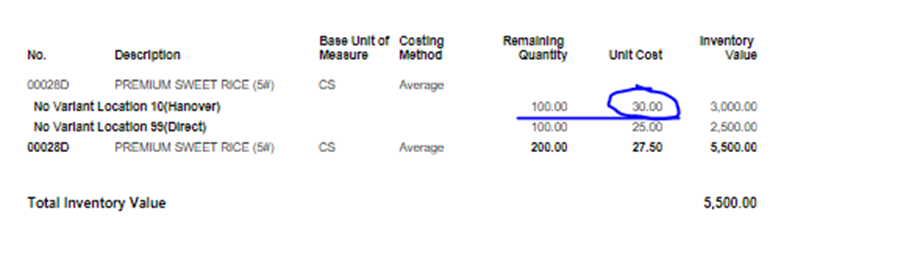
The unit cost on the SKU card for location 10 is $27.50!  Even weirder, this doesn't jive with the inventory valuation report:
pastedimage1680041334143v4.png

Can someone explain what's going on here?  I think that the Unit Cost calculation on the SKU card is incorrectly self-referential.  It's taking into account the total unit cost in the cost calculation for this SKU.  What's worse is that when this item is added to a sales order, I get the wrong unit cost (27.50, not 30.00)

I have the same question (0)
  • YUN ZHU Profile Picture
    102,590 Super User 2026 Season 1 on at

    Hi, I see that your Costing Method is Average, have you performed Adjust Cost - Item Entries?

    pastedimage1680048212060v3.png

    pastedimage1680048193538v2.png

    Hope this helps.

    Thanks.

    ZHU

  • kevinrhee Profile Picture
    15 on at

    Yes.  This is my Inventory Setup

    pastedimage1680096963541v1.png

  • kevinrhee Profile Picture
    15 on at

    I've run it manually as well.

Under review

Thank you for your reply! To ensure a great experience for everyone, your content is awaiting approval by our Community Managers. Please check back later.

Helpful resources

Quick Links

Season of Sharing Community Challenge Winners!

Congratulations to our community stars!

Women in Power Builds Momentum

Expanding mentorship, skilling, and AI innovation

Congratulations to the June Top 10 Community Leaders

These are the community rock stars!

Leaderboard > Small and medium business | Business Central, NAV, RMS

#1
OussamaSabbouh Profile Picture

OussamaSabbouh 580 Super User 2026 Season 1

#2
YUN ZHU Profile Picture

YUN ZHU 462 Super User 2026 Season 1

#3
Grigorios Mavrogeorgis Profile Picture

Grigorios Mavrogeorgis 272 Super User 2026 Season 1

Last 30 days Overall leaderboard

Featured topics

Microsoft Training Manuals

Product updates

Dynamics 365 release plans
