web
You’re offline. This is a read only version of the page.
close
Skip to main content

Announcements

No record found.

News and Announcements icon
Community site session details

Community site session details

Session Id :
Microsoft Dynamics AX (Archived)

"Layer and Version" in create New Model

(0) ShareShare
ReportReport
Posted on by 56

Dear All,

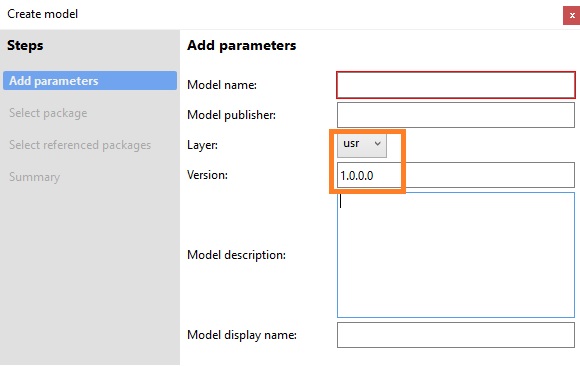
Can you please let me know when i am creating a new Model then it's showing "Layer and Version".

Layer is showing all layers in drop down and Version is showing 1.0.0.0

I saw that the version number is editable.
7450.Layer.jpg

Can you please let me know

1. The mechanism of Version number ? What it's represent?

And

2. The layer if i select Var instead of Usr layer then it will be impact in where ? OR

leave it as default "USR" layer always ?

Please give me more shed on this.

Thanks!

*This post is locked for comments

I have the same question (0)
  • Verified answer
    Chaitanya Golla Profile Picture
    17,225 on at

    Hi,

    Version is used to maintain version of the model and it's editable and doesn't get auto incremented. Layer concept is same when compared to AX2012 and usually layer is selected as CUS/USR(if its a customer based solution) or VAR as you stated.

  • @rp@n Profile Picture
    56 on at

    Thanks Chaitanya

    So, if i next time create a new model then i can change model Version to  1.0.0.1 so on...

    If i not change then it will conflict with versions ??

    And the layer which we are selecting during new model (USR or CUS) later if i want to see any Model belongs to which Layer ? then where i need to check ??

    Please give me more shed on this.

    Thanks!

  • Verified answer
    Chaitanya Golla Profile Picture
    17,225 on at

    Hi,

    I don't think it will be a issue, as you create new model with different name conflict will not occur and if you want to change anything on model later, you can use Update Model parameters wizard to update(Path: Dynamics AX (menu) > Model Management > Update model parameters (wizard))

    Refer below link:

    (Check for Modifying Models)

    us.hitachi-solutions.com/.../summary-new-microsoft-dynamics-ax-packages-models-and-projects

  • @rp@n Profile Picture
    56 on at

    Thanks Chaitanya

    Layer : from previous post

    And the layer which we are selecting during new model (USR or CUS) later if i want to see any Model belongs to which Layer ? then where i need to check ??

    Please give me more shed on this.

    Thanks!

  • @rp@n Profile Picture
    56 on at

    Thanks Sukrut

  • Suggested answer
    Mahmoud Hakim Profile Picture
    17,887 on at

    You can check this link

    docs.microsoft.com/.../version-models-build

  • Suggested answer
    PA-22040759-0 Profile Picture
    6,194 on at

    You decide what goes into version number. There is no system logic bound to the version number. We have our build scripts increment the version number and at release we change it to reflect our major version of the product and what MS version it applies to.

    You should choose the same layer as you would for an AX 2012 solution. The layers have a more limited role now however. They are only important when it comes to overlayering, and you should do what you can to avoid overlayering. In case of two solutions overlayering the same object, the layer is used to decide which one gets compiled.

    Layers in AX 2012: msdn.microsoft.com/.../aa851164.aspx

    Version in D365FOEEE: docs.microsoft.com/.../version-models-build

  • @rp@n Profile Picture
    56 on at

    Thanks Pelle

  • Chaitanya Golla Profile Picture
    17,225 on at

    Hi,

    If you feel your question has been answered, please mark the helpful answer(s) as verified to close the thread.

Under review

Thank you for your reply! To ensure a great experience for everyone, your content is awaiting approval by our Community Managers. Please check back later.

Helpful resources

Quick Links

Introducing the 2026 Season 1 community Super Users

Congratulations to our 2026 Super Stars!

Meet the Microsoft Dynamics 365 Contact Center Champions

We are thrilled to have these Champions in our Community!

Congratulations to the April Top 10 Community Leaders

These are the community rock stars!

Leaderboard > 🔒一 Microsoft Dynamics AX (Archived)

#1
CP04-islander Profile Picture

CP04-islander 39

#2
Michel ROY Profile Picture

Michel ROY 14

#3
imran ul haq Profile Picture

imran ul haq 8

Last 30 days Overall leaderboard

Featured topics

Product updates

Dynamics 365 release plans
