web
You’re offline. This is a read only version of the page.
close
Skip to main content

Notifications

Announcements

No record found.

Community site session details

Community site session details

Session Id :
Microsoft Dynamics CRM (Archived)

SharePoint site Validation causing errors

(0) ShareShare
ReportReport
Posted on by

Hi:

I have added a site in SharePoint sites in Document Managment of Dynamic CRM.

after this, when I click on Validate Site:

I have to face following error messages.
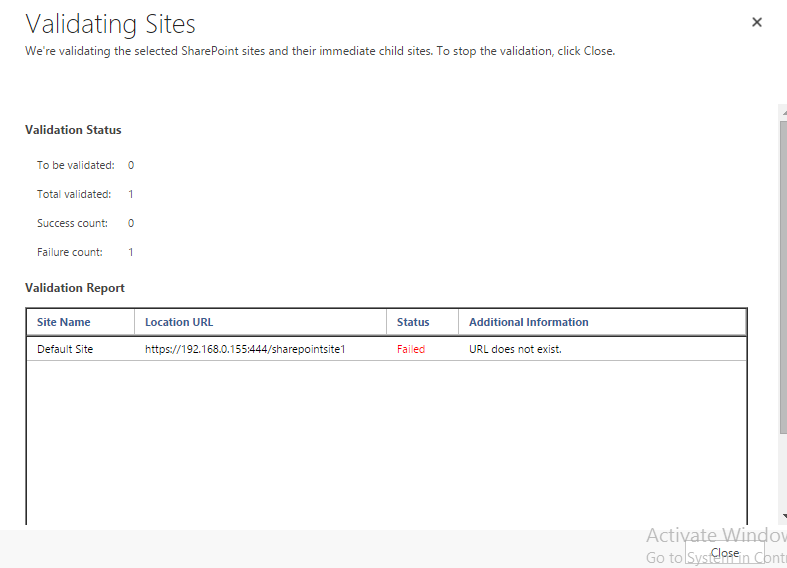
SharePointSiteValidation.png

although when I open this url in browser, it works well.

is there any possible solution for this error?

Thanks.

*This post is locked for comments

I have the same question (0)
  • tpeschat Profile Picture
    4,930 on at

    Hi,

    you are trying to connect SharePoint on Premise (which version?) with CRM Online. Right?

    Can you provide more details, what you have configured, setup?

    Did you follow this guide?

    msdn.microsoft.com/.../gg334768.aspx

    Did you select client to server or server to server integration?

    Seems like CRM Online can't access your SP on premise, or can't authenticate.

    br Thomas

  • Suggested answer
    Bas van de Sande Profile Picture
    4,383 on at

    Hi,

    the SharePoint url you specified is in a local IP range  (192.168.x.x). You'll need to hookup your local SharePoint to the internet (by adding alternate access mappings and by altering the local dns). Otherwise it can never be connected

    Bas

  • Suggested answer
    Community Member Profile Picture
    on at

    tpeschat yes, you have understood right.

    I am using on-premises sharepoint 2013 and Online Dynamic CRM 2016 for integration purpose.

    I have uploaded solution in Share Point Site Settings, but unable to Activate List Component Solution.

    when I click on activate, it does nothing.
    I searched for solution and found that I should run a command on Server PowerShell.

    ./AllowHtcExtn.ps1 https://mysharepointserver/CRM

    after running this command successfully, when I click on Activate Solution in sharepoint site settings,

    I am getting this error Message.

    Sorry, something went wrong
    An unexpected error has occurred.
    Technical Details

    Troubleshoot issues with Microsoft SharePoint Foundation.

    Correlation ID: 2971569d-bfac-b0c8-4b7b-7eb961fdb54b

    Date and Time: 1/18/2016 6:23:27 AM

    Although I have List Component in activated form.\

    urlNotExist.png

    but after this when I click on validate site, I am getting this error.

    urlNotExist.png

    one more thing that I observed

    sharePointListCompIssue.png

  • Suggested answer
    Community Member Profile Picture
    on at
  • Suggested answer
    Community Member Profile Picture
    on at

    @tpeschat Integration is next step, as Site should be validate before sharepoint integration.

  • Suggested answer
    tpeschat Profile Picture
    4,930 on at

    Hi,

    have you tried to access your SharePoint URL via the internet from another PC, instead of trying via CRM online?

    Is it working there?

    If not, please review this post, which provides some details about making SP on premise available via Internet.

    You need to ensure that your DNS is configured properly:

    social.technet.microsoft.com/.../configure-sharepoint-2013-for-accessing-over-internet

    Hth Thomas

  • Community Member Profile Picture
    on at

    @peschat Yes it is opened rightly at other systems over LAN.

  • tpeschat Profile Picture
    4,930 on at

    Over LAN means over your internal network?

    Sure that works. Can you try it with a PC outside of your network, if you can Access your SharePoint URL via the Internet?

    thx Thomas

  • Community Member Profile Picture
    on at

    I am accessing this url within LAN only, on all computers that are connected to my LAN Network can access this.

    And I am sure, it is working on other computers as well.

  • Community Member Profile Picture
    on at

Thank you for your reply! To ensure a great experience for everyone, your content is awaiting approval by our Community Managers. Please check back later.

Helpful resources

Quick Links

Responsible AI policies

As AI tools become more common, we’re introducing a Responsible AI Use…

Neeraj Kumar – Community Spotlight

We are honored to recognize Neeraj Kumar as our Community Spotlight honoree for…

Leaderboard > 🔒一 Microsoft Dynamics CRM (Archived)

#1
SA-08121319-0 Profile Picture

SA-08121319-0 4

#1
Calum MacFarlane Profile Picture

Calum MacFarlane 4

#3
Alex Fun Wei Jie Profile Picture

Alex Fun Wei Jie 2

Last 30 days Overall leaderboard

Featured topics

Product updates

Dynamics 365 release plans



