web
You’re offline. This is a read only version of the page.
close
Skip to main content

Notifications

Announcements

No record found.

Community site session details

Community site session details

Session Id :
Small and medium business | Business Central, N...
Suggested Answer

Job Queue - Printer Configuration

(0) ShareShare
ReportReport
Posted on by 55

Hi Team,

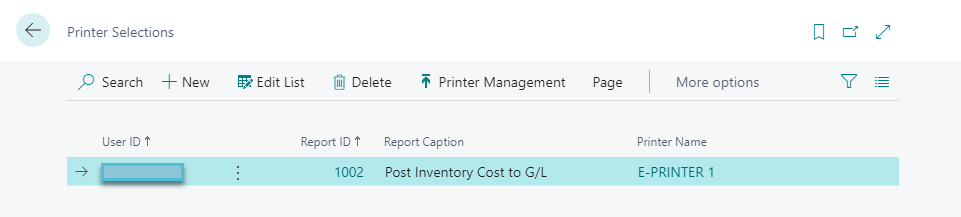
We have configure the Post Inventory Cost to GL (2846) Codeunit in Job Queue. While running the Job it throws an error ("The print document can't be downloaded to a client when it runs in a background task or session. The affected report ID is 1002. Verify that a printer has been configured for the report.").

So we have configured the printer for report 1002. If I run manually it works perfectly but while running in Job Queue it throws an error.

Please advise,

Thank you!
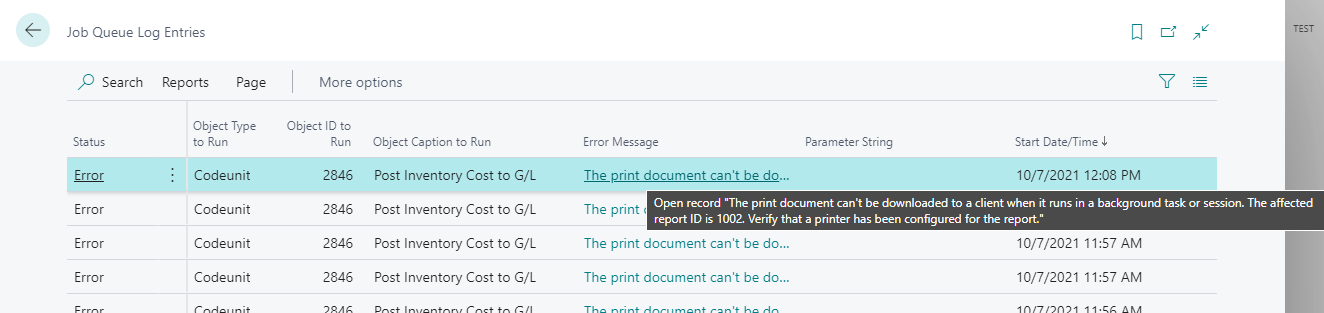
JobQueueEntries.png

PrinterManagement.png

I have the same question (0)
  • Suggested answer
    MahGah Profile Picture
    15,529 on at

    Hi

    Do you remember when you scheduled this report you used PDF or Print? You can check it in Job Queue. If it is Print can you change to PDF and try? 

    Also, in that Job Queue you have section to select the Printer. Can you select the printer there and try?

    Thanks 

    pastedimage1633629730603v3.png

    pastedimage1633629609488v1.png

  • RevanthM Profile Picture
    55 on at

    Hi @MahGah,

    Thank you for your response!

    We are running a codeunit 2846. Final output of the job is generating an report. We did not find Report Parameter Fast Tab in this Job Queue entry (Codeunit).

    Thank you!

    JobQueueEntries_5F00_3.png

    JobQueueEntries_5F00_2.png

  • Suggested answer
    MahGah Profile Picture
    15,529 on at

    Maybe because I am in SaaS version I see a different page 

    Can you search for "Post Inventory Cost to G/L" then put your parameters there. Then select "Send To" then Schedule to see if you have PDF option there? And see if you can create Job Queue that runs?

    Thanks 

    pastedimage1633637915837v1.png 

    pastedimage1633637994705v2.png

Under review

Thank you for your reply! To ensure a great experience for everyone, your content is awaiting approval by our Community Managers. Please check back later.

Helpful resources

Quick Links

Responsible AI policies

As AI tools become more common, we’re introducing a Responsible AI Use…

Neeraj Kumar – Community Spotlight

We are honored to recognize Neeraj Kumar as our Community Spotlight honoree for…

Leaderboard > Small and medium business | Business Central, NAV, RMS

#1
OussamaSabbouh Profile Picture

OussamaSabbouh 3,010

#2
Jainam M. Kothari Profile Picture

Jainam M. Kothari 1,270 Super User 2025 Season 2

#3
YUN ZHU Profile Picture

YUN ZHU 1,085 Super User 2025 Season 2

Last 30 days Overall leaderboard

Featured topics

Product updates

Dynamics 365 release plans