web
You’re offline. This is a read only version of the page.
close
Skip to main content

Notifications

Announcements

No record found.

Community site session details

Community site session details

Session Id :
Microsoft Dynamics AX (Archived)

Pass value from form to table. Which method to use?

(0) ShareShare
ReportReport
Posted on by 6

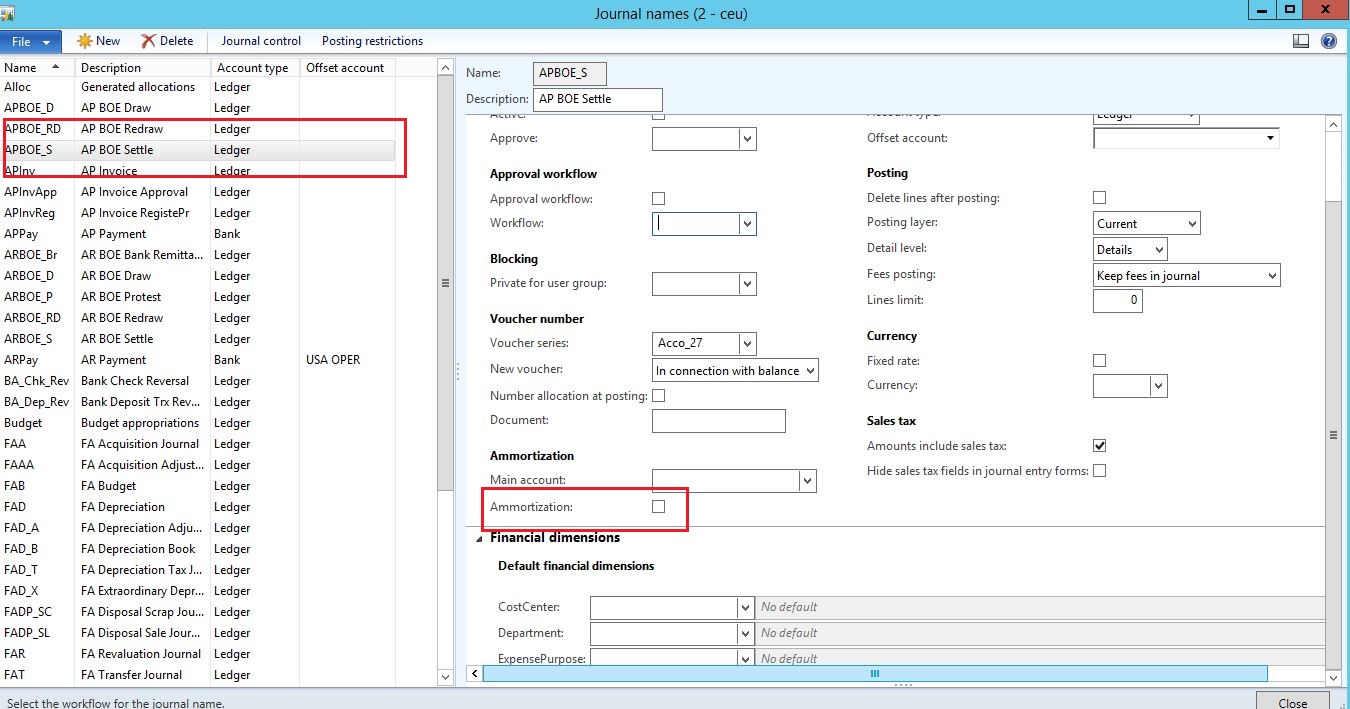
ajax.JPG

I click on the grid in the right. Firstly it will be highlighted in blue and later turns out grey. As i move the mouse away. When i click the check box, i want a one or all  of the value in the string edit(s) to be passed into formdata source.

Clicked method is available only in the GroupContainer, not in the grid itself or string edits.

Please help what are the methods to use and its sequence. 

Thank you,

Newbie

*This post is locked for comments

I have the same question (0)
  • Vilmos Kintera Profile Picture
    46,149 on at

    I am having trouble understanding what you want, can you please explain it better. I am not seeing a grid on the right, only on the left. What do you mean by clicking a check box (selecting a record in the grid on the left?), and what string edits are you referring and to which datasource do you want to pass what, and why? Please summarize the goal of your development requirements, so we could assist you in finding the correct solution.

  • NoobDaxCoder Profile Picture
    6 on at

    Grid on the left. Marked with red. I click that and move  my house. Perhaps check on tabs.

    Grid has 3 stringedits from DS- Ledgerjournalname table

    Check box in the right. Label ammortization. Marked with red.

    Requirement is.. When user selects one row in the grid. Later clicks on the ammortization button. It should pass that three records to another field in the same DS.

  • Verified answer
    Vilmos Kintera Profile Picture
    46,149 on at

    Ammortization seems to be a checkBox form control and not a Button, and most likely you did not mean to pass a record (since that is a tables' entire row with all fields), but to populate specific fields values only. If it is a bound control (has datasource/field), you could override the modified() method on the field inside the datasource, or modifiedField on the table behind to populate the other fields with your value. Then save the record and call YourTable_ds.reread() to show the changes on the form.

    Alternatively, which is a better option in my opinion, you could override the tables' update() method, end check if (this.orig().YourAmmortizationField != this.YourAmmortizationField()) then change the values in the other fields as well before calling super().

Under review

Thank you for your reply! To ensure a great experience for everyone, your content is awaiting approval by our Community Managers. Please check back later.

Helpful resources

Quick Links

Responsible AI policies

As AI tools become more common, we’re introducing a Responsible AI Use…

Neeraj Kumar – Community Spotlight

We are honored to recognize Neeraj Kumar as our Community Spotlight honoree for…

Leaderboard > 🔒一 Microsoft Dynamics AX (Archived)

#1
Priya_K Profile Picture

Priya_K 4

#1
Martin Dráb Profile Picture

Martin Dráb 4 Most Valuable Professional

#3
Ali Zaidi Profile Picture

Ali Zaidi 2

Last 30 days Overall leaderboard

Featured topics

Product updates

Dynamics 365 release plans
