web
You’re offline. This is a read only version of the page.
close
Skip to main content

Notifications

Announcements

No record found.

Community site session details

Community site session details

Session Id :
Small and medium business | Business Central, N...
Suggested Answer

Clicking "Correct" on Posted Purchase Invoice

(0) ShareShare
ReportReport
Posted on by 3,510

Hi:

In a sandbox, I'm testing the clicking of the "Correct" button on a Posted Purchase Invoice.  This invoice was not created based on a purchase order.

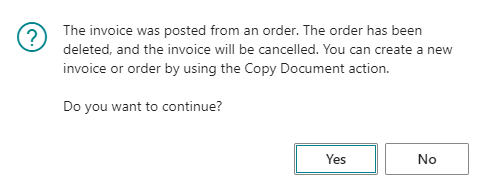
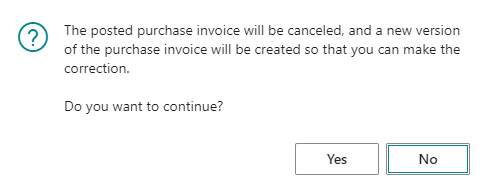
Upon clicking "Yes" to the first message shown below, I get the second message below saying that there is an error.

The error message informs me that there must be a "Document No." at the line item level.

Next, I conducted a second test where I added the "Document No." field at the line item of the unposted purchase invoice through "Personalize".  But, I received the same error.

So, I decided to test the "Correct" button by beginning with a purchase order and posting an invoice based on the purchase order.  This gave me the third message shown below.  Here's the problem with this second issue.  The third message says that I can create a new invoice by using the copy "Action".  I suppose that that would be nice, if there were such an action in the first place!  There is not.

Sigh....LOL!  All we want to do is have a means of correcting a Posted Purchase Invoice.  If there is no such means, then how do we enter a document that I guess would allow us to enter the same invoice and allow us to make the applicable changes?

Thanks!

John
pastedimage1637017999930v2.png

pastedimage1637017953484v1.png

pastedimage1637018914399v1.png

I have the same question (0)
  • Suggested answer
    YUN ZHU Profile Picture
    95,329 Super User 2025 Season 2 on at

    Hi, It seems that there is a problem with your settings or customization,
    I tested directly creating a purchase invoice, posting it, and then correcting it without any problems.
    as follows:

    [View:/cfs-file/__key/communityserver-discussions-components-files/758/TestCorrect.mp4:1024:768]

  • Kavisha Profile Picture
    310 on at

    Hi, Did the Posted invoice included G/L or type Items ?

    I tested it and doesn't bring the second error. 

  • john.ellis Profile Picture
    3,510 on at

    Ah!  Here is one thing that I forgot to mention.

    The line item was a "G/L Account" not an "Item"!

  • Kavisha Profile Picture
    310 on at

    Hi John

    Are your no. series updates as default or manual ?

    Also looks to be  some customization involved in creating invoices.

  • john.ellis Profile Picture
    3,510 on at

    "Default Nos." for posted and unposted purchase invoices, as well as posted and unposted credit memos.

  • john.ellis Profile Picture
    3,510 on at

    I have tested this backwards and forwards but with no luck.

    If anyone has any further ideas, please let me know.  Thanks!

  • Suggested answer
    Marco Mels Profile Picture
    on at

    Hello,

    Feel free to raise it or test the scenario in a standard CRONUS company.

    Thanks.

  • john.ellis Profile Picture
    3,510 on at

    Hi:

    It works correctly in Cronus.  So, I'm not sure why it is not working in a sandbox ("sort of live") company.  That's the issue.  :)

    Thanks!

    John

  • Suggested answer
    Marco Mels Profile Picture
    on at

    Hello,

    In that arena, is there any customization applied or an extension. You can perhaps try by uninstalling extensions one by one to see which one is causing the unwanted behavior.

    Thank you.

  • john.ellis Profile Picture
    3,510 on at

    No, there is nothing along those lines applied.

Under review

Thank you for your reply! To ensure a great experience for everyone, your content is awaiting approval by our Community Managers. Please check back later.

Helpful resources

Quick Links

Responsible AI policies

As AI tools become more common, we’re introducing a Responsible AI Use…

Neeraj Kumar – Community Spotlight

We are honored to recognize Neeraj Kumar as our Community Spotlight honoree for…

Leaderboard > Small and medium business | Business Central, NAV, RMS

#1
OussamaSabbouh Profile Picture

OussamaSabbouh 3,229

#2
Jainam M. Kothari Profile Picture

Jainam M. Kothari 1,867 Super User 2025 Season 2

#3
YUN ZHU Profile Picture

YUN ZHU 1,153 Super User 2025 Season 2

Last 30 days Overall leaderboard

Featured topics

Product updates

Dynamics 365 release plans