web
You’re offline. This is a read only version of the page.
close
Skip to main content

Announcements

No record found.

News and Announcements icon
Community site session details

Community site session details

Session Id :
Customer experience | Sales, Customer Insights,...
Answered

Create view with contact and EventRegistrationCancelled In CRM without power BI or segments

(0) ShareShare
ReportReport
Posted on by 534

Hi All

Event cancellation in the marketing app is still not working correct

Although the documentation says that you can also deactivate an event registration

https://docs.microsoft.com/en-us/dynamics365/marketing/set-up-event#the-registration-and-attendance-tab

With the February 2020 Marketing release, canceled event registrations are deactivated, not deleted. To cancel an event registration from within Marketing, simply deactivate the record.

Why does it not show deactivation button in the app?
There is only a delete button
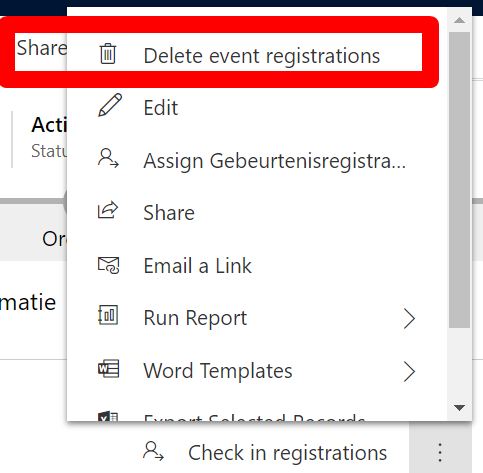
 

 delete-event-registrations.png

When we use the delete button the registration is removed and the contact with time stamp can be found in the subgrid

persons who has cancelled the event
In the view inactive event registrations the information of the deactivated regsitration does not show

But now i want to create a view of all the cancelled event registrations of all evenents 

I can create a segment with the event  EventRegistrationCancelled

But I want to show it in a normal CRM view in the marketing app. Not in A segment not in a power BI report

I read the eventregistrationcancelled is not a field but an eventregistration in customer insights

This is really not what i had ecpected as a behavior of event cancellations

I have the same question (0)
  • cloflyMao Profile Picture
    25,210 on at

    Hi Mariette,

    Thanks for your feedback and sorry for the inconvenience.

    * Deactivating an event registration record:

    When selecting a record, press ctrl and click edit button, it will open the record in a new tab without leaving current event form.

    pastedimage1602138347724v1.png

    The registration will be deactivated when the status field is changed from Active to Inactive.

    pastedimage1602138874548v2.png

    I am not clear that why there is no such button to deactivate record, you could add a custom button with Ribbon Workbench to run custom javascript function to deactivate record.

    * Creating a view for EventRegistrationCancelled

    Unlike other sections of Registration and attendance tab,

    In Contacts who canceled section, we can find that there is only one "Export to CSV" button, which means that EventRegistrationCancelled is also insights data,

    therefore, we couldn't access to them directly, you could export data to CSV and create a custom entity to save and manage EventRegistrationCancelled records.

    Regards,

    Clofly

  • Verified answer
    Jetj25 Profile Picture
    534 on at

    Thank you

    I have had already contact with the Microsoft team and found the active and inactive state

    There will be a fix for the button in the coming updates we have to wait for the releaseplans

  • cloflyMao Profile Picture
    25,210 on at

    Hi Mariette,

    Thanks for providing the information.

    Regards,

    Clofly

  • S.R Profile Picture
    31 on at

    Hi Mariette and Clofly,

    Im also experiencing this issue. When will the button to de-activate a registration be released?

    Another question if possible, what are the settings which allows a user to see the "Contacts who canceled" sub-grid?

Under review

Thank you for your reply! To ensure a great experience for everyone, your content is awaiting approval by our Community Managers. Please check back later.

Helpful resources

Quick Links

Introducing the 2026 Season 1 community Super Users

Congratulations to our 2026 Super Stars!

Meet the Microsoft Dynamics 365 Contact Center Champions

We are thrilled to have these Champions in our Community!

Congratulations to the March Top 10 Community Leaders

These are the community rock stars!

Leaderboard > Customer experience | Sales, Customer Insights, CRM

#1
11manish Profile Picture

11manish 165

#2
ManoVerse Profile Picture

ManoVerse 161 Super User 2026 Season 1

#3
Zhilan Profile Picture

Zhilan 49

Last 30 days Overall leaderboard

Product updates

Dynamics 365 release plans
