web
You’re offline. This is a read only version of the page.
close
Skip to main content

Announcements

No record found.

News and Announcements icon
Community site session details

Community site session details

Session Id :
Customer experience | Sales, Customer Insights,...
Active Discussion

Connecting MFA enabled Dynamics 365 V9x by Xrmtooling. Error in connecting : Unable to Login to Dynamics CRMOrganizationServiceProxy is null

(0) ShareShare
ReportReport
Posted on by 745

HI 

i was having this issue in connecting my C# console App to CRM which was working fine a few days before

so the solution is simple 

1 make the project with .Net framework 4.6.2 or greater prefer to make it latest

2 use xrmtooling from nuget with the latest version this will resolve the issue 

also folow these urls also to do azure side settings

https://nishantrana.me/2020/10/16/fixed-unable-to-login-to-dynamics-crm-or-an-unsecured-or-incorrectly-secured-fault-was-received-from-the-other-party-see-the-inner-faultexception-for-the-fault-code-and-detail/

and of course use TSL12

https://nishantrana.me/2018/04/24/unable-to-login-to-dynamics-crmorganizationserviceproxy-is-null-error-while-using-crmserviceclient/

  • a33ik Profile Picture
    84,331 Most Valuable Professional on at

    Hello,

    Can you please provide the code you use to connect to the instance, your connection string (with the fake ids) but I want to see the structure of it and an example of the usage?

  • MMK Profile Picture
    745 on at

    HI the old code works like that provided you disabled the MFA for your user

    string connectionString = GetServiceConfiguration();

                   ServicePointManager.SecurityProtocol = SecurityProtocolType.Tls12;

                   CrmServiceClient conn = new Microsoft.Xrm.Tooling.Connector.CrmServiceClient(connectionString);                

                   _orgService = (IOrganizationService)conn.OrganizationWebProxyClient != null ? (IOrganizationService)conn.OrganizationWebProxyClient : (IOrganizationService)conn.OrganizationServiceProxy;

                   WhoAmIResponse whoAmIResponse = (WhoAmIResponse)_orgService.Execute(new WhoAmIRequest());

  • a33ik Profile Picture
    84,331 Most Valuable Professional on at

    There are few things you should consider:

    1. You should stop using proxy nonsense. You can simplify code following way without losing any functionality:

    CrmServiceClient conn = new Microsoft.Xrm.Tooling.Connector.CrmServiceClient(connectionString);                

    WhoAmIResponse whoAmIResponse = (WhoAmIResponse)conn.Execute(new WhoAmIRequest());

    2. If you have MFA enabled for a user you will have to do some changes in configuration - both on Azure AD side and your config. Check this - www.alphabold.com/.../

  • MMK Profile Picture
    745 on at

    Hi 

    I was trying to connect my mfa enabled CRM to my console App but was unable to do so after doing lot of search got many connection ways like by ClientID client Secret blabla....

    but they use Rest Apis and our Iorganization service code which is used in plugin cannot be used that way so finally got the solution for connecting it 

    To Connect MFA Enabled Dynamics CRM with C# you just need to use App Password instead of your Password remaining every thing remains same as it was

                    string connectionString = GetServiceConfigurationfromAppCOnfig();

                   ServicePointManager.SecurityProtocol = SecurityProtocolType.Tls12;

                   CrmServiceClient conn = new Microsoft.Xrm.Tooling.Connector.CrmServiceClient(connectionString);                

                   _orgService = (IOrganizationService)conn.OrganizationWebProxyClient != null ? (IOrganizationService)conn.OrganizationWebProxyClient : (IOrganizationService)conn.OrganizationServiceProxy;

                   WhoAmIResponse whoAmIResponse = (WhoAmIResponse)_orgService.Execute(new WhoAmIRequest());

      Follow the below Steps to generate App password 

    1 login to office.com and Open My Account

                pastedimage1622811963832v1.png

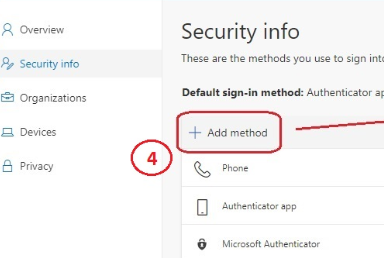
    2 Then go to  Security info

                                         pastedimage1622812022367v2.png

    4 Then Add Method

                                  pastedimage1622812065535v3.png

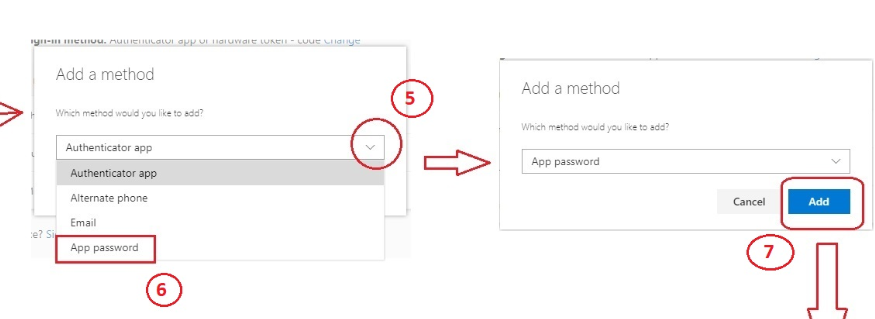
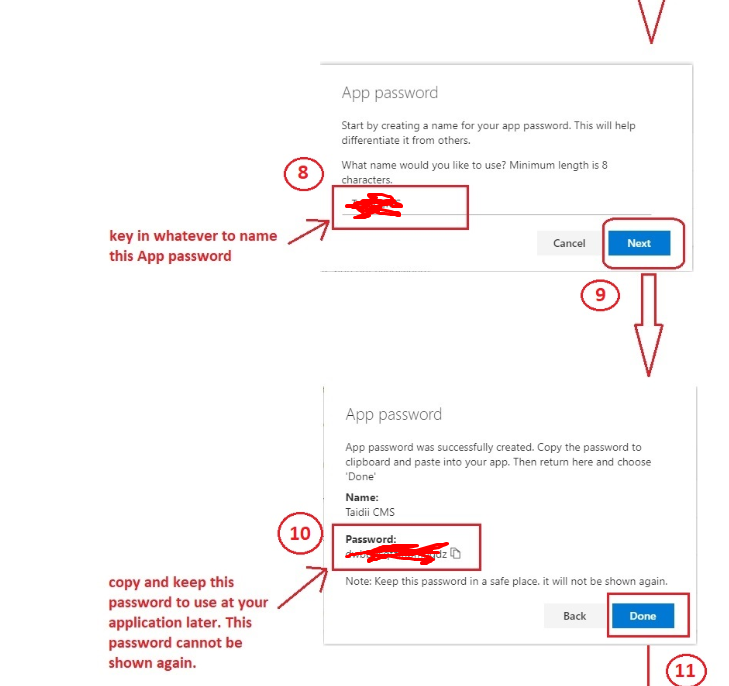
    5 Then Choose  App Password and Create one Give it a Name
                                pastedimage1622812117364v4.png

    6  Copy The Password  generated and keep it safe 
    pastedimage1622812186855v5.png

    Enjoy...............................................

  • MMK Profile Picture
    745 on at

    Andrew

      1. The very first thing is either you use proxy or not you have to connect to CRM that is the issue does it make sense

      2. To connect MFA enabled CRM you  don't need to do all those azure configurations to connect

          only you need to do is instead of using user's password use "App password" that i have shown in this blog

                 community.dynamics.com/.../connecting-to-mfa-enabled-dynamics-365-v9-x-crm-instance-through-c-or-console-app

  • a33ik Profile Picture
    84,331 Most Valuable Professional on at

    Moin,

    I'm glad you resolved your issue. Url you mentioned doesn't look like a blog post. It looks like another one thread. So because it answers your question I just merge it alltogether.

  • Community Member Profile Picture
    on at

    There is no "App Password" option in Add method anymore.

  • MMK Profile Picture
    745 on at

    Here is Simple steps for Connection to dynamics

    1 Create one App from Azure Portal's App Registration and get the Client Id generated here

    2 Create a Client Secret for that App

    3 Now use the Client Id and ClientSecret to connect to CRM

    public static CrmServiceClient createConnection()

           {

               try

               {

                   string clientId = "Client Id";

                   var clientSecret = "ClientSecret";

                   string organizationUri = "xxxxxx.crm5.dynamics.com/";

                   var conn = new CrmServiceClient($@"AuthType=ClientSecret;url={organizationUri};ClientId={clientId};ClientSecret={clientSecret}");

                   return conn;

               }

               catch (Exception ex)

               {

                   Console.WriteLine("Error while connecting to CRM " + ex.Message);

                   Console.ReadKey();

                   return null;

               }

           }

Under review

Thank you for your reply! To ensure a great experience for everyone, your content is awaiting approval by our Community Managers. Please check back later.

Helpful resources

Quick Links

Introducing the 2026 Season 1 community Super Users

Congratulations to our 2026 Super Stars!

Congratulations to our 2025 Community Spotlights

Thanks to all of our 2025 Community Spotlight stars!

Leaderboard > Customer experience | Sales, Customer Insights, CRM

#1
ManoVerse Profile Picture

ManoVerse 180 Super User 2026 Season 1

#2
11manish Profile Picture

11manish 123

#3
CU11031447-0 Profile Picture

CU11031447-0 100

Last 30 days Overall leaderboard

Product updates

Dynamics 365 release plans