web
You’re offline. This is a read only version of the page.
close
Skip to main content

Notifications

Announcements

No record found.

Community site session details

Community site session details

Session Id :
Microsoft Dynamics AX (Archived)

Report Parameter is Missing Value while Blank

(0) ShareShare
ReportReport
Posted on by 563

Dear Experts,

I create report with dynamic parameter
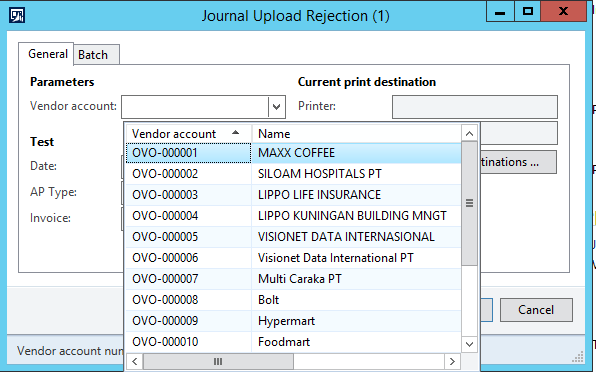
6888.Merchantlist.png

When I choose a value, report work successfully, but when I set to blank, show that error
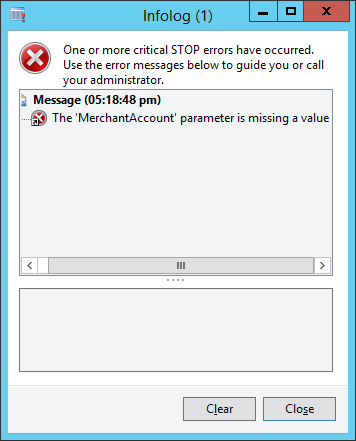
parameter-missing-value.png

I just set Filter property Operator to Like, but still error
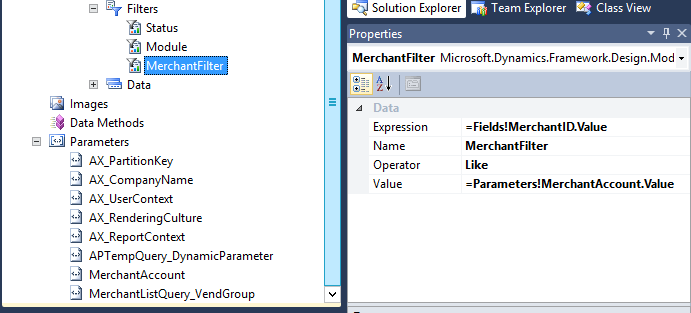
MerchantFilter-Property.png

I want to show all data while I don't choose a value

Is there any property I missed? Please give me a suggestion

Thank you in advance

Best Regards,

Bintang

*This post is locked for comments

I have the same question (0)
  • Bintang Profile Picture
    563 on at

    Hi Crispin John Augustine,

    I did, but doesn't change, still show that error

    Merchant-Account-Property.png

    Any other suggestion?

    Thank you before

  • krishna.rao@dax Profile Picture
    3,006 on at

    After doing changes

    1. redeploy ssrs report

    2. Refresh Report Server

    If it won't resolve the issue.

    Restart AOS+ restart Sql reporting services

  • Community Member Profile Picture
    on at

    Also you can restore the SSRS report in the AOT, this will works and you can avoid all this steps that only takes more time.

    Restore.png

  • Bintang Profile Picture
    563 on at

    Hai Krishna and Tatiana Garcia Ramos,

    Thank you

    I just did it, and didn't solve it

    Any idea?

  • Verified answer
    Community Member Profile Picture
    on at

    Hi Bintang,

    Please try below steps, If it is standard report

    > Goto Report Manager URL > Find your report and delete from report server

    > Deploy from Visual Studio again > Add to AOT

    > Deploy the report in AOT

    >Refresh the Report server cache.

    Run try run the report.

    Thanks

    Suresh

  • Bintang Profile Picture
    563 on at

    Hi Suresh,

    Still showing "Parameter is missing value" like before

    Am I doing something wrong?

  • Community Member Profile Picture
    on at

    Hi Bintang,

      Is it a customized report and standard report?

      you did that steps which i said?

    Thanks

    Suresh

  • Bintang Profile Picture
    563 on at

    It is customized report, I created with Visual Studio Report Model

    Of course I did

  • Verified answer
    Community Member Profile Picture
    on at

    Hi Bintang,

            you better neg-late merchant Account, recreate a parameter for this? it may work.

    Thanks

    Suresh

Under review

Thank you for your reply! To ensure a great experience for everyone, your content is awaiting approval by our Community Managers. Please check back later.

Helpful resources

Quick Links

Responsible AI policies

As AI tools become more common, we’re introducing a Responsible AI Use…

Neeraj Kumar – Community Spotlight

We are honored to recognize Neeraj Kumar as our Community Spotlight honoree for…

Leaderboard > 🔒一 Microsoft Dynamics AX (Archived)

#1
Martin Dráb Profile Picture

Martin Dráb 4 Most Valuable Professional

#1
Priya_K Profile Picture

Priya_K 4

#3
MyDynamicsNAV Profile Picture

MyDynamicsNAV 2

Last 30 days Overall leaderboard

Featured topics

Product updates

Dynamics 365 release plans
