web
You’re offline. This is a read only version of the page.
close
Skip to main content

Notifications

Announcements

No record found.

Community site session details

Community site session details

Session Id :
Microsoft Dynamics CRM (Archived)

What extra privileges are required for a Merge Case action?

(0) ShareShare
ReportReport
Posted on by

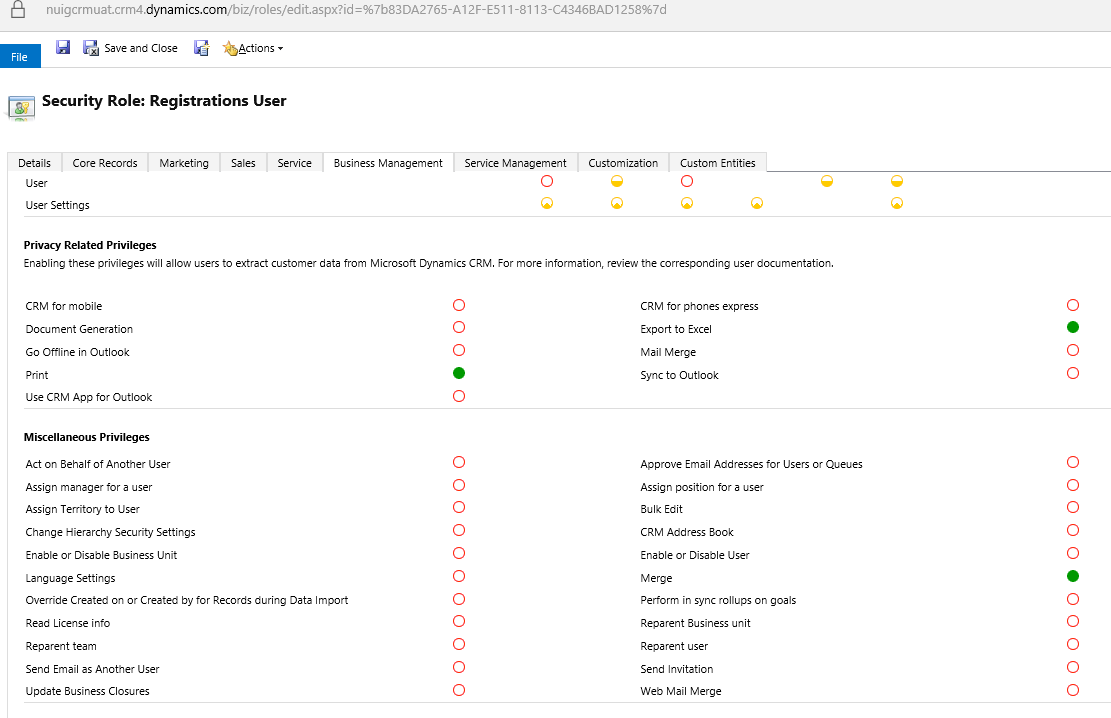
I've assigned the "Merge" privilege to a user - in order to give access to merge cases belonging to their business unit.

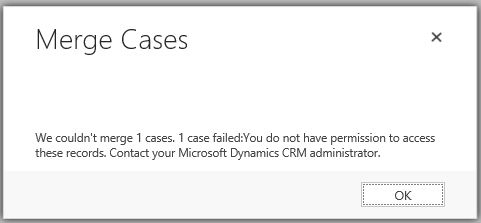
But after clicking Merge Cases and then subsequently hitting Merge. I get an error message stating that the user doesn't have permissions to access the cases.

I have the merge privilege checked but it seems there are extra privileges required from that error message.


Question:

Which extra privileges are required to merge cases?

Error Screenshot:
4621.case1.PNG

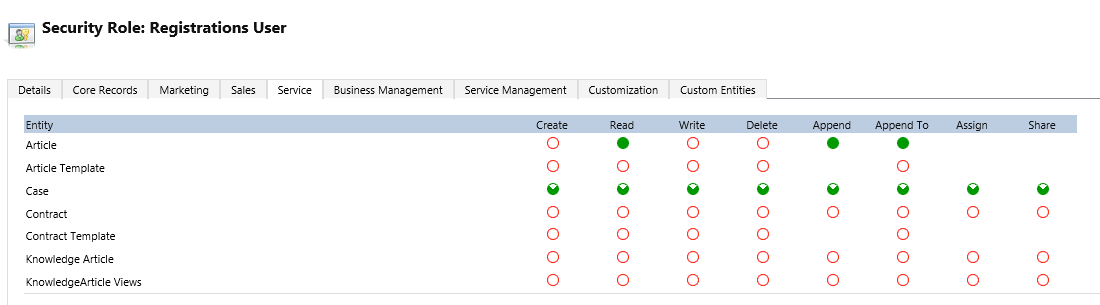
User's Security Role: Registration User


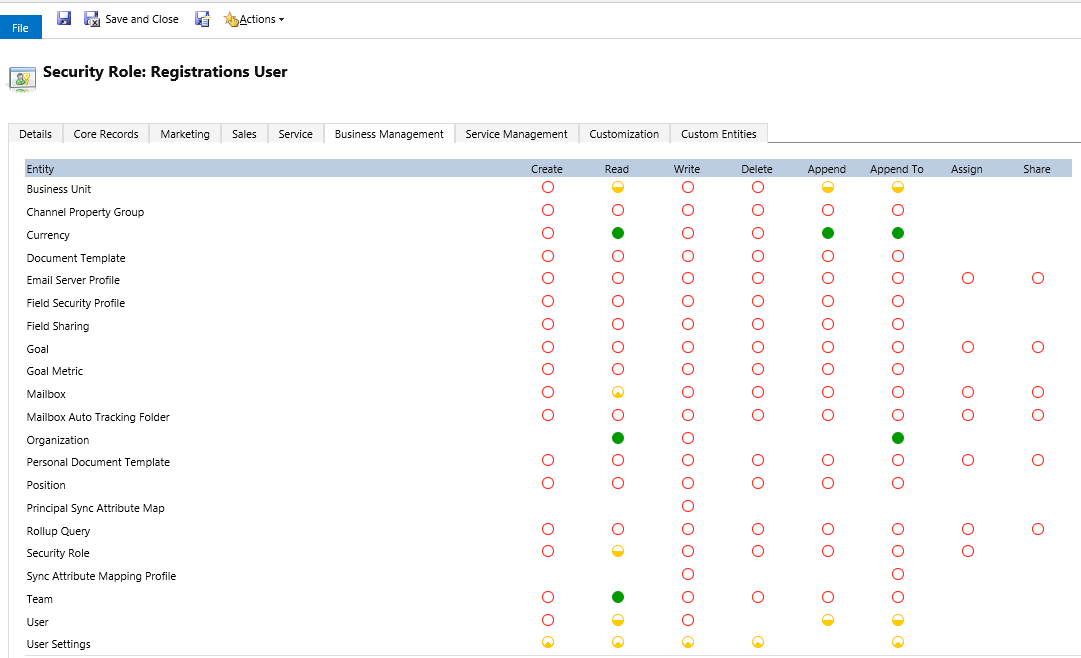
Business Management privileges -
7345.Capture.PNG

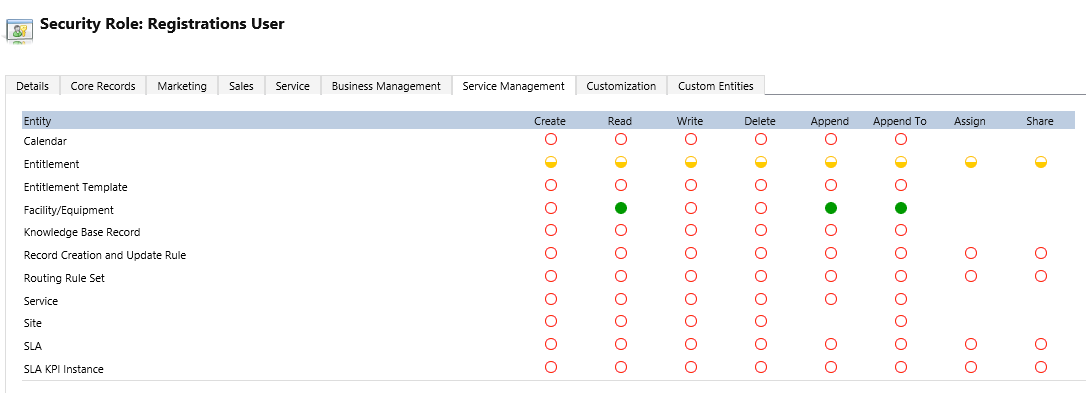
Service Management privileges -

37614.4.PNG

Service privileges- (I've given Parent-Chile level access to the case entity here which still doesn't fix the issue)
0412.3.PNG


Business Management privileges


3125.2.PNG


*This post is locked for comments

I have the same question (0)
  • Jason M. Cosman Profile Picture
    5,234 Moderator on at

    Hello Bvarley;

    I hope your day is going well. It sounds like you have a semi-complex security environment. Would it be possible to post the user's security role just for the Case? In order to merge you'd have to have write access to other's cases as well.

  • Community Member Profile Picture
    on at

    Hi Jason,

    I've just added Parent-Child level access to the Service tab's Case entity, but I still get the same error.
    More detail has been added to my question above on the specific security role setup.

    Any additional ideas as to what the missing privilege and or access level could be?


  • Verified answer
    Community Member Profile Picture
    on at

    Hi,

    The solution for this is to allow append privilege on the "mailbox tracking" permission.

    Adding this along with the "merge" and "case" privileges will allow merging of multiple cases using the Merge Case button in CRM.

  • Community Member Profile Picture
    on at

    Hi bvarley,

    I gave below access:

    1. Case - Parent-child business unit ( on all privileges )

    2. Merge - Organization

    3. Mailbox auto tracking folder - Organization ( on all privileges )

    But , still it is giving me the error.

    Please suggest.

  • Suggested answer
    Community Member Profile Picture
    on at

    Hi Bvarley,

    If you still facing merge case issue provide below access and check, it is working for me.

    Under core Records:

    Sync Error Entity provide user level access to read, write, append , append to and Share

    Under Service

    Case Entity Provide User level access for all.

    It will work for merge case.

  • chakkay Profile Picture
    594 on at

    After following all your suggestions it worked for me.

    Wonderful Posts. Thanks a lot guys.

    Keep Rockingzzzz

  • Žarko Radevic Profile Picture
    4 on at

    It seems that you have to have access on lookups as well (related entities). In my case we are having trouble to merge cases where there are some notes. Logically, users do not have permission to edit notes of other users, but CRM requires edit permission to move these notes to the merged case. I am not sure if this should be like this, I will create a support ticket. Sure, I could give access to notes and it would work, but it is not the right solution.

Under review

Thank you for your reply! To ensure a great experience for everyone, your content is awaiting approval by our Community Managers. Please check back later.

Helpful resources

Quick Links

Responsible AI policies

As AI tools become more common, we’re introducing a Responsible AI Use…

Neeraj Kumar – Community Spotlight

We are honored to recognize Neeraj Kumar as our Community Spotlight honoree for…

Leaderboard > 🔒一 Microsoft Dynamics CRM (Archived)

#1
SA-08121319-0 Profile Picture

SA-08121319-0 4

#1
Calum MacFarlane Profile Picture

Calum MacFarlane 4

#3
Alex Fun Wei Jie Profile Picture

Alex Fun Wei Jie 2

Last 30 days Overall leaderboard

Featured topics

Product updates

Dynamics 365 release plans