web
You’re offline. This is a read only version of the page.
close
Skip to main content

Notifications

Announcements

No record found.

Community site session details

Community site session details

Session Id :
Microsoft Dynamics AX (Archived)

GST Tax calculation

(0) ShareShare
ReportReport
Posted on by

Hi All, 
Since a few days i am facing a issue while working on AX 2009 post GST.
where the tax isn't calculating on my misc. charges i.e is freight and packing  charges.
its just calculates tax on  line totals  and adds up the freight charge amount to the total invoice valu.

how can i rectify this from happening ?

thanks and regards,

vinod
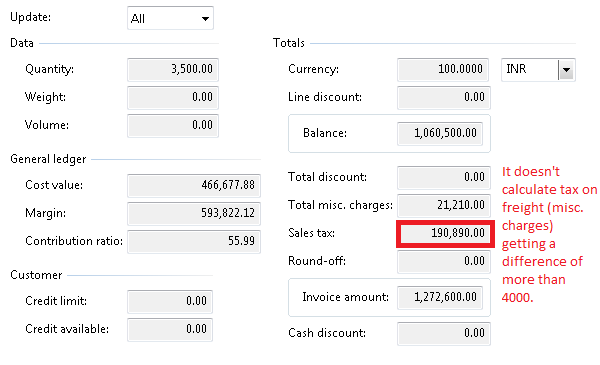
errorrrrrrrrr.PNG

*This post is locked for comments

I have the same question (0)
  • Ludwig Reinhard Profile Picture
    Microsoft Employee on at

    Hi vinod rao,

    Based on what you wrote above, I would assume that the tax calculation worked fine until some days ago. Is that right?

    Do you know whether some changes have been made to your tax setups or whether some GST related fixed have been incorporated?

    Best regards,

    Ludwig

  • Community Member Profile Picture
    on at

    Hi Ludwig,

    thanks for the prompt reply

    this is the first time we are doing this sort of invoice with freight charges included and we have never made any changes to tax setups nor any fixes have been incorporated.

    regards,

    vinod

  • Verified answer
    Ludwig Reinhard Profile Picture
    Microsoft Employee on at

    Hi nod rao,

    I see. Have you checked your charges setup then? Please double check if it has an item sales tax group linked.

    Best regards,

    Ludwig

  • Community Member Profile Picture
    on at

    hi ludwig,

    it doesn't have any item sales group nor sales tax group associated

    best regards,

    vinod

  • Suggested answer
    Ludwig Reinhard Profile Picture
    Microsoft Employee on at

    Hi Vinod,

    Ok. Then try to assign the sales tax there and test whether this resolves your issue.

    Would be great if you could let us know the outcome.

    Many thanks,

    Ludwig

  • Verified answer
    Community Member Profile Picture
    on at

    Hi Ludwig,
    I tried adding the HSN code to freight even in order to calculate the tax in tax information tab given and it works for me.
    let me know if I am doing something wrong 

    1) I went to tax info tab.

    6644.22.PNG

    2) I added the corresponding HSN code.

    6644.22.PNG

    3) I checked the totals.
    0358.33.PNG

    Best regards,
    vinod rao.

  • Ludwig Reinhard Profile Picture
    Microsoft Employee on at

    Hi Vinod roa,

    This looks great :-)

    Is there anything left not answered or open here or can we verify and close this thread?

    Best regards,

    Ludwig

  • Community Member Profile Picture
    on at

    Hi Ludwig,
    I don't think anything else is left in this thread, Thanks for your time and knowledge.
    its really good to share knowledge with people like you.

    best regards,
    vinod rao

Under review

Thank you for your reply! To ensure a great experience for everyone, your content is awaiting approval by our Community Managers. Please check back later.

Helpful resources

Quick Links

Responsible AI policies

As AI tools become more common, we’re introducing a Responsible AI Use…

Neeraj Kumar – Community Spotlight

We are honored to recognize Neeraj Kumar as our Community Spotlight honoree for…

Leaderboard > 🔒一 Microsoft Dynamics AX (Archived)

#1
Priya_K Profile Picture

Priya_K 4

#1
Martin Dráb Profile Picture

Martin Dráb 4 Most Valuable Professional

#3
Scott_itD Profile Picture

Scott_itD 2 Community Manager

Last 30 days Overall leaderboard

Featured topics

Product updates

Dynamics 365 release plans
