web
You’re offline. This is a read only version of the page.
close
Skip to main content

Notifications

Announcements

No record found.

Community site session details

Community site session details

Session Id :
Small and medium business | Business Central, N...
Suggested Answer

Workflow setup to automatically release a Purchase Order

(0) ShareShare
ReportReport
Posted on by 30

Hello,

Wondering if someone can advise me that the following can be archieved with Workflows in Business Central.

We have Purchase Orders and Purchase Quotes setup in Workflows with Approval user setup and are working as expected.

But there is a need to have specific Purchase Orders released that are created from another database via an API. These Purchase Orders already have gone through an approval process in the other database therefore they do not need to be approved again. Therefore a workflow that will ignore the approval user setup and release the PO.

My idea was to create a workflow that identifies these Purchase orders and automatically releases them.

Their unique data in the fields on the Purchase Header  are "Created By " and the "Global dimension 1 and 2" which I have entered on the "On Condition" fields.

Then the response to read as follows. 
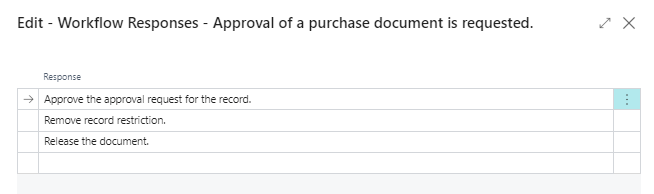
pastedimage1682497264955v1.png

So my questions are:

  1. Can workflows be created to auto release specific PO's? 
  2. And if Yes, what is the setup in the workflow? Am I on the right track?
  3. If No, can Power automate control this?

Thanks for your help and any suggestions would be appreciated.

Cheers

I have the same question (0)
  • Suggested answer
    Tech-Lucky Profile Picture
    1,267 Super User 2025 Season 2 on at

    I have a better suggestion if the specific Purchase Orders are created from another database via an API then why not create the purchase order directly with the status as Released why you are making a purchase order with Open status it should be handled at the API level. This will save your Automation step.

    now if I talk about your question I am not sure if it is possible using workflow but yes Power Automate can Definitely control this.

  • Chorus questions and answers Profile Picture
    30 on at

    Thanks Tech Lucky,

    Sorry for my late reply, but yes, I agree that this should be handled by the API. Will go back and get clarification.

    Cheers

    Chorus

Under review

Thank you for your reply! To ensure a great experience for everyone, your content is awaiting approval by our Community Managers. Please check back later.

Helpful resources

Quick Links

Responsible AI policies

As AI tools become more common, we’re introducing a Responsible AI Use…

Neeraj Kumar – Community Spotlight

We are honored to recognize Neeraj Kumar as our Community Spotlight honoree for…

Leaderboard > Small and medium business | Business Central, NAV, RMS

#1
OussamaSabbouh Profile Picture

OussamaSabbouh 3,229

#2
Jainam M. Kothari Profile Picture

Jainam M. Kothari 1,867 Super User 2025 Season 2

#3
YUN ZHU Profile Picture

YUN ZHU 1,153 Super User 2025 Season 2

Last 30 days Overall leaderboard

Featured topics

Product updates

Dynamics 365 release plans



