web
You’re offline. This is a read only version of the page.
close
Skip to main content

Announcements

No record found.

News and Announcements icon
Community site session details

Community site session details

Session Id :
Microsoft Dynamics AX (Archived)

Financial dimension value 6501 does not exist when use DIEF

(0) ShareShare
ReportReport
Posted on by

Hi

We use Dynamics AX2012 R3 CU8

I'm trying to do a load balance test using the DIEF: follow the journal

Debit     Bank Account       Financial Dimentions Cost center, Department, Purpose

$1.00     1234567890        11111111.22222222.00000000

Credit   Ledger Account                   Financial Dimentions Cost center, Department, Purpose

$1.00     6501-02-09-00-00            10000141.10000142.00000000

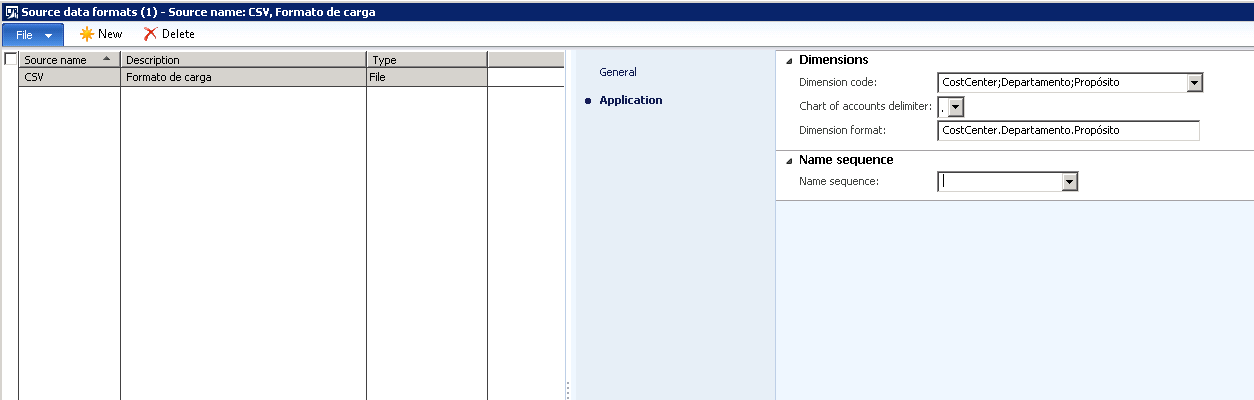
Source data formats as follow:
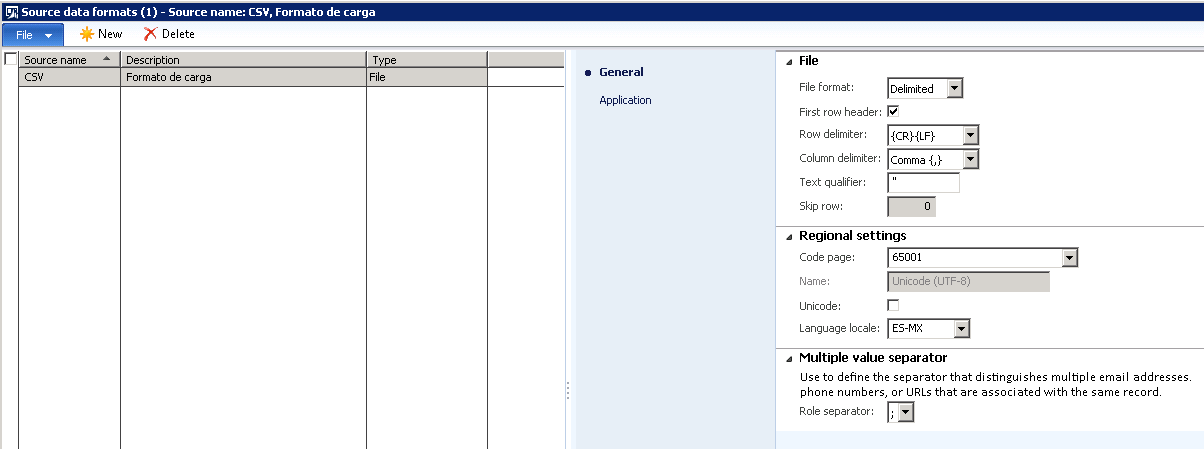
source-data-1.png

source-data-2.png

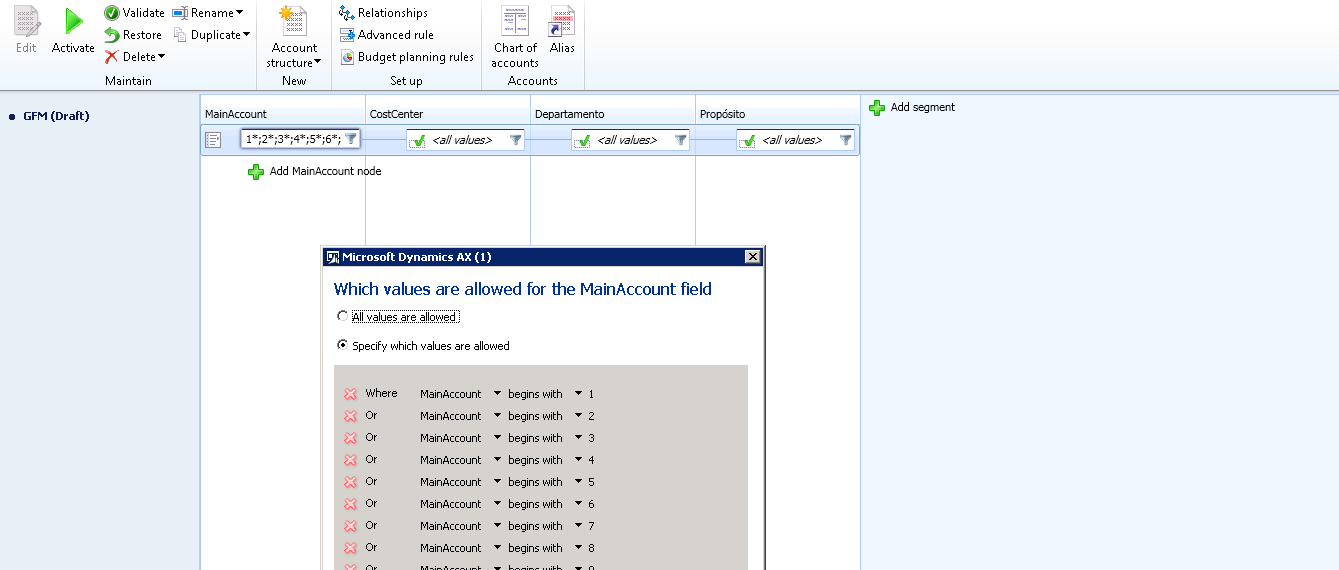
Account structure as follow:

accountstrecture.png

CSV as follow

csvv.png

The Staging data execution process of DIEF it does load the staging table, but when the Target data execution is process, the following error occurs
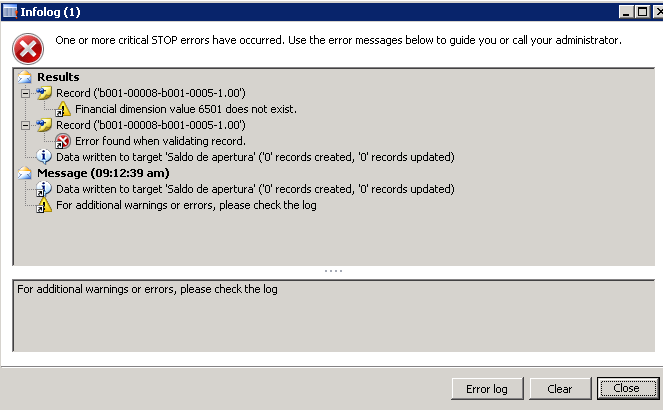
error-dief.png

"Financial dimension value 6501 does not exist."

All ledger accounts and dimention vales are in database

Thanks for help

*This post is locked for comments

I have the same question (0)
  • RamK Profile Picture
    2,580 on at

    Are you sure that account 6501 is part of Account Structure...?  Can you please add this account explicitly in Account structure and try it...?  Do you have any Advanced rule tied up with account structure...?  What is the account structure associated in Ledger form...?

  • 5400 Profile Picture
    7,162 on at

    It looks me your sequence wrong.

    Main-Cost-Dept-Pur

    6501-02-09-00-00  

    It should be 6501-02-09-

    Hope you don't have any advanced rule.

    Hope 6501 main account exist in your execution company.

  • Community Member Profile Picture
    on at

    Hi Ram

    .- The ledger account is part of the Structure, it was defined as follow:

    aest.png

    .- We have no any Advanced rule

    .- And the account structure associated in Ledger form as follow:

    aest.png

  • Community Member Profile Picture
    on at

    Hi Bhaskar:

    Ledger account is 6501-02-09-00-00

    and Dimentions as follow

    Cost Center   Department   Purpose

    10000141      10000142      00000000

    We have no any Advanced rule

  • 5400 Profile Picture
    7,162 on at

    Please ignore my previous comments. Your format is correct. Just I overlook your source data format setup.

    I think, this type of main account import is not possible with DIXF.

    Could I get your GL ledger dimension screen data when you are entering same data manually.

  • Community Member Profile Picture
    on at

     Follow manually entering for ledger account

    ledger1.png

  • 5400 Profile Picture
    7,162 on at

    My assumption was correct. Please change the separator as *  or others and check.

    6501*02*09*00*00-10000141-10000142-00000000

  • Verified answer
    5400 Profile Picture
    7,162 on at

    This issue got fixed in R3 cu9 or some hotfix has released for same.

    if you want to fix the issue u have to change one line code in class

    \Classes\DMFDimensionHelper\generateDynamicDimension line number 46.

    It is only workaround for your data set. Permanent fix you need hotfix or Cu9.

    dimValueList = str2con(dimValueString, enum2str(SystemParameters::find().ChartOfAccountsDelimiter),false);
    
    Change Code:
    dimValueList = str2con(dimValueString,'.',false);

    Ledger Dimension:
    6501-02-09-00-00.10000141.10000142.00000000
  • Community Member Profile Picture
    on at

    Bhaskar

    you have the right hotfix? the customer does not plan to update the CU9

  • Community Member Profile Picture
    on at

    Bhaskar

    Code change worked properly, but I think that the hotfix is the right solution.

    Thanks a lot for your help.

Under review

Thank you for your reply! To ensure a great experience for everyone, your content is awaiting approval by our Community Managers. Please check back later.

Helpful resources

Quick Links

Introducing the 2026 Season 1 community Super Users

Congratulations to our 2026 Super Stars!

Meet the Microsoft Dynamics 365 Contact Center Champions

We are thrilled to have these Champions in our Community!

Congratulations to the April Top 10 Community Leaders

These are the community rock stars!

Leaderboard > 🔒一 Microsoft Dynamics AX (Archived)

#1
CP04-islander Profile Picture

CP04-islander 39

#2
Michel ROY Profile Picture

Michel ROY 14

#3
imran ul haq Profile Picture

imran ul haq 8

Last 30 days Overall leaderboard

Featured topics

Product updates

Dynamics 365 release plans