web
You’re offline. This is a read only version of the page.
close
Skip to main content

Notifications

Announcements

No record found.

Community site session details

Community site session details

Session Id :
Microsoft Dynamics AX (Archived)

Picking list split into two journal automatically.

(0) ShareShare
ReportReport
Posted on by 3,110

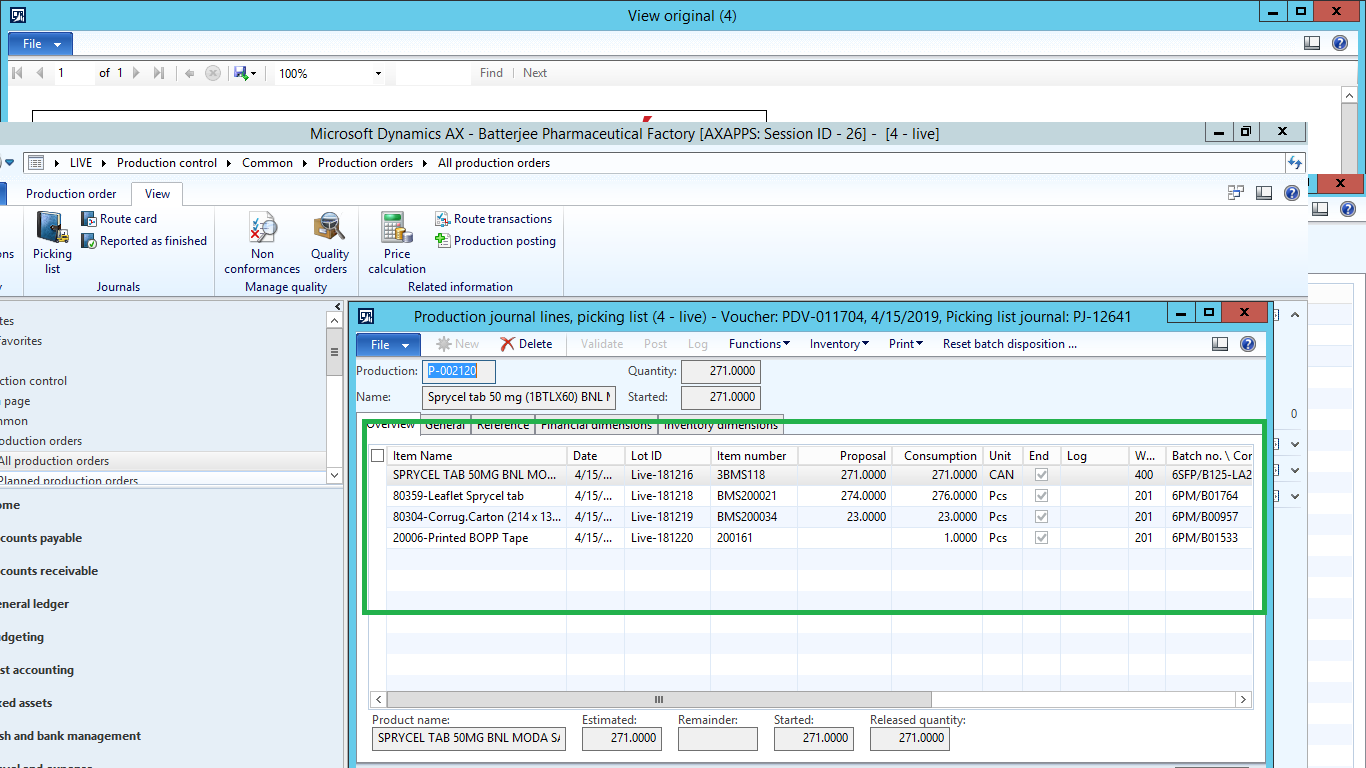
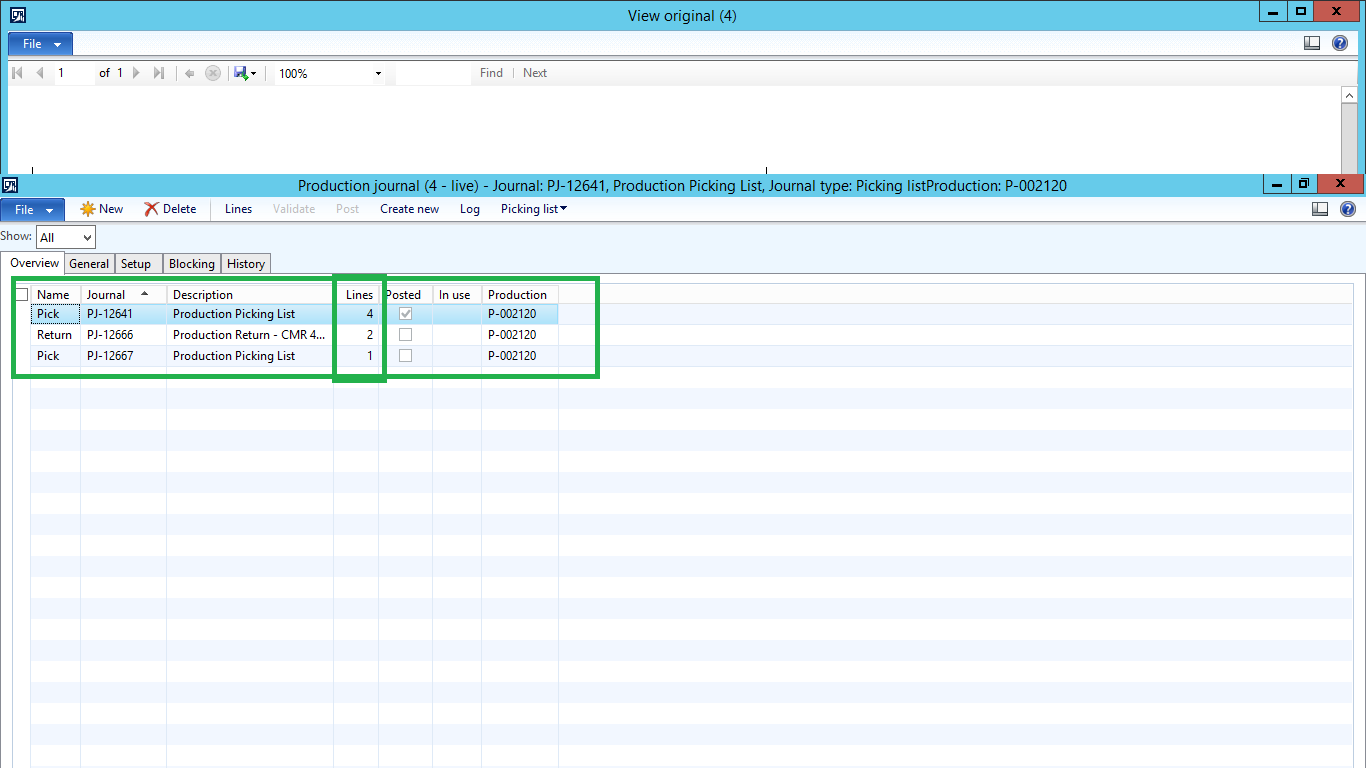
4linesofpickinglist.pngpickinglistsplit-to-two-journals.png

Dear Experts,

Working with Production module, i got an issue, making picking list for a batch Order, when i enter 5 lines to picking list journal the picking list journal was automatically break to 2 parts(after posting), in one journal there are 4 lines and in 1 journal 1 line.There is any way to make these journals to 1 journal  or make these journal lines from 4 to 5 to make it one journal.Please check in above screen shots.

Thanks and Regards,

Shabir Ahmad  

*This post is locked for comments

I have the same question (0)
  • Weaveriski Profile Picture
    23,620 Moderator on at

    Is the picking list for 1 line the line where the proposal is 0? Why is the proposal 0? What are your parameters on the creation of the pick list and when are you posting it?

  • Shabir Ahmad Profile Picture
    3,110 on at

    Steven Weaver,

    Picking list for 1line is 0 because, In the BOM quantity was not added that is way in proposal showing 0.

    Thanks and Regards,

    Shabir Ahmad

  • Weaveriski Profile Picture
    23,620 Moderator on at

    And is that the line that is seperated?

    What are your parameters in use at pick creation?

  • Shabir Ahmad Profile Picture
    3,110 on at

    Steven Weaver,

    No,that is different line for example in 1 journal lines are different than other. Your 2nd point is (what are your parameters in use at pick creation?). what does that mean, could you please explain?.

    Thanks and Regards,

    Shabir Ahmad

  • Weaveriski Profile Picture
    23,620 Moderator on at

    Could you give a clear example in the screen shots of which lines are on the BOM and then how they are split on the journal? So we have lines 1-6 on the BOM and line 4 is on a journal by itself?

    How are you creating the picking list journal? I presume at the start of production you have your elements set in the parameters of the start dialog? How are these set?

  • Shabir Ahmad Profile Picture
    3,110 on at

    Steven Weaver,

    We are creating picking list using production order and batch. Go to production order list specify the batch or production order and then view tab and select picking list picking list journal will be open click on lines.

    Thanks and Regards,

    Shabir Ahmad

  • Suggested answer
    ColbyGallagher Profile Picture
    3,666 on at

    When the production order was started, if the "Create Journal Per" parm for picking list journal was "Oper. No", and your Formula / BOM has ingredients consumed at different steps in the route, you will get a picking list journal per route operation.   If the parm was "Route Type", and you have Standard and Vendor route operations, that could also cause split picking list journals. 

    To see if this is the case, go to the batch order, click the "Log" button, and change the update to "Start" and you will see the parms that Weaveriski is referring too.  The parms in the screenshot below will create two picking list journals, since I have items consumed at operation 10 and operation 20.  If you don't want this behavior, clear the "Create Journal Per" field.  

     start_5F00_Log.jpg 

Under review

Thank you for your reply! To ensure a great experience for everyone, your content is awaiting approval by our Community Managers. Please check back later.

Helpful resources

Quick Links

Responsible AI policies

As AI tools become more common, we’re introducing a Responsible AI Use…

Neeraj Kumar – Community Spotlight

We are honored to recognize Neeraj Kumar as our Community Spotlight honoree for…

Leaderboard > 🔒一 Microsoft Dynamics AX (Archived)

#1
Martin Dráb Profile Picture

Martin Dráb 4 Most Valuable Professional

#1
Priya_K Profile Picture

Priya_K 4

#3
MyDynamicsNAV Profile Picture

MyDynamicsNAV 2

Last 30 days Overall leaderboard

Featured topics

Product updates

Dynamics 365 release plans
