web
You’re offline. This is a read only version of the page.
close
Skip to main content

Announcements

No record found.

News and Announcements icon
Community site session details

Community site session details

Session Id :
Microsoft Dynamics AX (Archived)
Answered

Transfer order auto reservation based on FEFO

(0) ShareShare
ReportReport
Posted on by 90

Dear All,

Is there any option to reserve transfer order line items automatically based on FEFO? 

Requirement is like reservation/issue/adjustment will be based on FEFO, User will update batch & expiry, costing is Weighted average.

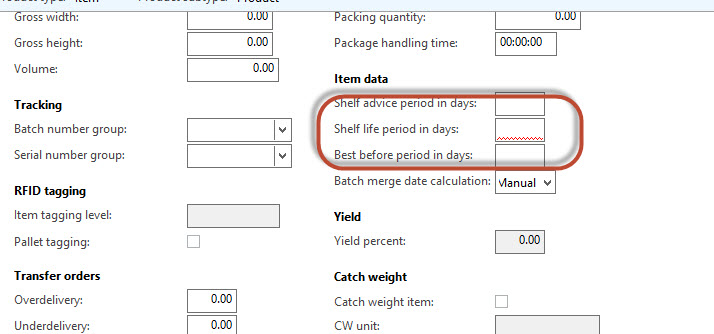
I have tried like below & but have some issues in the item master shelf life. This value become mandatory. Once shelf life entered, it doesn't allow to enter expiry date (disabled and auto calculated) for the batch number while receiving the items. Expiry date getting automatically calculated as Expiry =  receiving date + shelf life.

1u.jpg2u.jpg

Thanks

Asif

*This post is locked for comments

I have the same question (0)
  • Suggested answer
    Mahmoud Hakim Profile Picture
    17,887 on at

    if I understand you,

    you can reserve per line in transfer order as below

    8831.6.png

  • Asif Kunimmal Profile Picture
    90 on at

    Thanks Hakim,

    Requirement is to happen this reservation thorugh First expiry first out.

    Thanks

    Asif

  • Community Member Profile Picture
    on at

    Hi Asif, if you want to change the shelf life of the batch after it has been autocalculated you need to use following button:

    cambio-fecha-lote.jpg

    You can use the parameter shown by Mahmoud to auto-reserve each line or you can also check that parameter on the Transfer Order header (on the Setup tab). If you want, you can also activate it as a module parameter.

    Your setups on the Item Model Group about "FEFO Date controlled" and "Pick criteria" are ok. It will depend if you are using WHS-enabled items or not. If they are WHS-enabled (I'm talking about the Warehouse Management module introduced on AX 2012 R3 version) then you will need to be sure that they have a Reservation Hierarchy where the batch is above location.

    Hope that helps.

  • Verified answer
    Guy Terry Profile Picture
    28,970 Moderator on at

    If you also tick 'Purchase registration' on the Item model group,  you will be able to enter the Batch expiry date during PO receipt.

  • Asif Kunimmal Profile Picture
    90 on at

    Thanks Terry & Nick,

    Both option resolves the requirements,  how ever after ticking purchase registration on the item model group user doesn't required to reset every time.

    Thanks

    Asif

Under review

Thank you for your reply! To ensure a great experience for everyone, your content is awaiting approval by our Community Managers. Please check back later.

Helpful resources

Quick Links

Introducing the 2026 Season 1 community Super Users

Congratulations to our 2026 Super Stars!

Meet the Microsoft Dynamics 365 Contact Center Champions

We are thrilled to have these Champions in our Community!

Congratulations to the March Top 10 Community Leaders

These are the community rock stars!

Leaderboard > 🔒一 Microsoft Dynamics AX (Archived)

#1
Basit Profile Picture

Basit 1

#1
GL-01081504-0 Profile Picture

GL-01081504-0 1

#1
Roya Profile Picture

Roya 1

Last 30 days Overall leaderboard

Featured topics

Product updates

Dynamics 365 release plans