web
You’re offline. This is a read only version of the page.
close
Skip to main content

Notifications

Announcements

No record found.

Community site session details

Community site session details

Session Id :
Microsoft Dynamics CRM (Archived)

Identity customization in CRM 2013

(0) ShareShare
ReportReport
Posted on by 1,821

Hi,

I have unique reference number customization in CRM 2011.  Unique reference number will be created for each opportunity when save opportunity.  I did the following to achieve this functionality.  

1. Add new field called New_referenceNo  in opportunity form as shown in second picture.

2. Change filed property of New_referenceNo of table OpportunityExtensionBase in sql server as shown in below screen.

Allow Nulls No, Change Identity Specification to Yes ,Increment 1, Identity Seed 1.

4760.ref1.png

3 When save first time SQL will give the next sequence number to the opportunity in table and will update in reference Number.
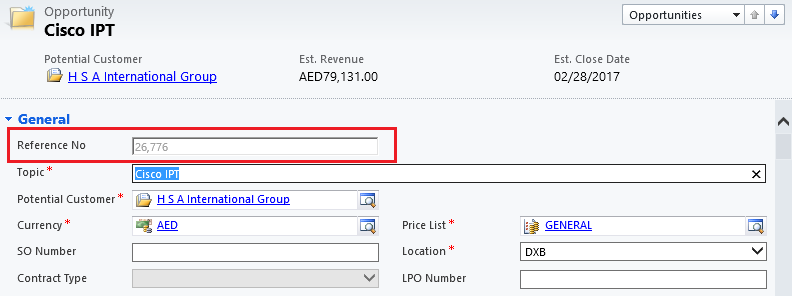
ref2.png

Since in CRM 2013 OpportunityExtensionBase and OpportunityBase merged into OpportunityBase table Kindly help me to do the same in CRM 2013.

I did the following to get this but it is giving error.  Please find the details.

Run the script to change Allow Null option to No

 ALTER TABLE OpportunityBase ALTER COLUMN New_referenceNo int NOT NULL

Change filed property of New_referenceNo of table OpportunityBase by design  - right click on table

Change Identity Specification to Yes ,Increment 1, Identity Seed 1.

But I am getting the below error when save opportunity.

Unhandled Exception: System.ServiceModel.FaultException`1[[Microsoft.Xrm.Sdk.OrganizationServiceFault, Microsoft.Xrm.Sdk, Version=6.0.0.0, Culture=neutral, PublicKeyToken=31bf3856ad364e35]]: Generic SQL error.Detail:
<OrganizationServiceFault xmlns:i="www.w3.org/.../XMLSchema-instance" xmlns="schemas.microsoft.com/.../Contracts">
  <ErrorCode>-2147204784</ErrorCode>
  <ErrorDetails xmlns:d2p1="schemas.datacontract.org/.../System.Collections.Generic" />
  <Message>Generic SQL error.</Message>
  <Timestamp>2017-03-06T05:07:52.1418066Z</Timestamp>
  <InnerFault i:nil="true" />
  <TraceText i:nil="true" />
</OrganizationServiceFault>

*This post is locked for comments

I have the same question (0)
  • Suggested answer
    jlattimer Profile Picture
    24,562 on at

    Altering the database directly isn't supported. You should consider looking for a supported auto-number solution. There are several ISVs that provide them and plenty of code on the web.

  • Suggested answer
    Wayne Walton Profile Picture
    13,730 on at

    There are many supported autonumbering solutions for Dynamics CRM.  I strongly suggest you use one of those as opposed to unsupported SQL changes that can break.

  • P NOUSHAD Profile Picture
    1,821 on at

    Hi,

    Thanks for your support.  I could find many solution for this but I do not know which one will be guaranteed one.  Kindly provide site or link the one you are familiar.

    Regards,

    Noushad

  • Suggested answer
    Rajkumar Rajaraman Profile Picture
    on at

Under review

Thank you for your reply! To ensure a great experience for everyone, your content is awaiting approval by our Community Managers. Please check back later.

Helpful resources

Quick Links

Responsible AI policies

As AI tools become more common, we’re introducing a Responsible AI Use…

Neeraj Kumar – Community Spotlight

We are honored to recognize Neeraj Kumar as our Community Spotlight honoree for…

Leaderboard > 🔒一 Microsoft Dynamics CRM (Archived)

#1
SA-08121319-0 Profile Picture

SA-08121319-0 4

#1
Calum MacFarlane Profile Picture

Calum MacFarlane 4

#3
Alex Fun Wei Jie Profile Picture

Alex Fun Wei Jie 2

Last 30 days Overall leaderboard

Featured topics

Product updates

Dynamics 365 release plans



