web
You’re offline. This is a read only version of the page.
close
Skip to main content

Notifications

Announcements

No record found.

Community site session details

Community site session details

Session Id :
Finance | Project Operations, Human Resources, ...
Answered

URL protocol handler not opening the forms in VS when clicked.

(0) ShareShare
ReportReport
Posted on by

Hello,

I have 2 related ongoing issues.

1>I had clicked yes to make VS as default for opening form control opener, so I do not get the pop any longer. Where can i change this default so as to get the pop up back.

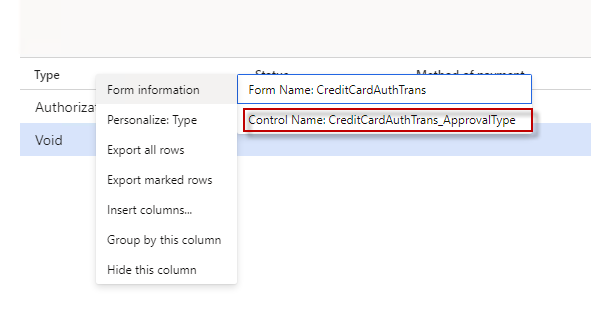
2>When i click below form control, the VS opens but it does not open the form & control (its not a runtime) so definitely it should open the form & control. It was working earlier like month ago. Have rebooted the VS.
pastedimage1633700341450v1.png

Thanks

Mav.

I have the same question (0)
  • André Arnaud de Calavon Profile Picture
    300,911 Super User 2025 Season 2 on at

    Hi Mav,

    Can you elaborate? I don't understand your questions. You showed a screenshot of the Dynamics 365 F&O client. From the web interface, there is no integration by default with Visual Studio.

  • Martin Dráb Profile Picture
    237,801 Most Valuable Professional on at

    I'm aware of the integration - it can open Visual Studio and navigate to the definition of the selected form control.

    Which application handles which protocol can be changed in Windows. Open Default Programs, then scroll down and click Choose default apps by protocol.

    Don't you have VS configured to always run as administrator? I think it breaks the opening of controls in VS (althought I didn't test it thoroughly).

  • Mav Profile Picture
    on at

    The default program is VS & hence when i click on control I see VS opens but the form & control does not open, this is same behavior i mentioned in the post itself.

    VS is configured to run as administrator , however even when this was working for me I notice that when you click on control it used to open the form & control in VS in non admin mode.

  • Martin Dráb Profile Picture
    237,801 Most Valuable Professional on at

    Just for completeness, if VS opened in non-admin mode, that it wasn't really configured to always open as admin. I guess you've merely set it on an individual shortcut, therefore it applies if you open VS but this particular shortcut, but not in other cases.

  • Mav Profile Picture
    on at

    I followed this

    docs.microsoft.com/.../user-permissions-and-visual-studio

    If you want me to do something different then please share details of what you want me to change.

    Thanks

    Mav

  • Martin Dráb Profile Picture
    237,801 Most Valuable Professional on at

    These are indeed steps for setting just an individual shortcut. If you run VS by any other means, such as through the protocol hander, your setup will have no impact.

    I don't want to you to set VS to run always as administrator. What I said that I'm aware of a problem with it, therefore I was just checking if you don't always run VS as admin. Now it's clear that you don't.

  • Mav Profile Picture
    on at

    So any solution for my issue.

    Why it suddenly stopped working & how can i get it to work again.

    Thanks

    Mav.

  • Suggested answer
    Mav Profile Picture
    on at

    Hi all,

    This was resolved by resetting the visual studio

    Open VS-->tools->import export settings.

    Thanks

    Mav

  • Suggested answer
    Dreadlock Profile Picture
    5 on at

    Hi Mav,

    This solve the issue for me:

    Open up windows registry (press Start and type regedit.exe)

    On the top of registry tree press CTRL+F
    Type UrlProtocolHandler and search until you will find something like this:
    2023_2D00_02_2D00_01_5F00_11_2D00_06_2D00_01.jpg

    Right click on the value and click modify. Copy path to the UrlProtocolHandler.exe file and open Explorer and past the copied path:

    2023_2D00_02_2D00_01_5F00_11_2D00_07_2D00_56.jpg

    Open properties of the UrlProtocolHandler.exe file and mark the Run as administrator checkbox:

    2023_2D00_02_2D00_01_5F00_11_2D00_10_2D00_08.jpg

    Enjoy

Under review

Thank you for your reply! To ensure a great experience for everyone, your content is awaiting approval by our Community Managers. Please check back later.

Helpful resources

Quick Links

Responsible AI policies

As AI tools become more common, we’re introducing a Responsible AI Use…

Neeraj Kumar – Community Spotlight

We are honored to recognize Neeraj Kumar as our Community Spotlight honoree for…

Leaderboard > Finance | Project Operations, Human Resources, AX, GP, SL

#1
Martin Dráb Profile Picture

Martin Dráb 664 Most Valuable Professional

#2
André Arnaud de Calavon Profile Picture

André Arnaud de Cal... 522 Super User 2025 Season 2

#3
Sohaib Cheema Profile Picture

Sohaib Cheema 303 User Group Leader

Last 30 days Overall leaderboard

Product updates

Dynamics 365 release plans
