web
You’re offline. This is a read only version of the page.
close
Skip to main content

Announcements

No record found.

News and Announcements icon
Community site session details

Community site session details

Session Id :
Microsoft Dynamics CRM (Archived)

After modifying custom entity with new icon, all other icons missing

(0) ShareShare
ReportReport
Posted on by 460

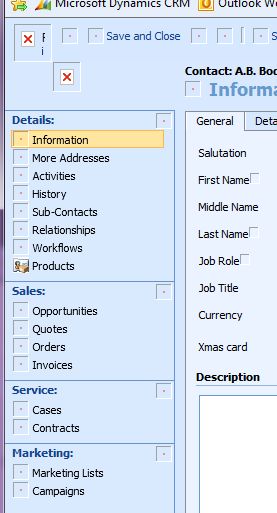
I used the Dynamics CRM Deveopement tool from this site http://crmrepository.blogspot.co.uk/2009/04/add-icons-for-custom-entities.html to modify the icon for a custom entity I've had for a while. As you can see from the image below, now the only icon that shows up is the custom icon. All the other icons are have gone. It seems to be some sort of permissions thing because all the icon files are still there on the server, it's just not displaying them. They all work fine on the computer I did the modification on but any other machine they are blank as you can see. 

Please help,
 

*This post is locked for comments

I have the same question (0)
  • Gus Gonzalez Profile Picture
    27,113 on at

    Matt,

    Is there any way to remove the icon from the entity you added it to?

    Did you make a backup of all customizations before you used the tool?

    If so, import all customizations to reset the images/

    Thanks.

  • Verified answer
    Matt Johnson Profile Picture
    460 on at

    Thanks for the reply but I worked it out.

    Somehow I had removed the permission on the folder /_imgs on the server. This made it so no images could be served up to the clients. Once I'd added this back in <domain>\users it all worked perfectly.

    I was very happy.

  • Gus Gonzalez Profile Picture
    27,113 on at

    I'm glad you got that working Matt!

    That was a scary one! :)

Under review

Thank you for your reply! To ensure a great experience for everyone, your content is awaiting approval by our Community Managers. Please check back later.

Helpful resources

Quick Links

Introducing the 2026 Season 1 community Super Users

Congratulations to our 2026 Super Stars!

Meet the Microsoft Dynamics 365 Contact Center Champions

We are thrilled to have these Champions in our Community!

Congratulations to the March Top 10 Community Leaders

These are the community rock stars!

Leaderboard > 🔒一 Microsoft Dynamics CRM (Archived)

#1
AS-17030037-0 Profile Picture

AS-17030037-0 2

Last 30 days Overall leaderboard

Featured topics

Product updates

Dynamics 365 release plans
