web
You’re offline. This is a read only version of the page.
close
Skip to main content

Announcements

No record found.

News and Announcements icon
Community site session details

Community site session details

Session Id :
Finance | Project Operations, Human Resources, ...
Unanswered

WorkflowType property of the CustTable

(0) ShareShare
ReportReport
Posted on by 2

Hi ,

    I have created a custom workflowtype and I want to use the custom workflow type in the CustTable form . But the custTable form already have the WorkflowType property filled with CustTableChangeProposalWorkflow
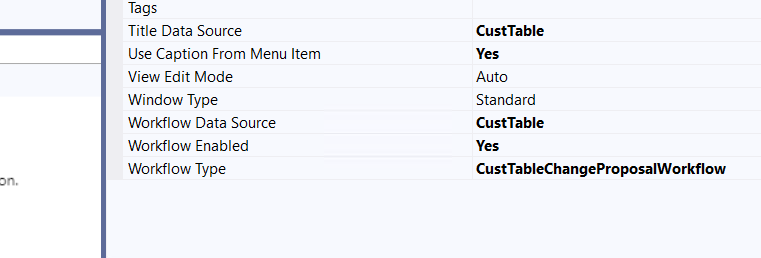
pastedimage1672387869832v1.png

Only If I add my workflow type in the workflowtype property of the form I can able to display my workflowtype in the List of Workflows in AccountsReceivable Module
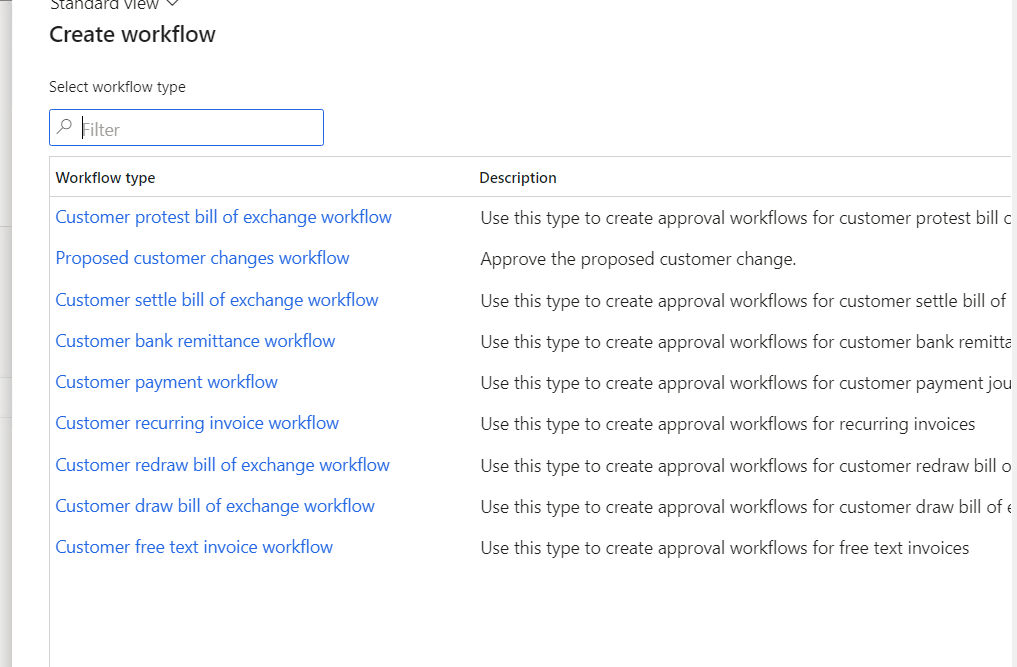
pastedimage1672388188958v2.png

Even In the Workflow Category I have mentioned as AccountsReceivable Module.Still it doesnt list here .

    [FormEventHandler(formStr(CustTable), FormEventType::Initializing)]
    public static void CustTable_OnInitializing(xFormRun sender, FormEventArgs e)
    {
        FormRun                custTable         = sender;
        FormBuildDesign CustTableDesign = custTable.form().design();

        CustTableDesign.workflowEnabled(true);
        CustTableDesign.workflowDatasource(tableStr(CustTable));
        CustTableDesign.workflowType(workflowTypeStr(CustTableWF));

    }

I have tried this code to add my custom workflow type to the form . But still I am unable to see in the List of WorkflowTypes . 

Is it recommended to create a custom workflow for the CustTable form or can I initialize my custom workflow to the custTable form  in any other way ? 

I have the same question (0)
  • GirishS Profile Picture
    27,843 Moderator on at

    Hi NoobGamer,

    Just remove the workflow type from the form design property and manually type in your custom workflow type name and check.

    Also, after changing. build and synch your custom model and check.

    Thanks,

    Girish S.

  • NoobGamer Profile Picture
    2 on at

    I have tried this now but still it doesnt display in List of workflowTypes .

    Or Else should I try making using of existing workflow and add my logic in CanSubmittoworkflow() Method ?

    And Whether there should be only one workflow for a form or there can be multiple workflow types for a form  ?

  • GirishS Profile Picture
    27,843 Moderator on at

    What customization you want in the standard workflow?

    Also, Double check the module specified in the workflow category.

    Thanks,

    Girish S.

  • NoobGamer Profile Picture
    2 on at

    Module is AccountsReceivable

    pastedimage1672395961966v1.png

    I need to create a workflow and that workflow button should be Enabled for submitting whenever new customer is created and that customer should be on hold untill it gets approved . for this whether should I have to create a custom workflow or can I makeuse of the standard workflow type ? Whether there can be multiple workflow instance for the one form ?

  • GirishS Profile Picture
    27,843 Moderator on at

    I think the existing workflow type won't help your case. Existing workflow will be used whenever field value in the customer form is changed and changed values will go into the workflow process.

    But the standard workflow will be enabled based on the parameters.

    Refer to the below blog for the explanation for existing workflow.

    https://www.axpeditesoftware.com/customer-change-approvals-in-dynamics-365-finance-and-operations/

    So, the exiting workflow won't suit your scenario. 

    If you change the workflow type property on the CustTable form to your custom workflow - then I think it will point only to your custom workflow only.

    Regarding your issue - Check the workflow category property on the workflow type you have created - It must be pointing towards the category you have created or an existing standard category which belongs to Accounts receivable module.

    Thanks,

    Girish S.

  • NoobGamer Profile Picture
    2 on at

    I have changed the association to global and category as customer  , Now it is displaying . And I have not changed the workflowtype property of the form .

    I Guess there will be some conflict between standard and custom workflow when I write a code in cansubmittoworkflow() method .And thanks for your Information Girish

  • GirishS Profile Picture
    27,843 Moderator on at

    Yes, module must be the customer on the workflow category.

    But I cannot see the canSubmitToWorkflow method on CustTable. I don't think there will be a conflict, since you are creating separating workflows.  Also, canSubmitToWorkflow method will have workflow type on the arguments.

    Thanks,

    Girish S.

  • NoobGamer Profile Picture
    2 on at

    canSubmitToWorkflow is wriiten in the Form Method of CustTable . And In the form Level I am unable to see any arguments passed . But I going to override the cansubmittoworkflow in table methods using COC.  Is there is any difference between form method and table method ?

    Because I tried creating a custom workflow earlier for another form , And when I tried creating a cansubmittoworkflow in the form method there was some issue in displaying the workflow button . It didnt display the workflow button sometimes when the status is in draft mode which triggers the workflow.

    And then I changed it to table method and the issue got solved .

  • GirishS Profile Picture
    27,843 Moderator on at

    It's better to write canSubmitToWorkflow method at table level only. I don't know the exact difference of writing at table or form level. But both methods will be called during form initialization.

    So, I guess for your scenario the existing workflow will be activated only when the "Enable customer approvals" on the "Accounts receivable parameters" form is set to Yes.

    Thanks,

    Girish S.

Under review

Thank you for your reply! To ensure a great experience for everyone, your content is awaiting approval by our Community Managers. Please check back later.

Helpful resources

Quick Links

Introducing the 2026 Season 1 community Super Users

Congratulations to our 2026 Super Stars!

Meet the Microsoft Dynamics 365 Contact Center Champions

We are thrilled to have these Champions in our Community!

Congratulations to the April Top 10 Community Leaders

These are the community rock stars!

Leaderboard > Finance | Project Operations, Human Resources, AX, GP, SL

#1
Giorgio Bonacorsi Profile Picture

Giorgio Bonacorsi 802

#2
André Arnaud de Calavon Profile Picture

André Arnaud de Cal... 636 Super User 2026 Season 1

#3
Subra Profile Picture

Subra 534

Last 30 days Overall leaderboard

Product updates

Dynamics 365 release plans
