web
You’re offline. This is a read only version of the page.
close
Skip to main content

Announcements

No record found.

News and Announcements icon
Community site session details

Community site session details

Session Id :
Small and medium business | Business Central, N...
Suggested Answer

Re-ordered lines on a document

(0) ShareShare
ReportReport
Posted on by 35

Hi,

How can I change the order of the lines in a document (for example a quote)?

Best regards

  • Suggested answer
    JAngle Profile Picture
    159 on at

    If you use a RDLC layout there is a sorting property for a table or matrix

    The second section of this post will help: www.tutorialgateway.org/.../

  • StephaneGerber Profile Picture
    35 on at

    Many thanks for your fast reply. But we want to reorder on the screen because for example an item has been inserted before another one.

  • Katrin Kinau Profile Picture
    Microsoft Employee on at

    Hi Stephane,

    on the lines you can click the drop-down button next to the column name. And from there you can change the order of the lines:

    pastedimage1605613021112v1.png

  • StephaneGerber Profile Picture
    35 on at

    To be more accurate, I don't want to sort but change the position of a line. Sorry

  • StephaneGerber Profile Picture
    35 on at

    Annotation-2020_2D00_11_2D00_17-140234.png

    Hi,

    I don't have ascending descending as you can see (we have version 17)

  • Suggested answer
    JAngle Profile Picture
    159 on at

    clicking in the wrong place. Click on the "Type" column heading to reveal the sort options. If you want the second item line to be after the first then use the "New Line" button on the first line and it will create a new line underneath. This works with any version.

  • RubenPita Profile Picture
    10 on at

    Hi,

    Sorry but cliking on the type heading don't show me the sort. Anyway I cannot move, for example, the third line to the first position.

  • Suggested answer
    Katrin Kinau Profile Picture
    Microsoft Employee on at

    Hi,

    On column No. you can change the sorting:
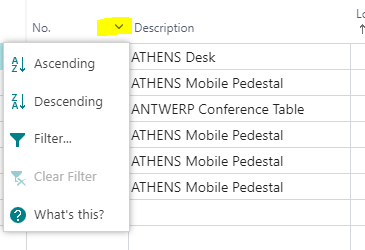
    pastedimage1605866536980v1.png

    But I understand you do not want to sort, but move lines. It is not possible to move the line directly. As workaround you could copy the line you would like to move: Select the line, copy it with Ctrl + C, then create a new line and then paste with Ctrl + V. Then the line is duplicated and you can delete the line you do not need anymore.

Under review

Thank you for your reply! To ensure a great experience for everyone, your content is awaiting approval by our Community Managers. Please check back later.

Helpful resources

Quick Links

Season of Sharing Community Challenge Winners!

Congratulations to our community stars!

Women in Power Builds Momentum

Expanding mentorship, skilling, and AI innovation

Leaderboard > Small and medium business | Business Central, NAV, RMS

#1
OussamaSabbouh Profile Picture

OussamaSabbouh 728 Super User 2026 Season 2

#2
YUN ZHU Profile Picture

YUN ZHU 545 Super User 2026 Season 2

#3
AndrewThomas81 Profile Picture

AndrewThomas81 328 Super User 2026 Season 2

Last 30 days Overall leaderboard

Featured topics

Microsoft Training Manuals

Product updates

Dynamics 365 release plans



