web
You’re offline. This is a read only version of the page.
close
Skip to main content

Announcements

No record found.

News and Announcements icon
Community site session details

Community site session details

Session Id :
Microsoft Dynamics AX (Archived)

create multi products at once

(0) ShareShare
ReportReport
Posted on by 2,050

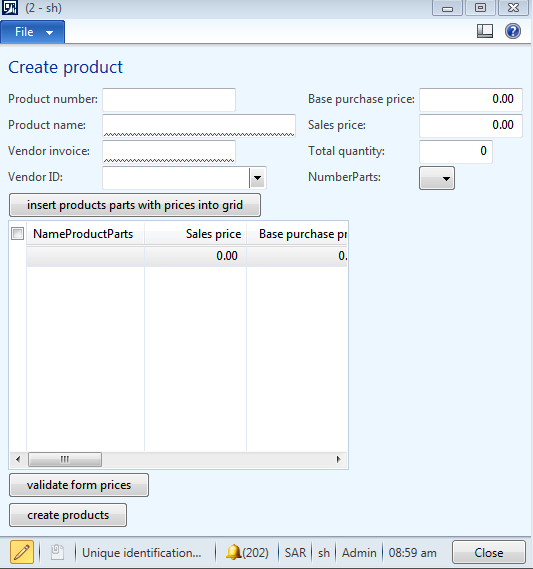
i created new form for EcoResProduct to create multi products at once with sale and purchase prices for each product which those insert into this grid view
so now how can i make it insert at InventTable like in this form (EcoResProductCreate)
4162.captur.PNG

*This post is locked for comments

I have the same question (0)
  • Suggested answer
    Anand.kushwaha Profile Picture
    55 on at

    Hi,

    One idea would be to loop through each record present in 'Grid' and insert records in InventTable or related tables (One at a time).

    On click of create product :

    //get the first selected record of the datasource and loop through all of the selected records

    for(localTable = Grid_DS.getFirst(true) ? Grid_DS.getFirst(true) : Grid_DS.cursor(); localTable ; localTable = Grid_DS.getNext())

    {

                     // retrieve and validate all the required values and create products

                    //  Something similar here from below blog

                   // pawansaxblog.blogspot.se/.../how-to-create-product-in-ax2012-using-x.html

    }

  • mohammed.mqi Profile Picture
    2,050 on at

    thanks for replay how about sale prices and purchase prices ?

  • Suggested answer
    Chaitanya Golla Profile Picture
    17,225 on at

    Hi,

    InventTableModule is the table that contains default purchase, sales and inventory prices(Field: Price).You can loop through your grid(as suggested by Anand) and use the code specified in the below link to create product along with their prices with small modifications

    SampleCode:

    //Extended product details – Inventory

    inventTableModule.clear();

    inventTableModule.initValue();

    inventTableModule.ItemId = inventTable.ItemId;

    inventTableModule.Price = 123 // Specify value

    inventTableModule.ModuleType = ModuleInventPurchSales::Invent;

    inventTableModule.insert();

    (Microsoft Dynamics AX 2012 Xpp – Products Import)

    www.tech.alirazazaidi.com/microsoft-dynamics-ax-2012-xpp-products-import

Under review

Thank you for your reply! To ensure a great experience for everyone, your content is awaiting approval by our Community Managers. Please check back later.

Helpful resources

Quick Links

Introducing the 2026 Season 1 community Super Users

Congratulations to our 2026 Super Stars!

Meet the Microsoft Dynamics 365 Contact Center Champions

We are thrilled to have these Champions in our Community!

Congratulations to the March Top 10 Community Leaders

These are the community rock stars!

Leaderboard > 🔒一 Microsoft Dynamics AX (Archived)

#1
CP04-islander Profile Picture

CP04-islander 16

#2
GiacomoRovai Profile Picture

GiacomoRovai 4

#3
Douglas Noel Profile Picture

Douglas Noel 2

Last 30 days Overall leaderboard

Featured topics

Product updates

Dynamics 365 release plans
