web
You’re offline. This is a read only version of the page.
close
Skip to main content

Announcements

No record found.

News and Announcements icon
Community site session details

Community site session details

Session Id :
Finance | Project Operations, Human Resources, ...
Answered

Provide hyperlink to customer Name on Customized form in D365

(0) ShareShare
ReportReport
Posted on by 758

Hi Everyone,

Need quick help.

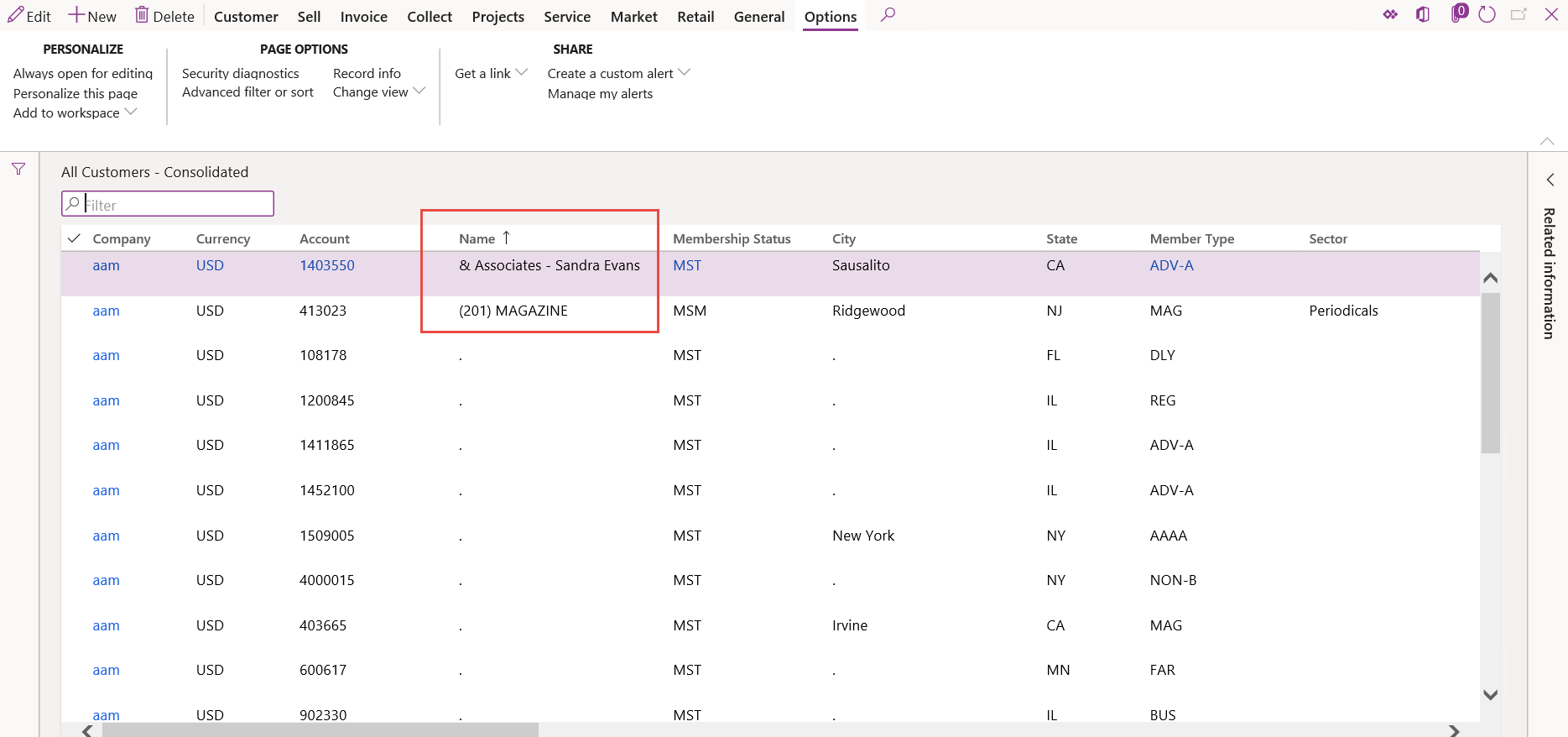
Below screenshot displays one customized form which includes Customer Account and Name.

If we click on Account it navigates to Customer master. My client wants the same action to be executed by providing hyperlink on Customer Name.

Is it possible? If yes, how it can be achieved?

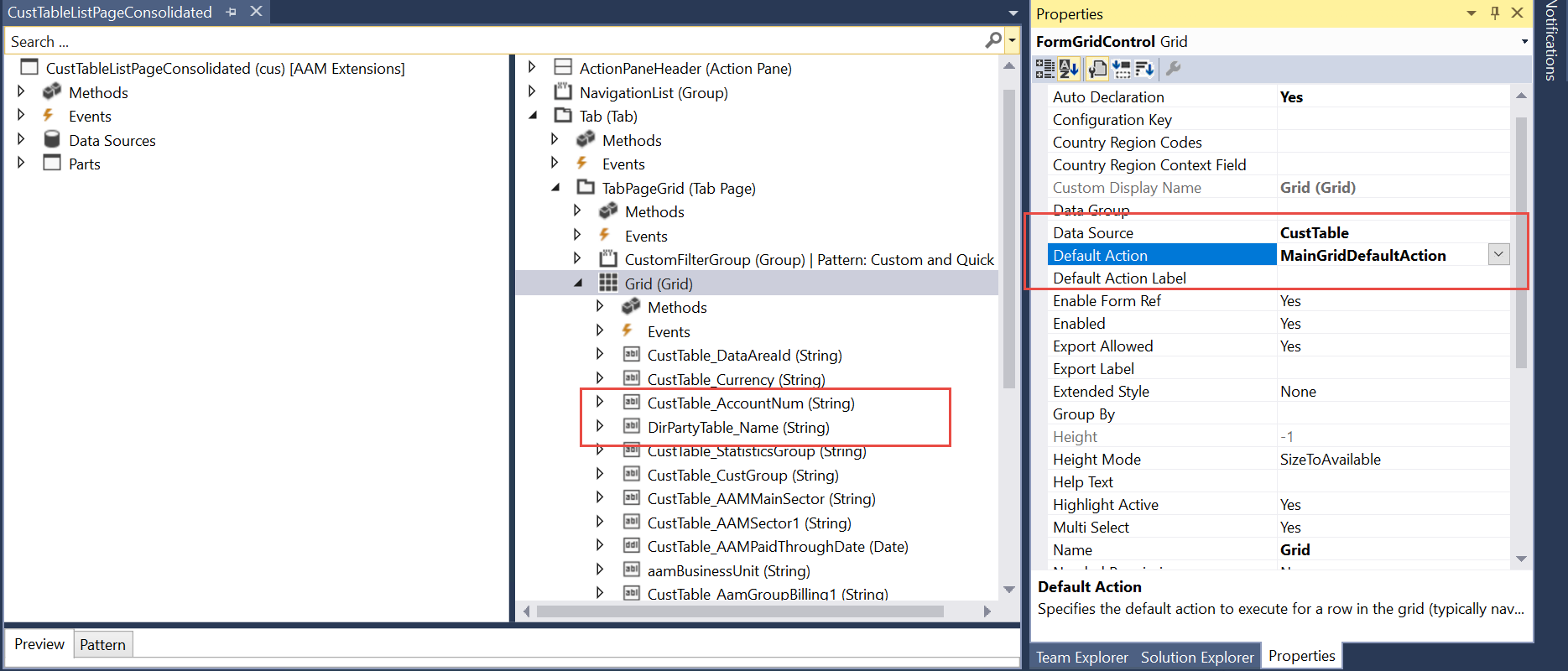
I have attached Grid properties screenshot as well.
A01.png

A02.png

I have the same question (0)
  • Blue Wang Profile Picture
    Microsoft Employee on at

    Hi Rhushikesh Raut,

    Do you have relations for Name field?

  • Verified answer
    André Arnaud de Calavon Profile Picture
    304,711 Super User 2026 Season 1 on at

    Hi Rhushikesh,

    It is possible. Have a look at the 'All customers' list page. This is having the link on the name field already. You can look at the design how this was accomplished by Microsoft itself.

  • Verified answer
    nmaenpaa Profile Picture
    101,172 Moderator on at

    You can override the jumpref method of the field, and add there logic to navigate to Customers form, using the customer account number of the same record.

    community.dynamics.com/.../ax-2012-how-to-use-jumpref-method

  • Verified answer
    ArunGarg Profile Picture
    3,926 on at

    Hi,

    1. If you set your "Form Template" (which is under Form properties) as List Page and when you drag and drop fields from DS, you will get Hyperlink DataSource and Hyperlink Menu Item under Grid level field properties. Refer SalesTableListPage form in D365 F&O

    4150.Capture.PNG

    2. Create Menu item button in Action Pane and set Visible as No (Refer ViewButton in SalesTableListPage Form)

    3. In your Grid (under properties), set Default Action as View Button.

    And as mentioned jumpRef method is used for view details, not for the hyperlink.

    Please verify the suggestion if it helps you.

  • Rhushikesh R Profile Picture
    758 on at

    Thanks Nikolaos,

    I overridden the jumpref method. And it does work for me,

       public void jumpRef()
            {
                super();
    
                MenuFunction    menuFunction;
                Args            args = new Args();
            
                CustTable   custTableLocal; // This is the table of the master where view details option will take you. Change table name here, this is just for sample
                ;
    
                custTableLocal = CustTable_ds.cursor();
    
    
                args.record(custTableLocal);
                args.lookupRecord(custTableLocal);
        
                menuFunction = new MenuFunction(menuitemDisplayStr(CustTableEditDetails), MenuItemType::Display);
                menuFunction.run(args);
            }

Under review

Thank you for your reply! To ensure a great experience for everyone, your content is awaiting approval by our Community Managers. Please check back later.

Helpful resources

Quick Links

Introducing the 2026 Season 1 community Super Users

Congratulations to our 2026 Super Stars!

Meet the Microsoft Dynamics 365 Contact Center Champions

We are thrilled to have these Champions in our Community!

Congratulations to the April Top 10 Community Leaders

These are the community rock stars!

Leaderboard > Finance | Project Operations, Human Resources, AX, GP, SL

#1
Giorgio Bonacorsi Profile Picture

Giorgio Bonacorsi 608

#2
André Arnaud de Calavon Profile Picture

André Arnaud de Cal... 591 Super User 2026 Season 1

#3
CP04-islander Profile Picture

CP04-islander 430

Last 30 days Overall leaderboard

Product updates

Dynamics 365 release plans