web
You’re offline. This is a read only version of the page.
close
Skip to main content

Announcements

No record found.

News and Announcements icon
Community site session details

Community site session details

Session Id :
Microsoft Dynamics NAV (Archived)

User can't log into NAV

(0) ShareShare
ReportReport
Posted on by

Hello,

We have a user that gets an error when opening NAV 2015.

His account is configured to log onto NAV via his domain account, not an NAV account.

Oddly the user can log in on 2 of his computers but not on his third computer.  All three of his computers are configured to log in using his domain account, not a local user account.  NAV uses a single sign-on so their is no need to enter a username and password when opening NAV.  When he opens NAV he gets the following error message:

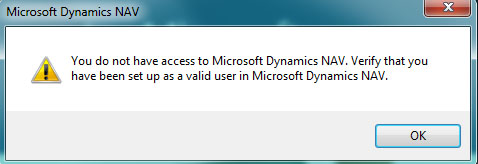
"You do not have access to Microsoft Dynamics NAV. Verify that you have been setup as a valid user in Microsoft Dynamics NAV."
Snip.jpg

As mentioned this user is properly configured in NAV and can access NAV from several other computers, just not one in particular.  I'm thinking their must be some issue with the way his account is configured on that one computer.

It would be much appreciated if anyone can share their insight on why this is occurring.

Thanks.,

Brendon

*This post is locked for comments

I have the same question (0)
  • Verified answer
    Suresh Kulla Profile Picture
    50,269 Super User 2026 Season 1 on at

    On the computer he is having issue please check at the following location

    C:\Users\<username>\AppData\Roaming\Microsoft\Microsoft Dynamics NAV\80\ClientUserSettings.config

    where <username> is name of the user

    Verify ClientServicesCredentialType value it should be Windows, compare the value with other files from other computer where he can login.

  • Community Member Profile Picture
    on at

    Hey Suresh,

    That file was the cause of the issue.

    It was pointing towards our Test Environment and this particular user wasn't in the test environment, I edited the file to point towards our Production Server and it resolved the issue.  

    There were a few entries that had to be modified to suit our environment:

    <add key="Server" ...

    <add key="ServerInstance" ...

    <add key="UrlHistory" ...

    <add key="HelpServer" ...

    <add key="UnknownSpnHint" ...

    <add key="ClientServicesCredentialType" ...

    I also confirmed this entry:

    <add key="ClientServicesCredentialType" value="Windows" />

    Once I did that all was good.

    Thanks for your help.

    Brendon

Under review

Thank you for your reply! To ensure a great experience for everyone, your content is awaiting approval by our Community Managers. Please check back later.

Helpful resources

Quick Links

Introducing the 2026 Season 1 community Super Users

Congratulations to our 2026 Super Stars!

Meet the Microsoft Dynamics 365 Contact Center Champions

We are thrilled to have these Champions in our Community!

Congratulations to the March Top 10 Community Leaders

These are the community rock stars!

Leaderboard > 🔒一 Microsoft Dynamics NAV (Archived)

Last 30 days Overall leaderboard

Featured topics

Product updates

Dynamics 365 release plans
