web
You’re offline. This is a read only version of the page.
close
Skip to main content

Announcements

No record found.

News and Announcements icon
Community site session details

Community site session details

Session Id :
Business Central forum

Initialization of container failed

(0) ShareShare
ReportReport
Posted on by 57

I am running the following script  in Powershell 

New-NavContainer -accept_eula -accept_outdated -containerName NAVDEMO -useGenericImage mcr.microsoft.com/dynamicsnav:generic-ltsc2016 -licenseFile C:\temp\MyLic.flf -isolation hyperv -includeAL -useBestContainerOS -auth Windows

However, I run into this error everytime i have tried creating a new nav container:
Initialization of container NAVDEMO failed
At C:\Program Files\WindowsPowerShell\Modules\navcontainerhelper\0.6.3.3\ContainerHandling\Wait-NavContainerReady.ps1:45 char:17
+ ... throw "Initialization of container $containerName failed" ...
+ ~~~~~~~~~~~~~~~~~~~~~~~~~~~~~~~~~~~~~~~~~~~~~~~~~~~~~~~~~
+ CategoryInfo : OperationStopped: (Initialization ... NAVDEMO failed:String) [], RuntimeException
+ FullyQualifiedErrorId : Initialization of container NAVDEMO failed

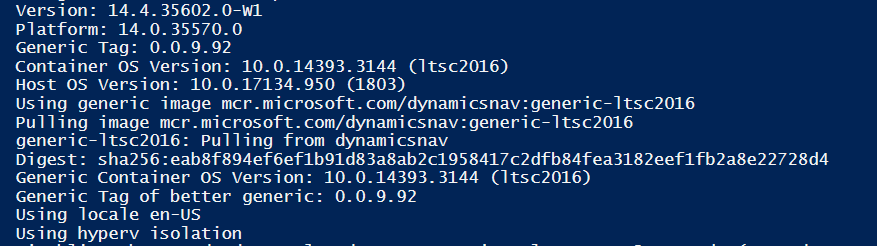
More details If this could help:

pastedimage1567412364655v1.png

pastedimage1567412395025v2.png

Any help?

Categories:
I have the same question (0)
  • Community Member Profile Picture
    on at

    I am always creating my containers with that script, maybe you can test it with that one to find out, if there is an error in your script?!

    New-NavContainer -accept_eula `

                    -accept_outdated `

                    -containerName "name_of_your_container" `

                    -auth NavUserPassword `

                    -imageName "microsoft/bcsandbox:base" `

                    -includeCSIDE `

                    -doNotExportObjectsToText `

                    -updateHosts

    -updateHosts is new, some time ago it was not needed.

  • Prayusha Profile Picture
    57 on at

    Thanks but this too ends up in the same error

  • Community Member Profile Picture
    on at

    Have you tried also with another image? Maybe yours is broken?!

  • Prayusha Profile Picture
    57 on at

    Yes  i tried with several options: microsoft/bcsandbox, mcr.microsoft.com/businesscentral/sandbox,

    mcr.microsoft.com/businesscentral/sandbox:ltsc2019,

    mcr.microsoft.com/businesscentral/sandbox:ltsc2016,

    mcr.microsoft.com/dynamicsnav,

    mcr.microsoft.com/dynamicsnav:ltsc2019

    I had also installed (and then removed) a sandbox container before, but i couldn't access it due to license issues. Now  I am trying it with my BC developer license

  • Community Member Profile Picture
    on at

    Okay, then try to run your script wihout your licensefile-tag.

  • Prayusha Profile Picture
    57 on at

    But that was the issue originally which led me to try with lic files, that the setup ends up in an error that the license is in invalid or expired. This is why I have been trying these steps with lic file

  • Community Member Profile Picture
    on at

    So you first tried to create a container without that tag and you got the error message, that the license is invalid or expired?

    If so, maybe your license file is not working or too new or too old for your BC version...

  • Suggested answer
    Suresh Kulla Profile Picture
    50,269 Super User 2026 Season 1 on at

    Try updating your navcontainerhelper module and then try

    install-module navcontainerhelper -force

    Tried this and have not faced any issues

    New-NAVContainer `

       -accept_eula `

       -containerName 'NAVDEMO' `

       -imageName microsoft/dynamics-nav:2018-cu14-na-ltsc2019 `

       -licenseFile 'C:\temp\test.flf' `

       -memoryLimit 4G `

       -Verbose `

       -doNotExportObjectsToText `

       -shortcuts Desktop `

       -includeCside `

       -updateHosts `

       -accept_outdated `

       -auth NavUserPassword

    If you want to use the above script just change the license file path.

Under review

Thank you for your reply! To ensure a great experience for everyone, your content is awaiting approval by our Community Managers. Please check back later.

Helpful resources

Quick Links

November Spotlight Star - Khushbu Rajvi

Congratulations to a top community star!

Forum Structure Changes Coming on 11/8!

In our never-ending quest to help the Dynamics 365 Community members get answers faster …

Dynamics 365 Community Platform update – Oct 28

Welcome to the next edition of the Community Platform Update. This is a status …

Leaderboard > Business Central

Last 30 days Overall leaderboard

Featured topics

Product updates

Dynamics 365 release plans