web
You’re offline. This is a read only version of the page.
close
Skip to main content

Notifications

Announcements

No record found.

Community site session details

Community site session details

Session Id :
Microsoft Dynamics AX (Archived)

Trace Parser "Row Fetch Time (ms)" column

(0) ShareShare
ReportReport
Posted on by 101

Hi

We have a customer who is running AX 2009 and currently the customer complains about sporadic system hangs. My first level of debugging was to activate "Long queries" SQL trace for some specific users. I would certainly expect to see any poor performing queries in the SQL trace, however to my surprise this was not the case. I was able to reproduce the system hang. The issue is not consistent. The hang would occur once every 20 or 30 times I opened the same form with the same queries. The system hangs up to 2 minutes. Even though the system hangs for up to 2 minutes the longest query in my SQL trace was 4 seconds.

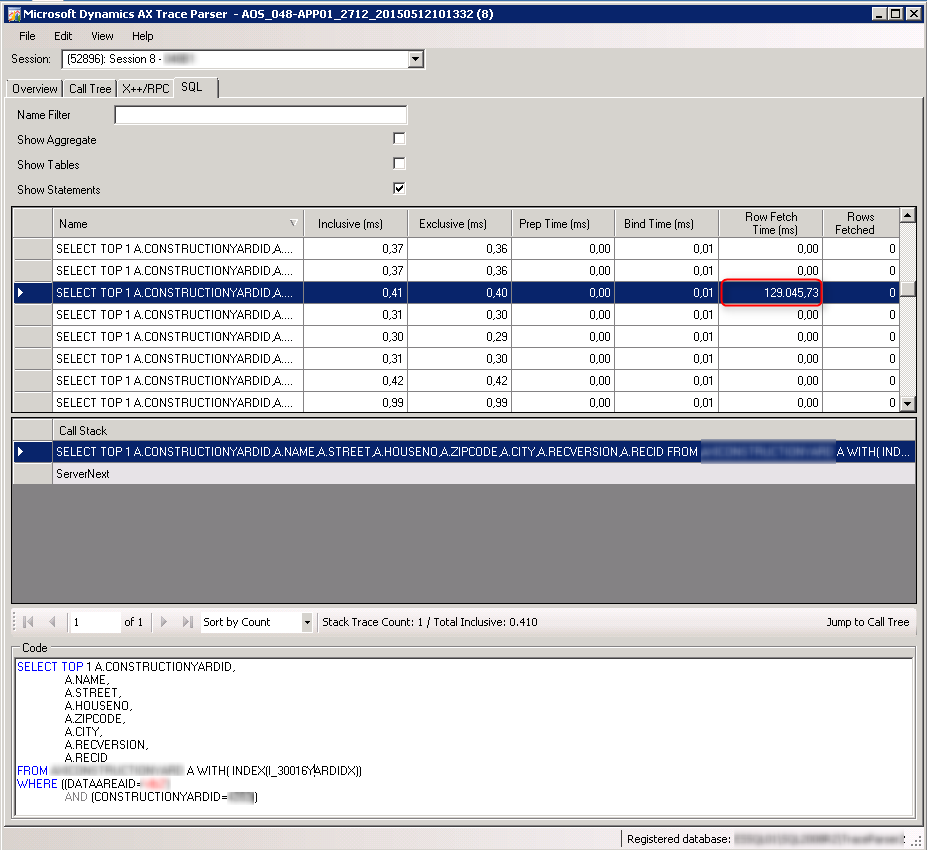
My next level of debugging is the Trace Parser. In the Trace Parser i am a bit puzzled about the this specific value:
2015_2D00_05_2D00_17_5F00_23h58_5F00_27.png
(Please note that the screen shot does not show aggregated values)

This is not the statement showing in the "Long queries" SQL trace, and looking at the "Inclusive (ms)" and "Exclusive (ms)" columns everything looks fine. However looking at the "Row Fetch Time (ms)" column I see a value which could explain a 2 minute system hang. The specific query is executed many times, and most of them show '0.00' in the "Row Fetch Time (ms)" column.

Generally looking at the "Inclusive (ms)" column, also in the "Call Tree" and "X++/RPC" tabs, nothing else seems to be able to explain the system hangs.

Now to the questions:

1) Does anybody knows what operations are covered in the "Row Fetch Time (ms)" value?
2) What should I look for on the SQL server?
3) Has anybody experienced similar behavior.

Thanks,

Jesper

*This post is locked for comments

I have the same question (0)
  • Martin Dráb Profile Picture
    237,990 Most Valuable Professional on at

    When AX executes a query, it puts data into a cursor. When needed, it fetches data from the cursor and send them to the application. (Imagine fetching data in while select, for example.) I believe that this is what the Row Fetch Time column refers to.

    Unfortunately I don't know why it's so slow. Maybe it's waiting for some locked resource and you could find something in wait statistics.

  • Back2Ax Profile Picture
    on at

    Hi,

    Your Last Name (Damgaard) could mean you have the best of relations directly to the original architects of Axapta :-)

    Martin Dráb has already answered Your question 1) and to add some more details to what Martin has provided, AX relies on API Server Cursors which basically means many SQL Statements are handled by a set of Stored Procedures in SQL Server (the API). You could read up on this here, and I'm almost sure that the Row Fetch Time is Equal to a Call to sp_cursorfetch.

    Question 2) requires some digging in SQL Server, but based on the already provided information, you should be able to find some useful information on how to identify and track this on SQL Server... Like the Execution Plan...

    3) Impossible to answer based on the information provided...

  • Community Member Profile Picture
    on at

    Hi Jesper,

    I support Martin and Hans-Petter : the answer is most likely to be found on the SQL server.
    I'd try to catch the execution plans on and try to find out why this statements takes more time once in a while.

    Is is the exact same query that is executed multiple times?
    What if you'd fire that query repeatedly directly in SQL? 

    Would it behave the same (a hick-up now and then)?

    Did you manage to reproduce on the 'hang' on the same system/environment?

    It's a long shot, but if it is server/hardware/network related, it might be worth trying to reproduce the same scenario on a simulation-system (with the same data) for example. 
    But if it is server/hardware/network related, I'd expect there would be more problems than just this query.

    bye

    Tom

Under review

Thank you for your reply! To ensure a great experience for everyone, your content is awaiting approval by our Community Managers. Please check back later.

Helpful resources

Quick Links

Responsible AI policies

As AI tools become more common, we’re introducing a Responsible AI Use…

Neeraj Kumar – Community Spotlight

We are honored to recognize Neeraj Kumar as our Community Spotlight honoree for…

Leaderboard > 🔒一 Microsoft Dynamics AX (Archived)

#1
Priya_K Profile Picture

Priya_K 4

#1
Martin Dráb Profile Picture

Martin Dráb 4 Most Valuable Professional

#3
MyDynamicsNAV Profile Picture

MyDynamicsNAV 2

Last 30 days Overall leaderboard

Featured topics

Product updates

Dynamics 365 release plans


