Hi Katie,
Nothing like responding to a post 4 years later. I truly hope you found a positive solution to your need. Granted my solution to this issue is long overdue to solve your issue I thought it may be valuable for others that stumble across this post.
I did some digging through the code that the Navigation List sits on and basically tracked down all the way to the root of the data displayed. At the very base of the Navigation List code sits 2 distinct views. sopHistoryTransactions and sopWorkTransactions
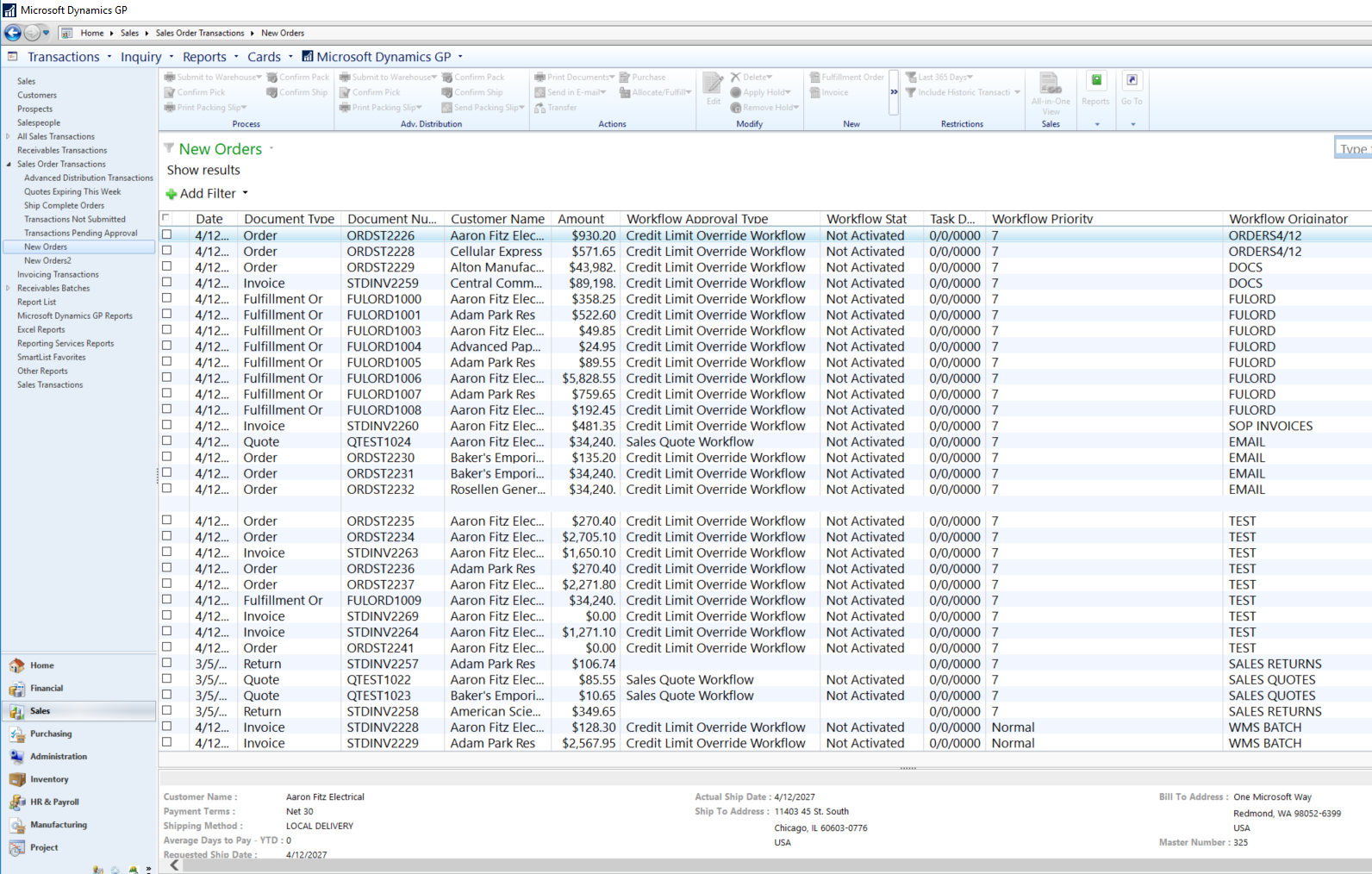
In these views the fields in the navigation list are available. The Workflow Originator field is BLANK so I altered it to point to the Batch Number field. Voila, the batch numbers now exist in the Navigation List to search by and all I did was change which field is represented in the Workflow Originator.
The only thing that this causes is you will most likely have to redeploy / alter the views again when an upgrade occurs.
Below is the update script for GP 2018 if anyone is interested but basically you scroll down and change the following
‘’ as ‘Workflow Originator’ to BACHNUMB as ‘Workflow Originator’
Do this in both views and add the Workflow Originator to your Navigation List and the data will show, sort, and filter immediately.
Hope this helps someone out there. The application of this solution is pretty much open to any field just be careful and take backups before going to wild with the modifications.
Best wishes
Sean
/****** Object: View [dbo].[sopWorkTransactions] Script Date: 5/16/2018 10:56:13 PM ******/
SET ANSI_NULLS ON
GO
SET QUOTED_IDENTIFIER ON
GO
ALTER VIEW [dbo].[sopWorkTransactions] as ( select 0 as 'MKTOPROC', 0 as 'InfoValue', 0 as 'CURRNIDX', GETDATE() AS 'DOCDATE', 0 as 'SOURCE', 0 as 'DOCTYPE', REPLICATE('X', 21) as 'DOCTYNAM', REPLICATE('X', 21) as 'DOCNUMBR', REPLICATE('X', 15) as 'CUSTNMBR', REPLICATE('X', 65) as 'CUSTNAME', 0 as 'PROSPECT', 0 as 'DCSTATUS', REPLICATE('X', 31) as 'STSDESCR', 9999999999999.99999 as 'DOCAMNT', REPLICATE('X', 15) as 'CURNCYID', REPLICATE('X', 21) as 'CSTPONBR', REPLICATE('X', 15) as 'PRSTADCD', REPLICATE('X', 15) as 'SLPRSNID', REPLICATE('X', 21) as 'SOPNUMBE', 0 as 'SOPSTATUS', REPLICATE('X', 51) as 'SOPSTSDESCR', REPLICATE('X', 21) as 'INVCNMBR', 0 as 'VOIDED', REPLICATE('X', 15) as 'PRCHLDID', GETDATE() AS 'QUOEXPDA', GETDATE() AS 'ReqShipDate', 0 as 'ALLOCABY', REPLICATE('X', 15) as 'DOCID', 0 as 'Password_Valid', REPLICATE('X', 51) as 'Workflow_Name', 0 as 'Workflow_Approval_Status', GETDATE() AS 'Workflow_Due_Date', 0 as 'Workflow_Priority', REPLICATE('X', 238) as 'Workflow_Originator', REPLICATE('X', 238) as 'Workflow_Approver', 9999999999999.9999 as 'QTYTOPURCH', 0 as 'SHIPCOMPLETE', 0 as 'WF_Step_Type', REPLICATE('X', 15) as 'BACHNUMB', REPLICATE('X', 15) as 'BCHSOURC', 0 as 'Emailed' where (1 = 0) UNION ALL select 0 as 'MKTOPROC', 0 as 'InfoValue', 0 as 'CURRNIDX', ['Sales Transaction Work'].[DOCDATE] as 'DOCDATE', 11 as 'SOURCE', ['Sales Transaction Work'].[SOPTYPE] as 'DOCTYPE', DOCTYNAM = dbo.DYN_FUNC_SOP_Type(['Sales Transaction Work'].[SOPTYPE]), rtrim(['Sales Transaction Work'].[SOPNUMBE]) as 'DOCNUMBR', rtrim(['Sales Transaction Work'].[CUSTNMBR]) as 'CUSTNMBR', rtrim(['Sales Transaction Work'].[CUSTNAME]) as 'CUSTNAME', ['Sales Transaction Work'].[PROSPECT] as 'PROSPECT', DCSTATUS = 1, STSDESCR = 'Work.', ['Sales Transaction Work'].[DOCAMNT] as 'DOCAMNT', rtrim(['Sales Transaction Work'].[CURNCYID]) as 'CURNCYID', rtrim(['Sales Transaction Work'].[CSTPONBR]) as 'CSTPONBR', rtrim(['Sales Transaction Work'].[PRSTADCD]) as 'PRSTADCD', rtrim(['Sales Transaction Work'].[SLPRSNID]) as 'SLPRSNID', '' as 'SOPNUMBE', SOPSTATUS = ['Sales Transaction Work'].[SOPSTATUS], SOPSTSDESCR = ISNULL(dbo.DYN_FUNC_SOP_Status(['Sales Transaction Work'].[SOPSTATUS]),''), '' as 'INVCNMBR', ['Sales Transaction Work'].[VOIDSTTS] as 'VOIDED', '' as 'PRCHLDID', ['Sales Transaction Work'].[QUOEXPDA] as 'QUOEXPDA', ['Sales Transaction Work'].[ReqShipDate] as 'ReqShipDate', ['Sales Transaction Work'].[ALLOCABY] as 'ALLOCABY', rtrim(['Sales Transaction Work'].[DOCID]) as 'DOCID', Password_Valid = 0, Workflow_Name = '', Workflow_Approval_Status = case ['Sales Transaction Work'].[SOPTYPE] when 1 then ['Sales Transaction Work'].[WorkflowApprStatusQuote] when 2 then ['Sales Transaction Work'].[WorkflowApprStatCreditLm] when 3 then ['Sales Transaction Work'].[WorkflowApprStatCreditLm] when 6 then ['Sales Transaction Work'].[WorkflowApprStatCreditLm] else 0 end, '01-01-1900' as 'Workflow_Due_Date', Workflow_Priority = case ['Sales Transaction Work'].[SOPTYPE] when 1 then ['Sales Transaction Work'].[WorkflowPriorityQuote] else ['Sales Transaction Work'].[WorkflowPriorityCreditLm] end, BACHNUMB as 'Workflow_Originator', '' as 'Workflow_Approver', 0 as 'QTYTOPURCH', ['Sales Transaction Work'].[SHIPCOMPLETE] as 'SHIPCOMPLETE', 0 as 'WF_Step_Type', rtrim(['Sales Transaction Work'].[BACHNUMB]) as 'BACHNUMB', rtrim(['Sales Transaction Work'].[BCHSOURC]) as 'BCHSOURC', Emailed = dbo.coIsDocumentEmailed(0,11,['Sales Transaction Work'].[SOPTYPE] ,['Sales Transaction Work'].[SOPNUMBE]) from [SOP10100] as ['Sales Transaction Work'] with (NOLOCK) where ['Sales Transaction Work'].[TRXSORCE] = '' and ['Sales Transaction Work'].[SOPTYPE] between 1 and 6 )
GO
/****** Object: View [dbo].[sopHistoryTransactions] Script Date: 5/16/2018 10:56:48 PM ******/
SET ANSI_NULLS ON
GO
SET QUOTED_IDENTIFIER ON
GO
ALTER VIEW [dbo].[sopHistoryTransactions] as ( select 0 as 'MKTOPROC', 0 as 'InfoValue', 0 as 'CURRNIDX', GETDATE() AS 'DOCDATE', 0 as 'SOURCE', 0 as 'DOCTYPE', REPLICATE('X', 21) as 'DOCTYNAM', REPLICATE('X', 21) as 'DOCNUMBR', REPLICATE('X', 15) as 'CUSTNMBR', REPLICATE('X', 65) as 'CUSTNAME', 0 as 'PROSPECT', 0 as 'DCSTATUS', REPLICATE('X', 31) as 'STSDESCR', 9999999999999.99999 as 'DOCAMNT', REPLICATE('X', 15) as 'CURNCYID', REPLICATE('X', 21) as 'CSTPONBR', REPLICATE('X', 15) as 'PRSTADCD', REPLICATE('X', 15) as 'SLPRSNID', REPLICATE('X', 21) as 'SOPNUMBE', 0 as 'SOPSTATUS', REPLICATE('X', 51) as 'SOPSTSDESCR', REPLICATE('X', 21) as 'INVCNMBR', 0 as 'VOIDED', REPLICATE('X', 15) as 'PRCHLDID', GETDATE() AS 'QUOEXPDA', GETDATE() AS 'ReqShipDate', 0 as 'ALLOCABY', REPLICATE('X', 15) as 'DOCID', 0 as 'Password_Valid', REPLICATE('X', 51) as 'Workflow_Name', 0 as 'Workflow_Approval_Status', GETDATE() AS 'Workflow_Due_Date', 0 as 'Workflow_Priority', REPLICATE('X', 238) as 'Workflow_Originator', REPLICATE('X', 238) as 'Workflow_Approver', 9999999999999.9999 as 'QTYTOPURCH', 0 as 'SHIPCOMPLETE', 0 as 'WF_Step_Type', REPLICATE('X', 15) as 'BACHNUMB', REPLICATE('X', 15) as 'BCHSOURC', 0 as 'Emailed' where (1 = 0) union all select 0 as 'MKTOPROC', 0 as 'InfoValue', 0 as 'CURRNIDX', ['Sales Transaction Hist'].[DOCDATE] as 'DOCDATE', 11 as 'SOURCE', ['Sales Transaction Hist'].[SOPTYPE] as 'DOCTYPE', DOCTYNAM = dbo.DYN_FUNC_SOP_Type(['Sales Transaction Hist'].[SOPTYPE]), rtrim(['Sales Transaction Hist'].[SOPNUMBE]) as 'DOCNUMBR', rtrim(['Sales Transaction Hist'].[CUSTNMBR]) as 'CUSTNMBR', rtrim(['Sales Transaction Hist'].[CUSTNAME]) as 'CUSTNAME', ['Sales Transaction Hist'].[PROSPECT] as 'PROSPECT', DCSTATUS = 3, STSDESCR = 'Hist', ['Sales Transaction Hist'].[DOCAMNT] as 'DOCAMNT', rtrim(['Sales Transaction Hist'].[CURNCYID]) as 'CURNCYID', rtrim(['Sales Transaction Hist'].[CSTPONBR]) as 'CSTPONBR', rtrim(['Sales Transaction Hist'].[PRSTADCD]) as 'PRSTADCD', rtrim(['Sales Transaction Hist'].[SLPRSNID]) as 'SLPRSNID', '' as 'SOPNUMBE', SOPSTATUS = ['Sales Transaction Hist'].[SOPSTATUS], SOPSTSDESCR = isnull(dbo.DYN_FUNC_SOP_Status(['Sales Transaction Hist'].[SOPSTATUS]), ''), '' as 'INVCNMBR', ['Sales Transaction Hist'].[VOIDSTTS] as 'VOIDED', '' as 'PRCHLDID', ['Sales Transaction Hist'].[QUOEXPDA] as 'QUOEXPDA', ['Sales Transaction Hist'].[ReqShipDate] as 'ReqShipDate', ['Sales Transaction Hist'].[ALLOCABY] as 'ALLOCABY', rtrim(['Sales Transaction Hist'].[DOCID]) as 'DOCID', Password_Valid=0, Workflow_Name='', Workflow_Approval_Status = case ['Sales Transaction Hist'].[SOPTYPE] when 1 then ['Sales Transaction Hist'].[WorkflowApprStatusQuote] when 2 then ['Sales Transaction Hist'].[WorkflowApprStatCreditLm] when 3 then ['Sales Transaction Hist'].[WorkflowApprStatCreditLm] when 6 then ['Sales Transaction Hist'].[WorkflowApprStatCreditLm] else 0 end, '01-01-1900' as 'Workflow_Due_Date', Workflow_Priority = case ['Sales Transaction Hist'].[SOPTYPE] when 1 then ['Sales Transaction Hist'].[WorkflowPriorityQuote] else ['Sales Transaction Hist'].[WorkflowPriorityCreditLm] end, BACHNUMB as 'Workflow_Originator', '' as 'Workflow_Approver', 0 as 'QTYTOPURCH', ['Sales Transaction Hist'].[SHIPCOMPLETE] as 'SHIPCOMPLETE', 0 as 'WF_Step_Type', rtrim(['Sales Transaction Hist'].[BACHNUMB]) as 'BACHNUMB', rtrim(['Sales Transaction Hist'].[BCHSOURC]) as 'BCHSOURC', Emailed = dbo.coIsDocumentEmailed(0,11,['Sales Transaction Hist'].[SOPTYPE] ,['Sales Transaction Hist'].[SOPNUMBE]) from [SOP30200] as ['Sales Transaction Hist'] with (NOLOCK) )
GO