web
You’re offline. This is a read only version of the page.
close
Skip to main content

Notifications

Announcements

No record found.

Community site session details

Community site session details

Session Id :
Finance | Project Operations, Human Resources, ...
Suggested Answer

Error message for vendor payment in ISO20022 format in Tier 1 environment

(0) ShareShare
ReportReport
Posted on by 270

I am currently working in an UAT environment
Installed product version : 10.0.33 (10.0.1549.38)Installed platform version : Update57 (7.0.6861.30)

I have imported the ISO20022 Credit transfer (SE) part. 
I have added adress, IBAN, Swift, routing number to the bank number for the vendor and for the Legal Entity. 

When generating the payment (Clicking on the generate payment file, i am facing this error. Maybe this is because it is a Tier 1 environment?

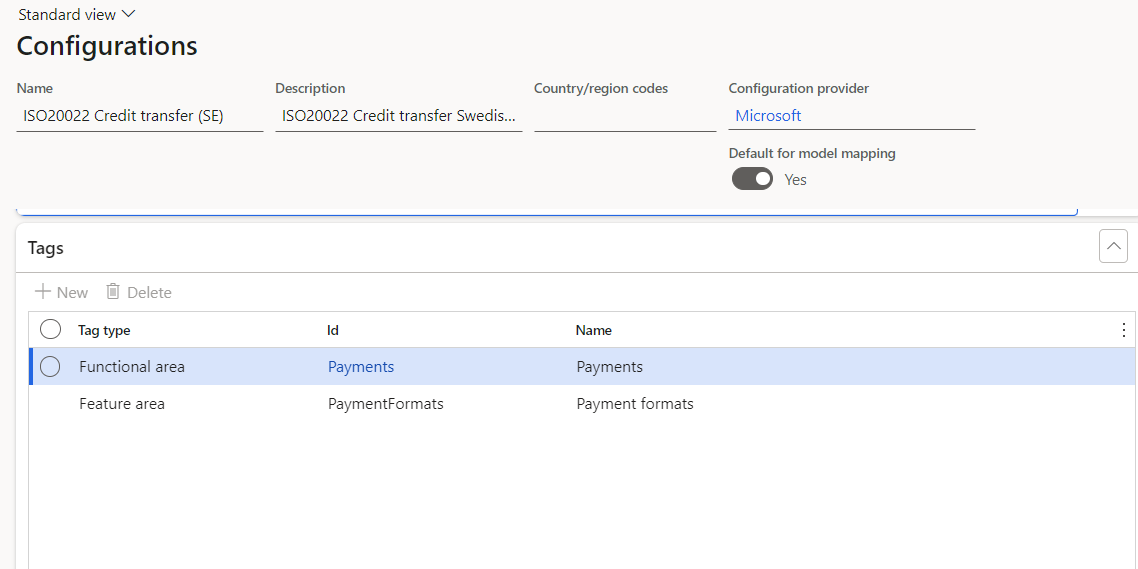
pastedimage1683041023238v1.png

pastedimage1683041092766v2.png

______________________________________________________________

Payment generation process information

No records were found to generate a payment file.
Evaluating expression for path '$PaymentByDebtor/$FirstPaymentInGroup/InitiatingParty/$convertedName'.
List is empty at '$PaymentByDebtor'
Property 'Enabled' of the format component 'ISO20022CTReports/XMLHeader/Document/CstmrCdtTrfInitn/GrpHdr/InitgPty/Nm' is evaluated.
An error occurred during the 'Format mapping' run. For more information, contact your system administrator.
Property 'Enabled' of the format component 'ISO20022CTReports/XMLHeader/Document/CstmrCdtTrfInitn/GrpHdr/InitgPty/Nm' is evaluated.
Error while evaluating expression for path '$PaymentByDebtor/$FirstPaymentInGroup/InitiatingParty/$convertedName'.
List is empty at '$PaymentByDebtor'
The payments cannot be generated

I have seen a similar question, but not seen a verifed answer.l 


I have the same question (0)
  • ThangNguyen Profile Picture
    184 on at

    Hi,

    1. Try to update Payment status in journal line to None or Rejected and then generate again.

    2. If 1 doesn't work,  try one more step: settle transaction and pick 1 or more invoices, then click OK and then generate again

  • Kristina K Profile Picture
    270 on at

    Thank you for this. I have tried both proposals but still get the error message as in my question.

    Any other proposals?

  • Suggested answer
    Hana Xue Profile Picture
    Microsoft Employee on at

    Hi Kristina,

    Before you can set the ISO20022 payment format, you need to import the most recent versions of the following Electronic reporting configuration from Lifecycle Services (LCS):

    ISO20022 Credit transfer (FR): All required model and model mapping configurations will be imported automatically with this.

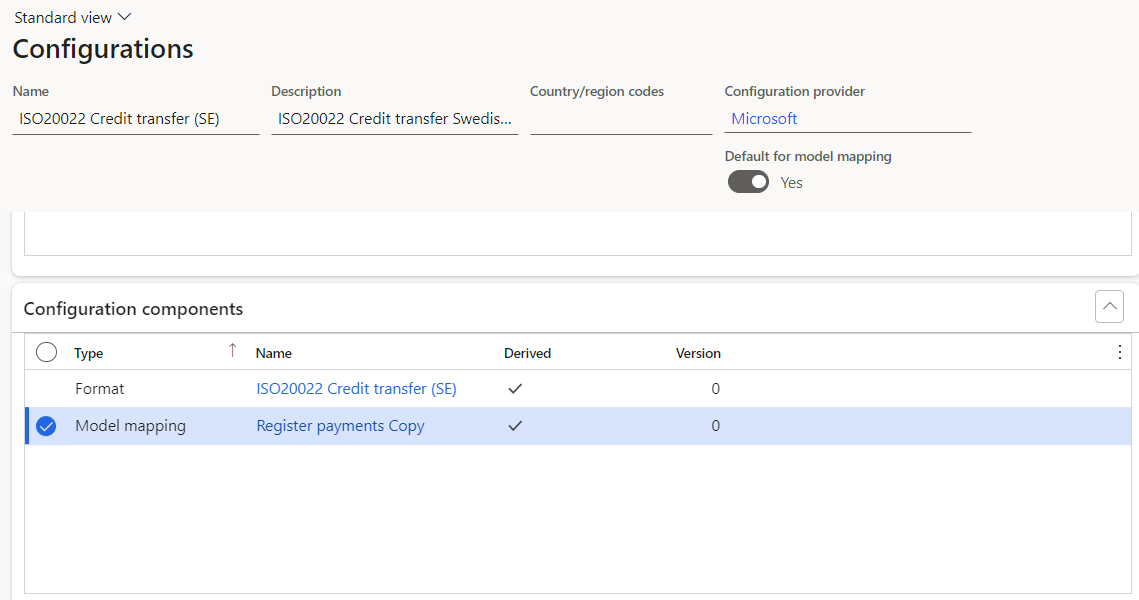
    Have you activate "Default model mapping" for the derived model mapping? If not, please activate it and generate payment file again.

    Best Regards,

    Hana

  • Kristina K Profile Picture
    270 on at

    Hello Hana!

    Thank you for your answer. I have put on the default mapping model in and still getting the same errors. I am thinking this might be the case because it is a Tier 1 and the new version.

    Will have to test in a Tier 2 envirnoment.

  • Alireza Eshaghzadeh Profile Picture
    14,679 Super User 2025 Season 2 on at

    Hi Kristina K,

    The error message means that it needs a value for 'ISO20022CTReports/XMLHeader/Document/CstmrCdtTrfInitn/GrpHdr/InitgPty/Nm'.

    According to the ISO20022 Credit transfer (SE) this field will be enabled you have a value for company name.

    Please check if the company have name on legal entity level and primary address.

    pastedimage1683094698211v1.png

  • Kristina K Profile Picture
    270 on at

    Hello Reza

    Both the Legal Entity has a company name and an adress that is set to primary. It also has a name for contact.

    The Swift code, IBAN are entered for both the LE and the vendor.

  • Suggested answer
    Alireza Eshaghzadeh Profile Picture
    14,679 Super User 2025 Season 2 on at

    Hei Kristina,

    Do you use ISO20022 Credit transfer (SE) 43.56.17?

    Please check if

    1- Vendor payment method is updated with a bank account (i.e. DBTest)

    pastedimage1683097872522v1.png

    2- Legal entity is updated with name, primary address (description), 

    Then try to set the payment status to "None" and run the "Generate payment" again.

  • Kristina K Profile Picture
    270 on at

    Hello Alireza

    I use ISO20022 Credit transfer (SE) 43.56.17

    I have a name of the legal entity and primary adress

    When trying to run the payment with status none (and also the payment method put to None) I get another error like this

    odel/Payments/PaymentType/PaymentMethodType'.

    Evaluating expression for path '$CustPaymMode/PaymentType'.

    List is empty at '$notSentTransactions/$CustPaymMode'

    Evaluating validation binding of format component ISO20022CTReports/XMLHeader/Document/CstmrCdtTrfInitn.

    An error occurred during the 'Format mapping' run. For more information, contact your system administrator.

    An error occurred during the 'Format mapping' run. For more information, contact your system administrator.

    Evaluating validation binding of format component ISO20022CTReports/XMLHeader/Document/CstmrCdtTrfInitn.

    Error while evaluating expression for path '$IsSepa'.

    Error while evaluating expression for path '$isCheck'.

    Error while evaluating expression for path 'model/Payments/PaymentType/PaymentMethodType'.

    Error while evaluating expression for path '$CustPaymMode/PaymentType'.

    List is empty at '$notSentTransactions/$CustPaymMode'

    The payments cannot be generated
    pastedimage1683106137467v1.png

    pastedimage1683106169916v2.png

    Any ideas what to look for more?


  • Suggested answer
    Kristina K Profile Picture
    270 on at

    Hello!

    I solved this case by resetting the filter in the Generate Payment file and also to use the Edit invoices for selected payments and choose the LE Bank account in there. Will test some more payment files as well.

  • Hana Xue Profile Picture
    Microsoft Employee on at

    Hi Kristina,

    I’m glad that your issue was resolved, and thanks for your sharing.

    Best Regards,

    Hana

Under review

Thank you for your reply! To ensure a great experience for everyone, your content is awaiting approval by our Community Managers. Please check back later.

Helpful resources

Quick Links

Responsible AI policies

As AI tools become more common, we’re introducing a Responsible AI Use…

Neeraj Kumar – Community Spotlight

We are honored to recognize Neeraj Kumar as our Community Spotlight honoree for…

Leaderboard > Finance | Project Operations, Human Resources, AX, GP, SL

#1
Martin Dráb Profile Picture

Martin Dráb 503 Most Valuable Professional

#2
André Arnaud de Calavon Profile Picture

André Arnaud de Cal... 434 Super User 2025 Season 2

#3
BillurSamdancioglu Profile Picture

BillurSamdancioglu 278 Most Valuable Professional

Last 30 days Overall leaderboard

Product updates

Dynamics 365 release plans