web
You’re offline. This is a read only version of the page.
close
Skip to main content

Announcements

No record found.

News and Announcements icon
Community site session details

Community site session details

Session Id :
Customer experience | Sales, Customer Insights,...
Answered

Configure products

(0) ShareShare
ReportReport
Posted on by 1,299

Hi Experts,

I would like to know how can we configure products in CRM where the price should change when the property changes. For example we sell Wood Panels, so these wood panels come in different sizes lets say 5 different sizes like 2 x 2, 4 x 2 etc, they come in different color, different edges like squared edge, rounded edge and beveled edge. Every time we select a property like a size the price of the board should change, and so it is for color and edges. If i use product property it lets me to chose the property but the price doesn't change or there is no place for me to define the price for property.

Currently we have all different permutation and combination for each single product and added them as an individual product and we sell lot of other products with similar property and hence the product list is very large, now the sales team is finding it hard to find the correct product to create opportunity line item or quote.

Please let me know how can this be addressed or am i doing something wrong here. Thanks in advance for your help.

I have the same question (0)
  • Verified answer
    ba365guy Profile Picture
    2,950 on at

    If you are looking at Out of the Box Configurations:

    Since you already mentioned that price varies based on color, size,shape, etc., each combination of size, color, shape should be defined as separate product in your scenario.

    Each of the combinations should be treated as independent product and should be identified with unique product number (SKU number). 

    This is based on best practice of product catalog definition.

    Similarly, in D365 you need to define these as independent products if your prices are different. 

    If you are looking at customizing:

    The price definition and price calculation should be completely implemented with custom logic. (i don't recommend this)

  • Verified answer
    ashish12 Profile Picture
    3,079 on at

    Hi,

    I would suggest to use OOB product configuration rather creating custom product & price-list management. You can make a small config change if needed.

    docs.microsoft.com/.../create-product-sales

  • Verified answer
    LuHao Profile Picture
    40,892 on at

    Hi Davyjones,

    As mentioned in the answers above, each products combination should be created as a separate product with a unique number.

    So you will have a huge amount of products, this is normal. We need to take several measures to help us find the right product quickly. In your case, please take the first option below.

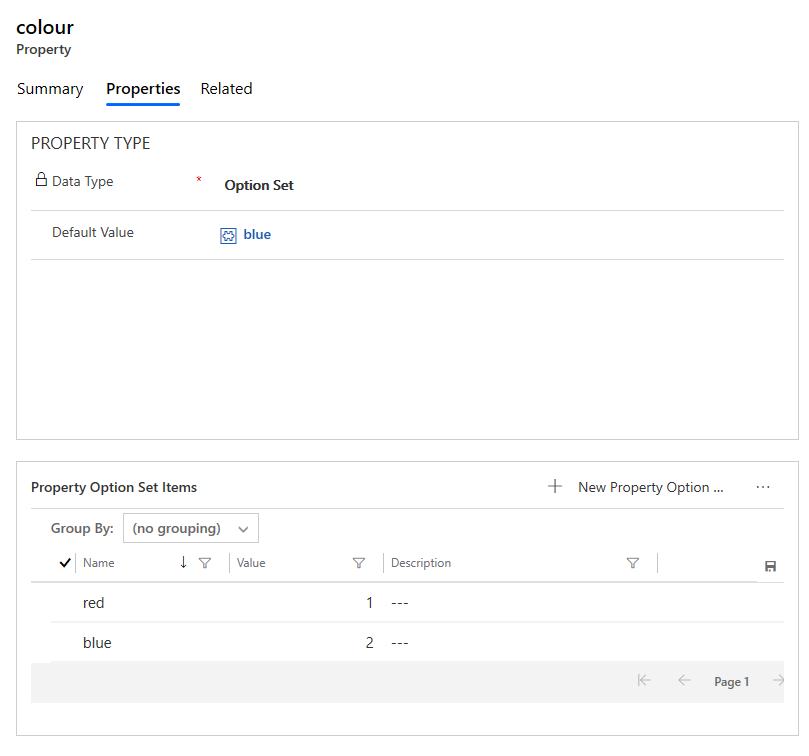
    1. Use properties to describe a product

    Simplify product management and classification by adding properties that help distinguish products from one another. Adding well-defined properties to products cuts down on the time spent by your agents trying to find products with the right specifications or properties for your customers when they're building orders.

    A property of a product could be its size, color, component, and so on. You can add properties to a family, bundle, or product when they're in Draft or Under Revision states. The child products, bundles, and families inherit the properties from their parent.

    Please read https://docs.microsoft.com/en-us/dynamics365/sales-enterprise/use-properties-describe-product

    pastedimage1578280687125v7.png    pastedimage1578280664026v6.png

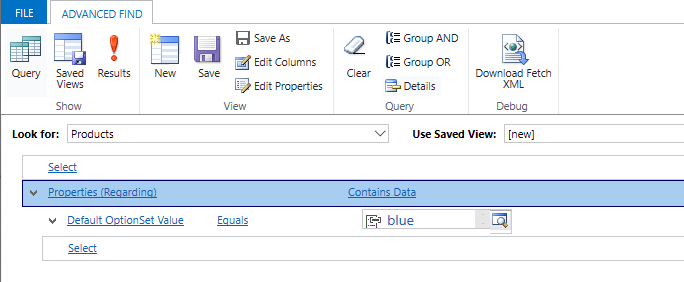
    Product properties can be used as search criteria, so it is easy to search for the desired product based on properties.
    pastedimage1578280712454v8.png

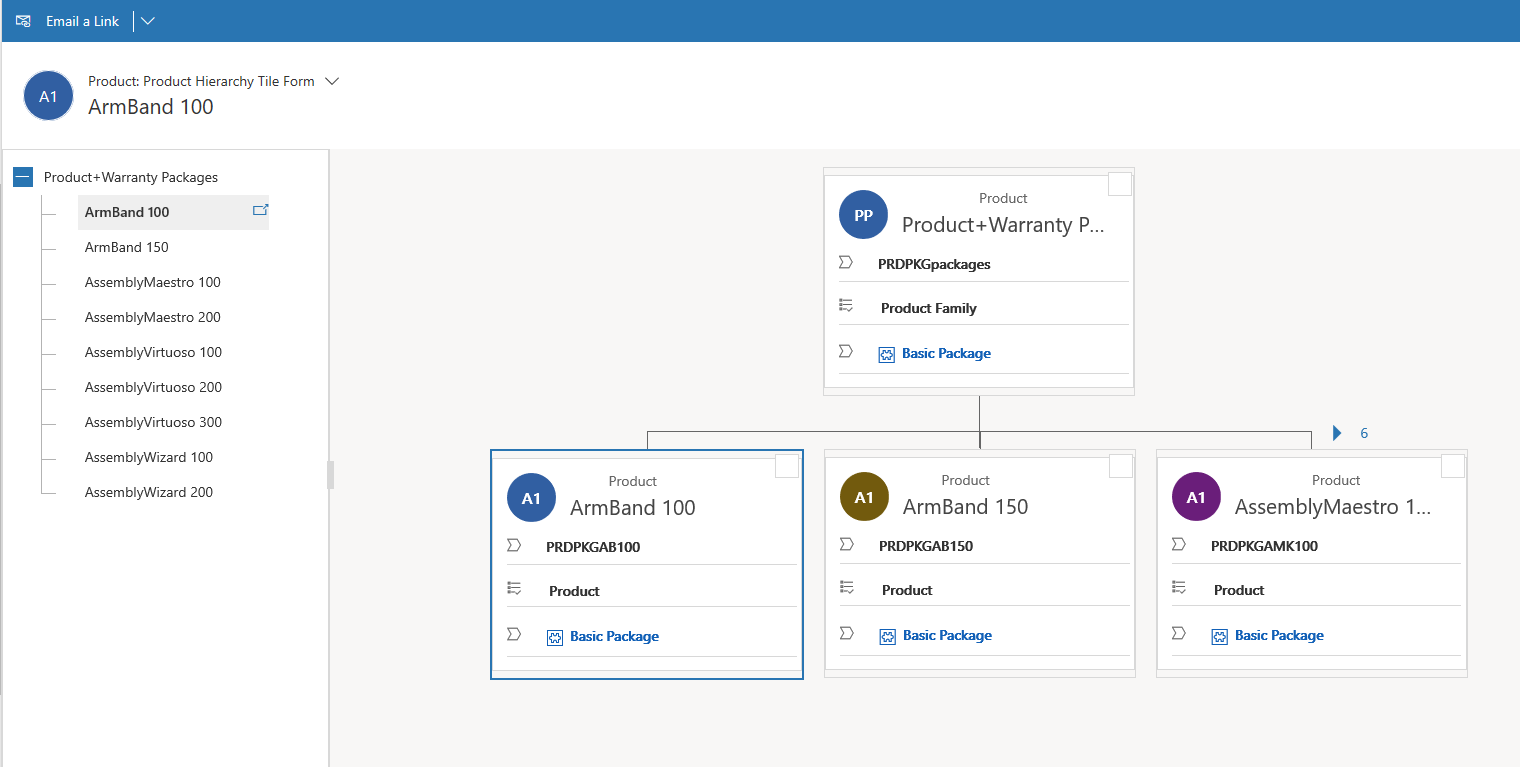
    2. Set up product families

    Make it easier for sales agents to find products and services in a product catalog by creating a product family and classifying similar products in it. A product family lets you group and categorize products, making it easier for you to manage them.

    Please read https://docs.microsoft.com/en-us/dynamics365/sales-enterprise/create-product-family

    https://docs.microsoft.com/en-us/dynamics365/sales-enterprise/change-product-parent

    https://docs.microsoft.com/en-us/dynamics365/customerengagement/on-premises/basics/hierarchical-relationship

    With product families, products are in the hierarchical organization, rather than unrelated products.

    pastedimage1578279566251v1.png    pastedimage1578279581096v2.png

    3. Define related products

    Please read https://docs.microsoft.com/en-us/dynamics365/sales-enterprise/define-related-products-increase-chances-sales

    When you add a product to an opportunity, the sales agents can see the related product as suggestions for an opportunity. The Suggestions dialog box on the opportunity record suggests only those products that are related to the main product and have the same price list as the one associated with the opportunity.

    pastedimage1578279912094v3.png    pastedimage1578279925635v4.png  

  • Davyjones Profile Picture
    1,299 on at

    Hi, thank you so much for your response.

    @ba365 yeah we have defined it in such a way with all these product as independent products with their (SKU number), thank you so much for confirming.

    @Canada365guy and @Lu Hao thanks for your advice.

    Also as Lu Hao said the product list becomes huge and its very difficult to search for them while adding them in the opportunity or quote product list item, is there an easy way to do it. @Lu Hao, if i go with individual product for each variation the product property actually doesn't matter as prices depend on it and product property doesnt offer that  option, i am try to see if there is an easy way to add products into the line item or any thing like CPQ tool that can do the  sku calculation and insert the product based on the selections made

  • Suggested answer
    ba365guy Profile Picture
    2,950 on at

    If you are going ahead with a CPQ tool, please check if the tool creates the opportunity product/ quote product as "write-in" or "existing" product. 

    Please check the impact on your reporting too.

  • Davyjones Profile Picture
    1,299 on at

    @ba365, thanks for your response again. we dont want to do CPQ, just trying to understand if there is better way to add opportunity product line item trying and searching through all the available SKU's.

  • LuHao Profile Picture
    40,892 on at

    Hi Davyjones,

    For an existing product, it should have its Price List Item with its price. So each product combination should already have its price defined.

    pastedimage1578363115439v2.png

    So after adding it to the opportunity product line, we can get its price directly.

    As for how to search for it, I would recommend you first use product properties to search in Advanced Find to get its product ID, and then use this ID to search in the opportunity product line.

    pastedimage1578363390302v3.png

    If you would like to create Price List Item for products with different properties to automatically set their prices, then I would recommend you first download the import template for the Price List Item entity, calculate their amount in your local Excel, and then import the Excel into D365. In other words, use Excel to quickly complete the automatic calculation of prices.

Under review

Thank you for your reply! To ensure a great experience for everyone, your content is awaiting approval by our Community Managers. Please check back later.

Helpful resources

Quick Links

Introducing the 2026 Season 1 community Super Users

Congratulations to our 2026 Super Stars!

Congratulations to our 2025 Community Spotlights

Thanks to all of our 2025 Community Spotlight stars!

Leaderboard > Customer experience | Sales, Customer Insights, CRM

#1
ManoVerse Profile Picture

ManoVerse 180 Super User 2026 Season 1

#2
11manish Profile Picture

11manish 123

#3
CU11031447-0 Profile Picture

CU11031447-0 100

Last 30 days Overall leaderboard

Product updates

Dynamics 365 release plans