web
You’re offline. This is a read only version of the page.
close
Skip to main content

Notifications

Announcements

No record found.

Community site session details

Community site session details

Session Id :
Microsoft Dynamics CRM (Archived)

Authentication Issue

(0) ShareShare
ReportReport
Posted on by 545

We are using Dynamic CRM 365 online, My scenario is, we have a security layer while logging in CRM. 1). I, Log in using the CRM Credential 2). Then it will take me to a page, where i need to enter authentication code, which i will get on my mobile using some app.

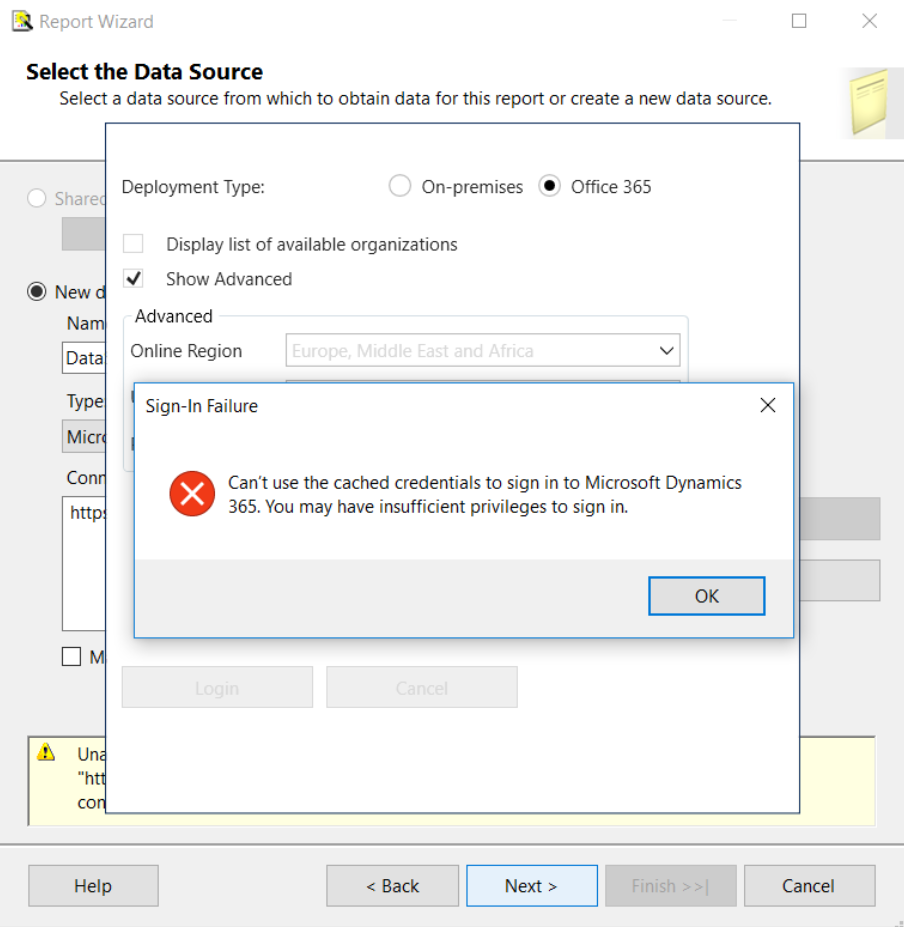
The issue is being, whenever i want to connect CRM using Visual Studio for Plugin Development or SSRS Reports, its throwing error as follows, 
crmconnection.PNG

I would like to know, what is the reason for this issue & how this issue can be solved  

*This post is locked for comments

I have the same question (0)
  • Community Member Profile Picture
    on at

    Hi Ganesh,

    Have you tried after clearing cache and %temp% folder?

  • ganesh198715 Profile Picture
    545 on at

    Yes, Naveen, I did Try that

  • Community Member Profile Picture
    on at

    Can you try following things:

    1. Try to connect on other system.

    2. Check project .net framework is >= to 4.5.2

    3. Check sdk dll versions whether it is compatible with dynamics 365 or not as sdk dll for dynamics 365 have some new authentication methods and sometimes it throws security exception.

  • ganesh198715 Profile Picture
    545 on at

    Seems Everything Fine to me, I checked the Error Log "parsing_wstrust_response_failed: Parsing WS-Trust response failed" this is the error i got.

  • Community Member Profile Picture
    on at

    Is MFA enabled in your org.?

  • ganesh198715 Profile Picture
    545 on at

    Yes

  • Community Member Profile Picture
    on at

    This is the reason behind your issue. I am trying to find out some work around for it. In the mean time, you can try to connect with CRM after disabling the MFA.

  • Suggested answer
    Pradip Raj Profile Picture
    327 on at

    Hi,

    I have fixed my issue by uninstalling Report Authoring Extension and installing the latest one. Refer below link :

    mscrm365.blogspot.com/.../dynamics-crm-v9-connection-error-in.html

    Thanks

    Pradip

  • Suggested answer
    Nishant Rana Profile Picture
    11,325 Microsoft Employee on at

    User App Password or Azure AD Conditional Access for that particular account

    www.mdsny.com/.../

  • haseem Profile Picture
    23 on at
    The error message "Can't use the cached credentials to sign into Microsoft Dynamics 365.
    You may have insufficient privileges to sign in" suggests a problem with user account permissions or the credentials being used.
    To resolve this issue, verify that the user account has the necessary privileges, clear cached credentials, ensure you have the latest Visual Studio and CRM SDK versions, double-check connection details, and consider alternative authentication methods if needed. If the problem persists, contact your organization's system administrator or IT support for further assistance.

Under review

Thank you for your reply! To ensure a great experience for everyone, your content is awaiting approval by our Community Managers. Please check back later.

Helpful resources

Quick Links

Responsible AI policies

As AI tools become more common, we’re introducing a Responsible AI Use…

Neeraj Kumar – Community Spotlight

We are honored to recognize Neeraj Kumar as our Community Spotlight honoree for…

Leaderboard > 🔒一 Microsoft Dynamics CRM (Archived)

#1
SA-08121319-0 Profile Picture

SA-08121319-0 4

#1
Calum MacFarlane Profile Picture

Calum MacFarlane 4

#3
Alex Fun Wei Jie Profile Picture

Alex Fun Wei Jie 2

Last 30 days Overall leaderboard

Featured topics

Product updates

Dynamics 365 release plans



