web
You’re offline. This is a read only version of the page.
close
Skip to main content

Notifications

Announcements

No record found.

Community site session details

Community site session details

Session Id :
Customer experience | Sales, Customer Insights,...
Suggested Answer

Enable Filter By on column

(0) ShareShare
ReportReport
Posted on by

Hi team,

I'm trying to enable the "Filter By" option in the following scenario:

When I look at the Members in my Marketing List, the columns seem to only sort by Ascending/Descending/ The "Filter By" option is disabled.
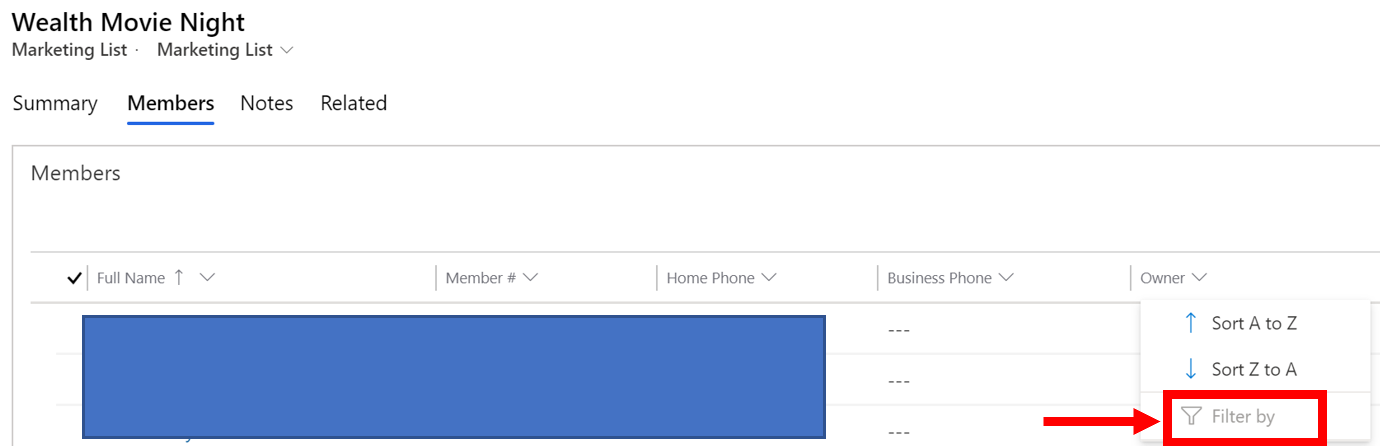
pastedimage1594662890577v1.png

What I'd like to see is this in the column drop down:

pastedimage1594662937968v2.png

Any thoughts?

Thanks!

I have the same question (0)
  • Suggested answer
    Bipin D365 Profile Picture
    28,983 Moderator on at

    Hi,

    This is by Design and can not be costomized.

    And to confirm this I have added account subgrid on Contact form and verified Filter By column is disabled in subgrid.

    But Filter By option is enabled when we see columns on Account Home Grid.

    I am not sure whether this is bug or by design. Keep this thread open to see what other community members has to say about it.

    If found helpful, Please mark my answer verified.

  • Suggested answer
    Wei Xiong Profile Picture
    on at

    Hi eS_Be,

    This is by design and cannot customized. 

    Thanks,

    Wei

  • Community Member Profile Picture
    on at

    Thanks Wei and Bipin. I actually was working on another task and noticed that there actually IS a way OOB to enable "Filter By".

    I enabled/added "Editable Grid Control" to the Contact sub-grid in the Marketing List form and that actually did the trick!

    Have a go at it on your end and let me know if that did it for you guys.

    Thanks!

  • Suggested answer
    Wei Xiong Profile Picture
    on at

    Hi eS_Be,

    Thanks for sharing your solution to the community. Good to know it works for you now.

    Thanks,

    Wei

Under review

Thank you for your reply! To ensure a great experience for everyone, your content is awaiting approval by our Community Managers. Please check back later.

Helpful resources

Quick Links

Responsible AI policies

As AI tools become more common, we’re introducing a Responsible AI Use…

Neeraj Kumar – Community Spotlight

We are honored to recognize Neeraj Kumar as our Community Spotlight honoree for…

Leaderboard > Customer experience | Sales, Customer Insights, CRM

#1
Tom_Gioielli Profile Picture

Tom_Gioielli 74 Super User 2025 Season 2

#2
Daniyal Khaleel Profile Picture

Daniyal Khaleel 32 Most Valuable Professional

#3
Gerardo Rentería García Profile Picture

Gerardo Rentería Ga... 31 Most Valuable Professional

Last 30 days Overall leaderboard

Product updates

Dynamics 365 release plans
