web
You’re offline. This is a read only version of the page.
close
Skip to main content

Notifications

Announcements

No record found.

Community site session details

Community site session details

Session Id :
Small and medium business | Business Central, N...
Answered

What's the difference between ApplicationArea and Licence (Experience Tier) ?

(0) ShareShare
ReportReport
Posted on by 215

Hello,

I was reading MS documentation on Business Central, and I wondered about : "what's the difference between ApplicationArea, a field property that can have Basic, Suite and All attributes, and the company Licence property, that can have Essential or Premium attributes, called Experience Tier ?"

Documentation "mixing" these two notions : https://docs.microsoft.com/en-us/dynamics365/business-central/dev-itpro/developer/devenv-extending-application-areas

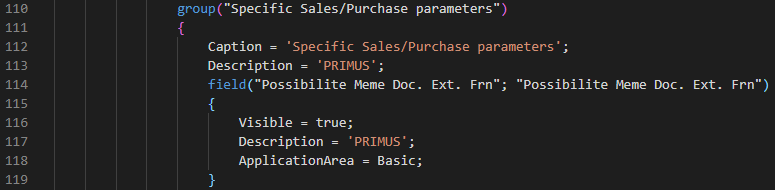
When I develop, I have to add the preporty ApplicationArea into a new field to see this new field on my BC 16.0. I can attribute Basic or All to this property.
pastedimage1594625318324v1.png

When I'm on the Page Company Information, at the bottom of it, in the FastTab User Experience, I can chose Essential or Premium attribute for my company. Not Basic, as in ApplicationArea.

pastedimage1594625412278v2.png

So this make me think these are two distinct notions. But I don't really understand how different they are. Can you help me to understand please ?

I have the same question (0)
  • Suggested answer
    JAngle Profile Picture
    133 on at

    Not sure if I will help or hinder but here we go...

    Essential = everything apart from service mgt. and manufacturing

    Premium = everything

    ApplicationArea is then used to break this up into further detail. For Essential I can expect to have Basic, Suite and All. For Premium I will get an ApplicationArea of Service and Manufacturing. Check out some of the pages in the base app to get a better understanding of this:

    pastedimage1594627519611v1.png

    pastedimage1594627600134v2.png

    Biggest question is what parts of the system are you developing for? Who is your audience? If it is users in the service and manufacturing area then a ApplicationArea for those makes sense. If it isn't then choose the options you have already determined.

  • Verified answer
    Jyotsna NAV Profile Picture
    585 on at

    Hello,

    License - Authorization for Pages, Role

    Application Area - Where all the field(s) should be visible. Whether it should be in All, List, Report.

    A User can have License for a Sales order but still cannot see a Field of Sales Order since you haven't applied it if you haven't included an Application Area.

    License (Sales Order) is the first factor and then Application Area is the second factor (Lists in Sales Order module)

    Hope this helps!

    Regards
    Jyotsna
    jyotsnanav.blogspot.com

    Don't forget to help the community by verifying my answer or at least like the suggestion if it did help in any way. It will let others know that the topic has a verified answer and was beneficial to you.

  • Verified answer
    Magicrevette Profile Picture
    215 on at

    Thanks a lot for your answers !

Under review

Thank you for your reply! To ensure a great experience for everyone, your content is awaiting approval by our Community Managers. Please check back later.

Helpful resources

Quick Links

Responsible AI policies

As AI tools become more common, we’re introducing a Responsible AI Use…

Neeraj Kumar – Community Spotlight

We are honored to recognize Neeraj Kumar as our Community Spotlight honoree for…

Leaderboard > Small and medium business | Business Central, NAV, RMS

#1
OussamaSabbouh Profile Picture

OussamaSabbouh 3,229

#2
Jainam M. Kothari Profile Picture

Jainam M. Kothari 1,867 Super User 2025 Season 2

#3
YUN ZHU Profile Picture

YUN ZHU 1,153 Super User 2025 Season 2

Last 30 days Overall leaderboard

Featured topics

Product updates

Dynamics 365 release plans
