Hello,
I have successfully implemented a solution using the Ribbon Workbench to hide/show certain ribbon buttons on forms and views based off of a users security role. I had to add an additional role to ONLY the command which displays the Activate button on the Account form/view. The button will display now but when you click it, nothing happens. The other roles which were part of the initial successful implementation still function as they should. I am not sure if this is a Ribbon Workbench issue or a security role setting for this role. Here is the code being used and the ribbon workbench setting:
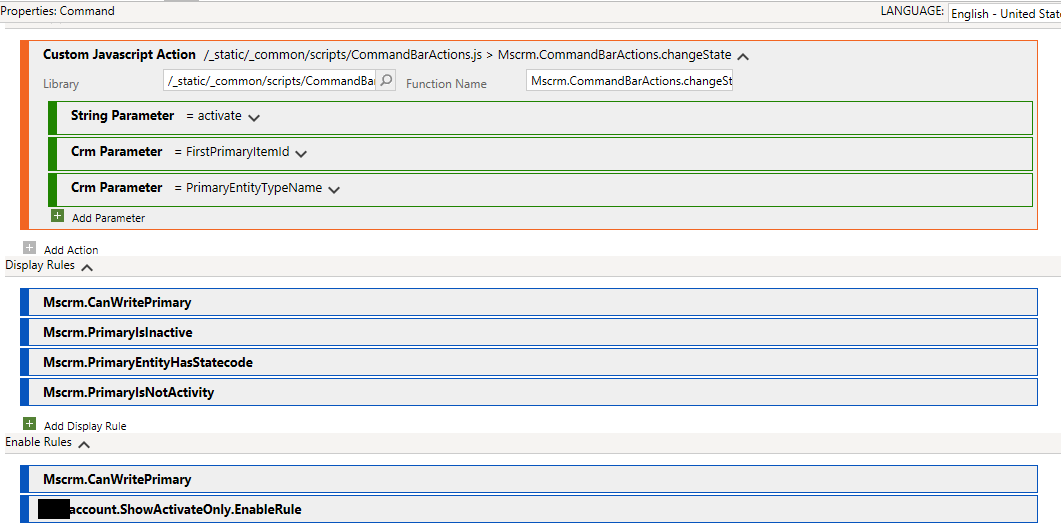
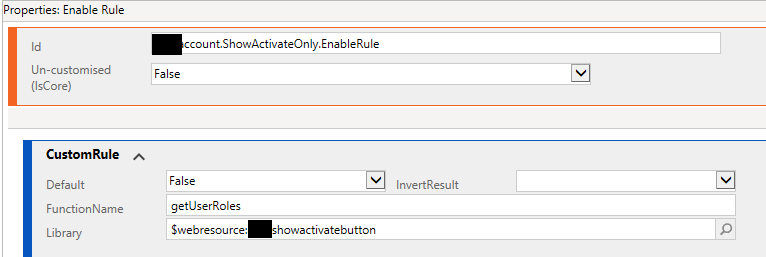
Here is the script being used. In this scenario, "role4" is the issue. The account entity security settings for role4 are below.
function getUserRoles() {

        var roleid = Xrm.Page.context.getUserRoles();
        var name;
        var showButton = false;
        for (var i = 0; i < roleid.length; i++) {
            var roleID = roleid[i];
            var RoleName = getRoleName(roleID);
            if (RoleName == '[role1]' || RoleName == '[role2]' || RoleName == '[role3]' || RoleName == '[role4]') {
                showButton = true;
                break;
            }
        }
        return showButton;
}

function getRoleName(roleID) {
        var serverUrl = Xrm.Page.context.getClientUrl();
        var OdataURL = serverUrl + "/XRMServices/2011/OrganizationData.svc/RoleSet?$filter=RoleId eq guid'" + roleID + "'";
        var roleName = null;
        $.ajax({
            type: "GET",
            async: false,
            contentType: "application/json; charset=utf-8", datatype: "json",
            url: OdataURL,
            beforeSend:
            function (XMLHttpRequest) {
                XMLHttpRequest.setRequestHeader("Accept", "application/json");
            },
            success:
            function (data, textStatus, XmlHttpRequest) {
                var result = data.d;
                roleName = result.results[0].Name;
            },
            error:
            function (XmlHttpRequest, textStatus, errorThrown) {
                alert('OData Select Failed: ' + OdataURL);
            }
        });
        return roleName;
}
Security role settings; Account entity for role4:

*This post is locked for comments
I have the same question (0)







