web
You’re offline. This is a read only version of the page.
close
Skip to main content

Notifications

Announcements

No record found.

Community site session details

Community site session details

Session Id :
Customer experience | Sales, Customer Insights,...
Suggested Answer

Add 'Insights' tab to custom form?

(0) ShareShare
ReportReport
Posted on by 230

We have implemented Dynamics Marketing but I was wondering - is it possible to add the 'Insights' tab to a custom form?

I tried adding the 'Insights' field on the from but it just shows and a text string on the form (like ti also does in classic view) any ideas

Insights-Field-on-Form.jpg?

I have the same question (0)
  • Suggested answer
    cloflyMao Profile Picture
    25,210 on at

    Hi Amey,

    Insight is a built-in component of Dynamics Marketing. 

    Unlike other common components, it won't display in list for us to select.

    The "Insights" field you added is actually a text field, which is not the real Insights widget. (You can find the field in Customization > Contact > Fields.)

    A workaround is that by creating a new form in classic UI, the component will be available by default, then customize the form with layout you want.
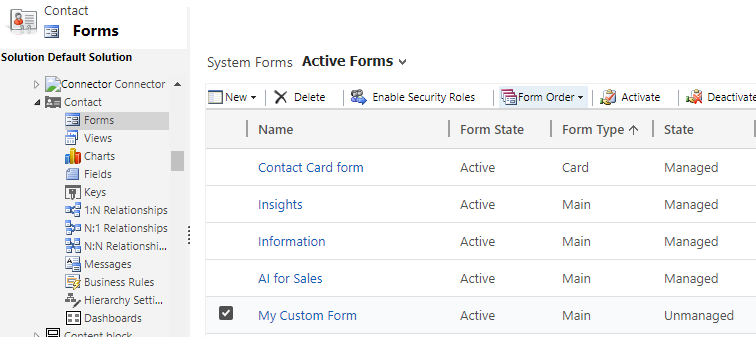
    pastedimage1594717806483v1.png

    Not sure whether it is an issue: after I saved and published the custom form, it didn't display in form selector, thus I took further steps to make it works.

    1. Open Marketing app in App Designer, enable the form.
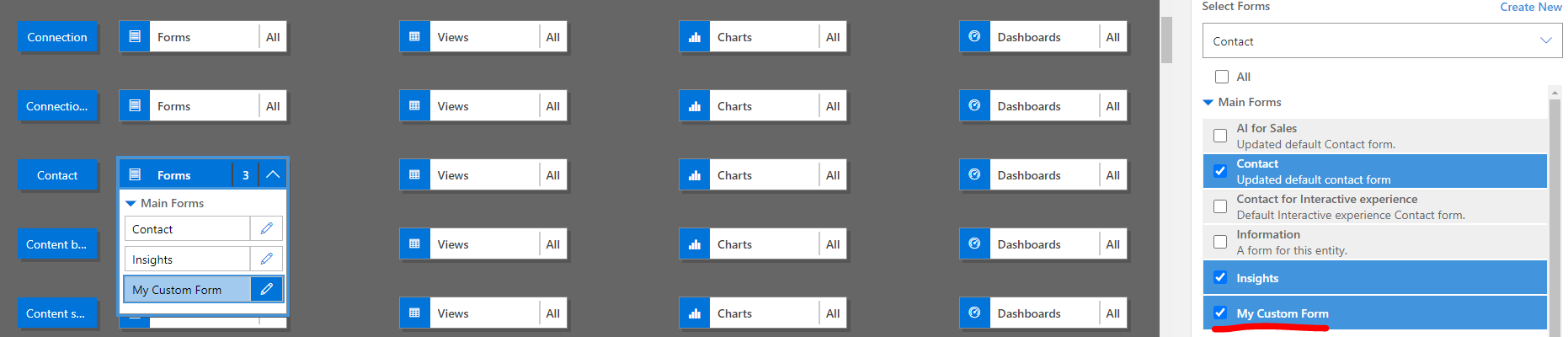
    pastedimage1594718159003v2.png

    2. Set the custom form as the first item, then publish all customization.
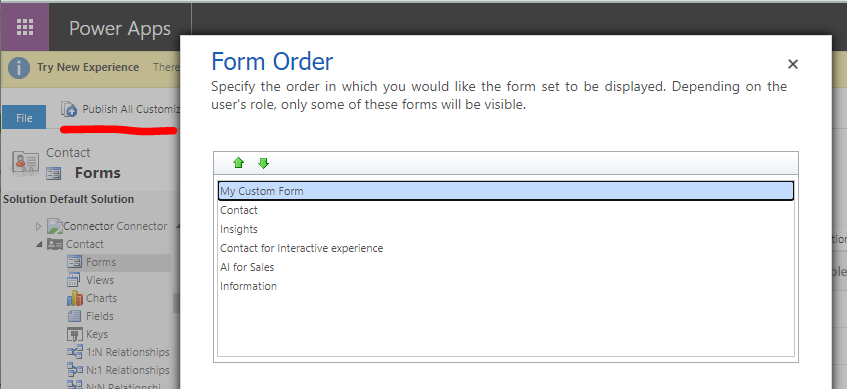
    pastedimage1594718240499v3.png

    Result:

    Now my custom form has appeared in selector, and Insights component is also there.
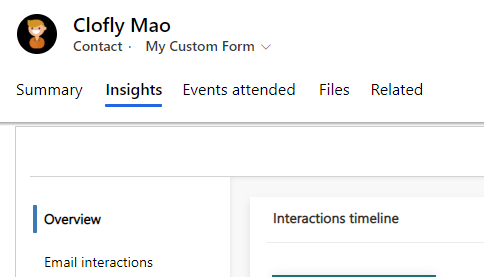
    pastedimage1594718329719v4.png

    Regards,

    Clofly

  • cloflyMao Profile Picture
    25,210 on at

    Hi Amey,

    Supplement:

    I found that even in modern powerapps form designer, the Insights component will be added by default.(But it not appears in designer view.)

    So we don't need to drag Insights field to form, the component will display automatically after we publish the custom form.

    Regards,

    Clofly 

  • AmeyHolden Profile Picture
    230 on at

    Thanks Clofy - unfortunately it needs to be added to an existing form rather than create a new one in this case but I'm glad this can be achieved with new forms at least

  • icimasa Profile Picture
    390 on at

    Hi,

    we are trying to achieve the same thing, any luck getting this to work on an existing form?

    best regards

    Martin

  • AmeyHolden Profile Picture
    230 on at

    Hey Martin - unfortunately not no - the only way is to create a new form

  • Zackery Profile Picture
    5 on at

    Great tip, thank you! Will definitely do this mygroundbiz

    I was also wondering - is there any way to se a campaign's performance based on your demographic choices? Not counting age, gender, placement or device. So as in, industry, job title, language, relationship status, location, interest - and so on?

Under review

Thank you for your reply! To ensure a great experience for everyone, your content is awaiting approval by our Community Managers. Please check back later.

Helpful resources

Quick Links

Responsible AI policies

As AI tools become more common, we’re introducing a Responsible AI Use…

Neeraj Kumar – Community Spotlight

We are honored to recognize Neeraj Kumar as our Community Spotlight honoree for…

Leaderboard > Customer experience | Sales, Customer Insights, CRM

#1
Tom_Gioielli Profile Picture

Tom_Gioielli 137 Super User 2025 Season 2

#2
#ManoVerse Profile Picture

#ManoVerse 57

#3
Jimmy Passeti Profile Picture

Jimmy Passeti 50 Most Valuable Professional

Last 30 days Overall leaderboard

Product updates

Dynamics 365 release plans
